


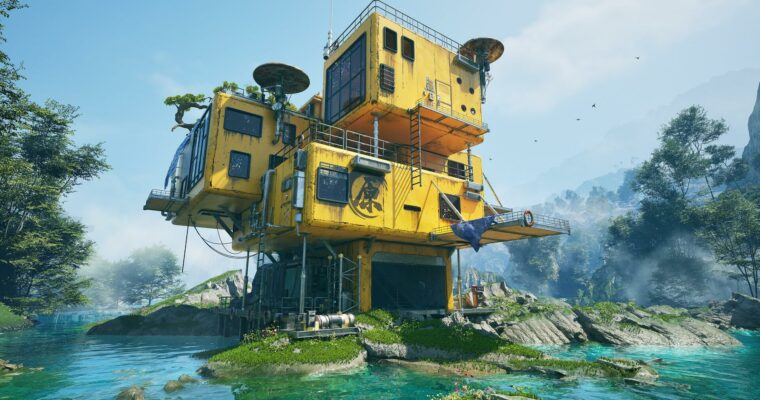
UE5 Engine Aesthetics Advanced Course MetalCabin by UE班的小学生

Actual Duration:21h 23m
Release date:2026
Publisher:Yiihuu
Skill level:Advanced
Language:Chinese
Exercise files:Yes
Software:Unreal Engine 5, Blender, Substance Painter, Premiere
Course URL:https://www.yiihuu.com/a_12547.html
This course walks you through a complete UE5 environment art workflow, from a bare whitebox to a polished cinematic scene. You’ll build a metal cabin with a strong mood and story, learning how to make smart aesthetic decisions at every stage. It’s practical, hands-on, and aimed at artists who want to level up their scene-building game.
🎯 What you’ll learn
- Build a solid blockout and whitebox scene from scratch
- Create detailed assets in Blender and texture them in Substance Painter
- Apply level design principles for rhythm and visual interest
- Render a final cinematic sequence using UE5 Sequencer and Premiere
✅ Requirements
- Skills: Working knowledge of UE5 interface and basic 3D concepts
- Tools: Blender, Substance Painter, Premiere
- Hardware: Dedicated GPU with at least 8GB VRAM, 16GB RAM
📝 Description
This isn’t a button-pushing tutorial. It’s about building an eye for composition and detail. The course is split into four clear phases, each one building on the last. You start with a whitebox, which is where most scenes live or die. Getting the proportions and layout right early saves you hours of rework later.
From there, you move into asset production. The instructor shows you how to model in Blender and texture in Substance Painter, focusing on materials that tell a story — rust, wear, and grime that make the cabin feel lived-in. Then comes the fun part: dressing the scene. You’ll learn how to place props, control sightlines, and use lighting to guide the viewer’s eye. It’s level design thinking applied to a single environment.
The final module covers UE5 Sequencer and Premiere for rendering. You’ll set up cameras, animate a simple shot, and composite the final output. By the end, you’ll have a complete workflow you can adapt to your own projects. The instructor’s approach is methodical, and if you follow along, you’ll walk away with a process, not just a pretty render.
🧑🎓 Who this course is for
- Environment artists looking to improve their UE5 scene composition skills
- 3D artists who want a complete workflow from blockout to final render
- Hobbyists and students aiming to build a strong portfolio piece
🧑🏫 About the Author
UE班的小学生 is an environment artist specializing in Unreal Engine 5 scene production. Their work focuses on atmospheric, story-driven environments with a strong emphasis on material detail and cinematic lighting. This course reflects their hands-on production experience and their belief that a solid workflow is the key to creative freedom.
🏁 Final Result
- A fully realized, cinematic metal cabin environment rendered in UE5
- A portfolio-ready scene demonstrating your ability to handle a complete environment art pipeline
- A reusable workflow for future personal projects
 Channel




Can you also upload the subtitle files?