The Ultimate Guide to Blender 3D Rigging & Animation by 3D Tudor

Duration:8 hours on-demand video
Actual Duration:7h 52m
Release date:2025, April
Publisher:Udemy
Skill level:Beginner
Language:English
Exercise files:Yes
Software:Blender
Course URL:https://www.udemy.com/course/blender-3d-rigging-animation
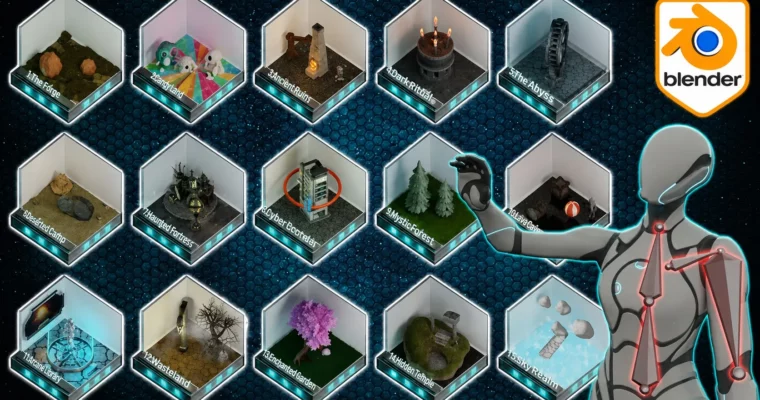
This course is a massive, hands-on guide to Blender animation and rigging. Instead of just theory, you’ll build 16 different animation projects, from simple bouncing balls to a full Indiana Jones-style trap scene. It’s built for beginners who want to skip the fluff and get straight to making things move.
🎯 What you’ll learn
- Create 15 different animation projects, including grass, wheels, tank tracks, fire, and character walk cycles.
- Master character rigging with single and multiple bones, IK controls, and weight painting.
- Animate tank tracks that realistically stick to any terrain using drivers and curve modifiers.
- Use shape keys for morphing objects and vegetation growth.
- Build a complete adventure scene with rolling boulders, shaking ceilings, and spike traps.
✅ Requirements
- Skills: Basic familiarity with Blender’s interface is helpful but not required.
- Tools: A computer with Blender installed (free to download).
- Hardware: A standard computer (Windows, Mac, or Linux) capable of running Blender.
📝 Description
Most Blender courses focus on modeling and texturing. This one is different. It’s a straight shot into rigging and animation, covering the techniques you’ll actually use in game dev and film projects.
The course is structured in 16 stages, each building on the last. You start with basic keyframes and interpolation, then quickly move into single-bone rigs for a swing. From there, it’s a steady climb: weight painting for trees, shape keys for morphing, IK controls for chains, and finally a full character walk cycle.
What sets this apart is the variety. You’re not just animating one thing. You’ll tackle tank tracks that conform to terrain using drivers, stylized fire with animated textures, and a moth swarm using Blender’s particle boid system. The final project is a large adventure scene with rolling boulders and shaking ceilings—a practical test of everything you’ve learned.
The instructor, Neil Bettison, uses live on-screen tooltips throughout, so you never have to pause and search for a shortcut. It’s a workflow designed to keep you moving.
🧑🎓 Who this course is for
- Beginner 3D animators who want to learn by building real projects.
- Blender enthusiasts looking to fast-track their understanding of the animation and rigging tools.
- Mid-level 3D modelers who want to add animation skills to their pipeline.
- Game environment artists who want to bring their static scenes to life.
🧑🏫 About the Author
3D Tudor, founded by Neil Bettison, is a top-rated Udemy instructor with over 200,000 students. Neil is a professional prop and environment artist with 9 years of experience in Blender, Maya, and ZBrush. His courses are known for their clear, to-the-point instruction and high ratings (4.7+). He is the only instructor on Udemy who uses live on-screen tooltips, making his lessons accessible to absolute beginners and intermediate users alike. His YouTube channel is a go-to resource for Blender artists.
🏁 Final Result
By the end of the course, you will have completed 16 distinct animation projects, including a full character walk cycle and a complex, multi-asset adventure scene. You’ll have a portfolio-ready demonstration of your ability to rig and animate a wide range of objects and characters in Blender.
 Channel