Ad Clicks : Ad Views : Ad Clicks : Ad Views : Ad Clicks : Ad Views : Ad Clicks : Ad Views :
Oh Snap!

It looks like you're using an adblocker. Adblockers make us sad. We use ads to keep our content happy and free. If you like what we are doing please consider supporting us by whitelisting our website. You can report badly-behaved ads by clicking/tapping the nearby 'Advertisement' X text.

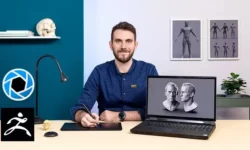
Sculpting in Zbrush-Ultimate course beginners-intermediate by Milivoj Popovic

Sculpting in Zbrush-Ultimate course beginners-intermediate by Milivoj Popovic

/

Author:Milivoj Popovic

Duration:32.5 hours on-demand video

Actual Duration:32h 42m

Release date:2025, December

Publisher:Udemy

Skill level:Intermediate

Language:English

Exercise files:Yes

Software:ZBrush, Photoshop

Course URL:https://www.udemy.com/course/sculpting-in-zbrush

Learn ZBrush from zero to hireable with real sculpting jobs, not just button tours.

Learn ZBrush the practical way — by sculpting actual props, creatures, and characters from day one with a studio owner telling you what actually gets you hired.

🎯 What you’ll learn

  • Navigate the ZBrush UI, custom UI, hotkeys, and project workflow
  • Sculpt with Standard, Clay Buildup, DamStandard, TrimDynamic and Morph brushes
  • Use Alphas, Masking, Show/Hide, Trim and Clip brushes for hard-surface control
  • Work with DynaMesh, Sculptris Pro, ZRemesher and ProjectAll for clean topology
  • Build base meshes with ZSpheres, Mannequins and ShadowBox
  • Combine parts with Live Boolean for props like a toy piano
  • Apply Materials, Polypaint and UVs, then export Normal and Displacement maps
  • Organize meshes with Polygroups, Panel Loops and Deformations
  • Light and Render in ZBrush and finish in Photoshop
  • Use Dynamics for cloth and quick drapery simulations

✅ Requirements

  • Skills: Basic computer knowledge, basic English listening comprehension
  • Tools: ZBrush installed on your computer, drawing tablet strongly recommended for sculpting
  • Hardware: PC or Mac capable of running ZBrush smoothly

📝 Description

This isn’t a tour of every button. It’s a work-like-you-mean-it ZBrush course built around small, finishable sculpts. You start with apples, bananas and pumpkins to get brush control, pressure, and form right. Then you move to harder stuff — Wacom pen, AC remote, headphones — where Show/Hide, Masking and Clip brushes actually matter.

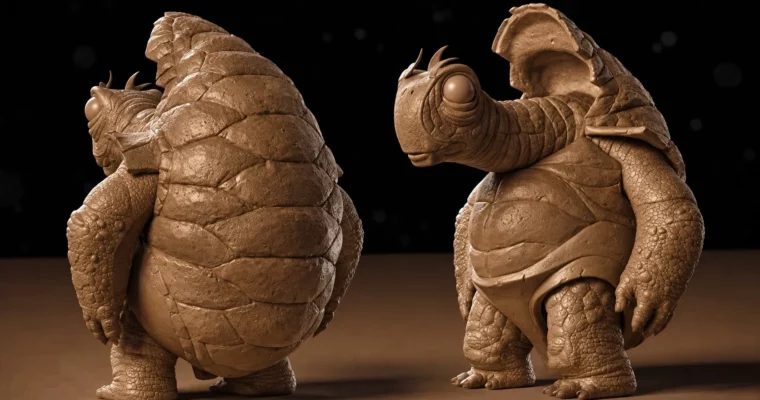
The middle of the course is where it clicks. You’ll use DynaMesh to sketch freely without worrying about topology, then clean it up with ZRemesher and ProjectAll. There’s a full 20+ part creature project where you block out, refine, add teeth, eyes and surface detail with InsertMesh. You also get Sculptris Pro, ZSpheres and Mannequins for quick character bases, plus ShadowBox for hard-surface starts.

Later sections cover the stuff beginners usually skip: Polypaint and Materials, UVs with Normal and Displacement export, Polygroups and Panel Loops for armor and mechanical parts, and Live Boolean for the toy piano build. You finish with lighting, BPR rendering and a Photoshop pass, plus Dynamics for cloth. Every section has written summaries and quizzes, so you can check you actually got it before moving on.

🧑‍🎓 Who this course is for

  • Beginners to intermediate users who want to get into 3D sculpting from 2D, traditional clay, or design
  • Designers and freelancers who need to add digital sculpting to their paid workflow

🧑‍🏫 About the Author

Milivoj Popovic is an award-winning digital sculptor, Art Academy professor, and studio head with over 15 years in the industry. He runs his own studio, so he teaches from the hiring side — what a clean base mesh, readable forms, and finished presentation should look like.

He’s known for breaking down character sculpting and hard-surface workflows into simple, repeatable steps. Students also get access to his private Q&A group with 5000+ members for feedback and guidance.

🏁 Final Result

  • A portfolio set of finished sculpts: organic props, hard-surface props (pen, remote, headphones, toy piano), a full Dynamesh creature, ZSpheres characters, and a polypainted, rendered character presented with BPR passes.
Curriculum

📋 Course content

  1. Module 1:  Introduction and Basics of Digital Sculpting
    • Hello!3:22
    • Introduction to the course11:35
    • Basics of digital sculpting7:04
  2. Module 2:  ZBrush UI Essentials
    • Loading Introduction Zbrush User Interface – NOT THE BLUE UI!0:55
    • Adjusting UI for smaller res displays3:53
    • Zbrush UI14:37
    • Hotkeys and shortcuts for Zbrush – MAC users read lecture description!0:14
  3. Module 3:  Basics of ZBrush
    • Basics of Zbrush 01 – load/save, import/export, primitives, enter into edit mode14:37
    • Basics of Zbrush 02 – Perspective, Floor, rotate y axes, how to navigate in Zbrush11:07
    • Basics of Zbrush 03 – Polymesh3D, Initialize Primitive9:19
    • Basics of Zbrush 04 – Move, Scale, Rotate, Transpose line15:39
    • Basics of Zbrush 05 – Local button, Symmetry, PolyF button12:38

    • Basics of Zbrush 06 – Subtools15:07
    • Basics of Zbrush 06b – Folders8:26
    • Basics of Zbrush 07 – Subtool options: Rename, Reorder, Duplicate, Delete, Merge12:37
    • Basics of Zbrush 08 – Subdivisions17:17
    • Basics of Zbrush 09 – Undo2:37
  4. Module 4:  Gizmo and Brush Tools
    • Gizmo3D p019:12
    • Gizmo3D p0211:12
    • Brush Tools 01 – Brush menu, Zadd/Zsub, Z Intensity, Draw Size, Focal Shift21:00
    • Brush Tools 02 – Brushes: Standard, Smooth, Clay Buildup, Dam Standard, Trim Dynamic17:33
    • Brush Tools 03 – Brushes: Move, Move Topological, Morph22:45
    • Brush Tools 04 – Strokes: Dots, DragRect, FreeHand, Spray, DragDot9:59
    • Brush Tools 05 – Smt Button, Lazy Mouse, recap9:26
  5. Module 5:  Practice Props – Apple, Banana, Pumpkin
    • Sculpting assignment: Apple – p017:17
    • Sculpting assignment: Apple – p0215:30
    • Sculpting assignment: Apple – p038:58
    • Sculpting assignment: Apple – p0411:05
    • Sculpting assignment: Bannana – p0114:43
    • Sculpting assignment: Bannana – p0210:04
    • Sculpting assignment: Bannana – p0314:33
    • Sculpting assignment: Bannana – p0414:25
    • Sculpting assignment: Pumpkin – p0112:10
    • Sculpting assignment: Pumpkin – p0212:21
    • Sculpting assignment: Pumpkin – p039:37
    • Sculpting assignment: Pumpkin – p0419:01
  6. Module 6:  Alpha, Masking, Show/Hide
    • IMPORTANT – Setting up my Blue UI and Pop-up menu!! Download CUSTOM UI here!!4:18
    • Alpha and Masking 01 – My Custom UI, what are alphas, make your own alpha19:21
    • BackfaceMasking1:38
    • Alpha Blur and Midvalue12:52
    • Alpha and Masking 02 – Add mask, Erase mask, Invert masked, masking options14:03
    • Alpha and Masking 03 – View mask, Alpha&Mask, MaskPen, MaskLasso, MaskCurve10:45
    • Show/Hide brushes14:03
    • Trim and Clip brushes12:48
  7. Module 7:  Practice Props – Pen, Remote, Headphones
    • Sculpting assignment: Wacom pen – p0118:11
    • Sculpting assignment: Wacom pen – p0217:20
    • Sculpting assignment: Wacom pen – p0321:32
    • Sculpting assignment: AC remote – p0121:51
    • Sculpting assignment: AC remote – p0221:43
    • Sculpting assignment: AC remote – p0321:55
    • Sculpting assignment: Headphones – p0127:48
    • Sculpting assignment: Headphones – p0239:51
    • Sculpting assignment: Headphones – p0318:23
    • Sculpting assignment: Headphones – p0415:04
    • Sculpting assignment: Headphones – p0526:02
  8. Module 8:  Dynamesh and ZRemesher
    • Dynamesh24:57
    • Zremesher15:46
    • Good topology v Bad Topology and ProjectAll feature15:58
    • Dynamesh Creature Timelapse19:28
  9. Module 9:  Dynamesh Creature Project
    • Sculpting assignment: Dynamesh Creature – p0125:59
    • Sculpting assignment: Dynamesh Creature – p0222:40
    • Sculpting assignment: Dynamesh Creature – p0310:08
    • Sculpting assignment: Dynamesh Creature – p0411:18
    • Sculpting assignment: Dynamesh Creature – p0511:48
    • Sculpting assignment: Dynamesh Creature – p0610:01
    • Sculpting assignment: Dynamesh Creature – p0713:31
    • Sculpting assignment: Dynamesh Creature – p0814:15
    • Sculpting assignment: Dynamesh Creature – p0915:42
    • Sculpting assignment: Dynamesh Creature – p1010:28
    • Sculpting assignment: Dynamesh Creature – p1117:23
    • Sculpting assignment: Dynamesh Creature – p1211:57
    • Sculpting assignment: Dynamesh Creature – p1317:07
    • Sculpting assignment: Dynamesh Creature – p1412:36
    • Sculpting assignment: Dynamesh Creature – p157:52
    • Sculpting assignment: Dynamesh Creature – p1614:54
    • Sculpting assignment: Dynamesh Creature – p17 – Insertmesh25:43
    • Sculpting assignment: Dynamesh Creature – p1825:18
    • Sculpting assignment: Dynamesh Creature – p1913:09
    • Sculpting assignment: Dynamesh Creature – p2016:28
    • Sculpting assignment: Dynamesh Creature – p2114:55
  10. Module 10:  Sculptris Pro, ZSpheres, Mannequins and ShadowBox
    • Sculptris Pro19:59
    • Timelapse – Sculpting a Character using Sculptris Pro! WIP2:09
    • Zspheres 0111:55
    • Zspheres 0211:55
    • Zspheres 03 – Sculpting assignment: Zsphere characters p017:39
    • Zspheres 03 – Sculpting assignment: Zsphere characters p0211:32
    • Zspheres 0425:29
    • Zspheres to polygons13:02
    • Mannequins15:10
    • Shadowbox22:58
  11. Module 11:  Boolean and Toy Piano Project
    • Boolean12:34
    • Sculpting assignment: Toy piano p0110:07
    • Sculpting assignment: Toy piano p0211:42
    • Sculpting assignment: Toy piano p0324:52
    • Sculpting assignment: Toy piano p0411:56
    • Sculpting assignment: Toy piano p0516:52
    • Sculpting assignment: Toy piano p0624:13
  12. Module 12:  Materials and Polypaint
    • Materials 0118:52
    • Materials 0210:02
    • Polypaint21:06
    • Sculpting assignment: Polypainting p0111:04
    • Sculpting assignment: Polypainting p0214:51
    • Sculpting assignment: Polypainting p0317:24
    • Sculpting assignment: Polypainting p0425:02
  13. Module 13:  UV Maps and Map Export
    • UV Maps 0126:17
    • UV Maps 0211:07
    • UV Maps 0313:01
    • Bonus – Creating and exporting Normal Map and Displacement map3:40
  14. Module 14:  Polygroups, Deformations and Panel Loops
    • Polygroups 0119:27
    • Polygroups 0215:38
    • Polygroups 0327:15
    • Deformations tab17:06
    • Polygroups 0410:29
    • Panel Loops 0110:03
    • Panel Loops 0211:05
    • My Menu18:23
  15. Module 15:  Rendering and Photoshop Finish
    • Rendering 0118:00
    • Rendering 0219:31
    • Rendering 0311:46
    • Rendering 0415:12
    • Rendering 0514:15
    • Sculpting assignment: Rendering p0116:07
    • Sculpting assignment: Rendering p0214:44
    • Sculpting assignment: Rendering p0318:40
  16. Module 16:  Dynamics and Bonus
    • Dynamics 0114:22
    • Dynamics 028:33
    • Dynamics 0321:32
    • Dynamics 049:49
    • Dynamics 0516:04
    • Dynamics 0626:10
    • Sculpting Giger Star Wars Helmet timelapse3:22
    • Sculpting a chair leg in Zbrush12:47
    • NPR4:26
    • More poly’s – less smooth1:15
    • Student question about materials8:43
    • Student question about symmetry0:42
Watch online or Download for Free
Sculpting in Zbrush-Ultimate course beginners-intermediate by Milivoj Popovic
NAME
SIZEDURATION
1.A Quick Hello!
13.1 MB3m
1-Hello!
13.1 MB3m
2.Introduction to the course
19.5 MB11m
3.Basics of Digital Sculpting
9.3 MB7m
6.Gizmo3D and Deformers
26.5 MB20m
15.Polygroups, Deformations and Panel Loops
125.1 MB1h 51m
16.My Menu
18.1 MB18m
132-My Menu
18.1 MB18m
18.Dynamics
131.8 MB1h 36m

Download all Videos (135)
2.3 GB32h 42m


Download all

Join us on
  Channel    and      Group

Leave a Comment

Your email address will not be published. Required fields are marked *