


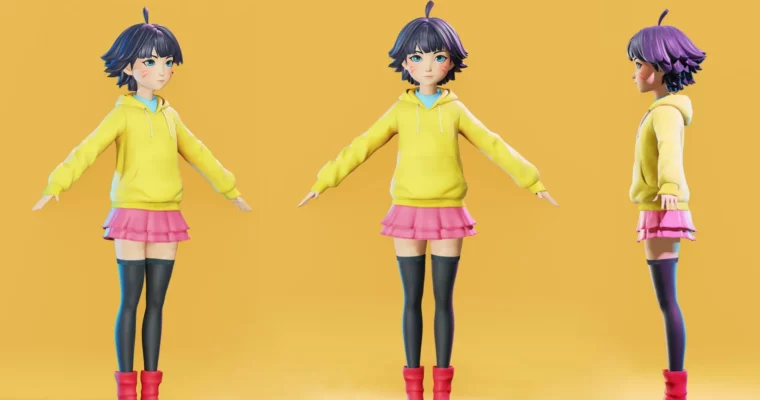
Himawari – Naruto character fan-art modeling – Blender 3.6 – 4.0 by Flycat

Actual Duration:15h 46m
Release date:2023, November
Publisher:Flycat
Skill level:Advanced
Language:English
Exercise files:Yes
Software:Blender
Course URL:https://flycatfly.gumroad.com/
This tutorial guides you through creating a fantastic fan-art 3D model of Himawari Uzumaki from the Naruto series, using Blender versions 3.6 to 4.0. You’ll get step-by-step instructions to bring this beloved character to life in 3D.
🎯 What you’ll learn
- Character Modeling: Learn to model Himawari, capturing her unique features and style.
- Sculpting Techniques: Discover advanced sculpting methods to add realistic details.
- Texturing and Materials: Apply textures and materials for a polished look.
- Rigging Basics: Get an introduction to rigging for posing your character.
- Rendering Tips: Understand how to render your final model effectively.
✅ Requirements
- Skills: Familiarity with 3D concepts is helpful.
- Tools: Blender (versions 3.6 – 4.0).
- Hardware: A computer capable of running Blender smoothly.
📝 Description
This course offers a comprehensive walkthrough for modeling Himawari Uzumaki, a popular character from the Naruto universe. You’ll follow along with detailed explanations and clear visuals, covering everything from initial blocking to final rendering. The tutorial is designed to be accessible, whether you’re just starting with 3D modeling or looking to refine your character art skills. You’ll gain practical experience in sculpting, texturing, and basic rigging, all within the powerful environment of Blender. Project files are included to help you along the way.
🧑🎓 Who this course is for
- Fans of Naruto who want to create their own 3D models of the characters.
- Aspiring 3D artists looking to improve their character modeling and sculpting skills.
- Anyone interested in creating fan art using Blender.
🧑🏫 About the Author
Flycat is an experienced 3D artist specializing in character modeling and fan art. With a passion for anime and manga, Flycat brings a unique perspective to creating beloved characters in 3D. This tutorial showcases their expertise in Blender and their ability to break down complex processes into easy-to-follow steps.
🏁 Final Result
- A portfolio-ready 3D model of Himawari Uzumaki, ready for posing and rendering.
 Channel

Hey ! Thx for the course
Do you have
Hampton gesture
And Vandruff perspective
?