


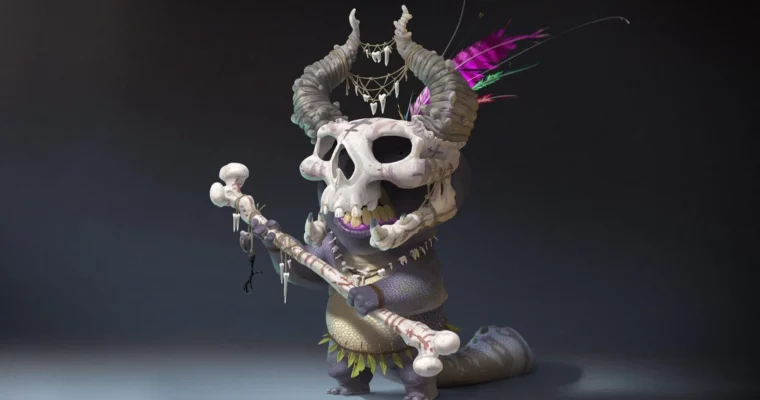
Digital Painting in Photoshop by Dave Neale

Duration:6h 5m
Actual Duration:6h 3m
Release date:2025, February
Publisher:Gnomon
Skill level:Beginner
Language:English
Exercise files:Yes
Software:Photoshop, Wacom
Course URL:https://www.thegnomonworkshop.com/workshops/digital-painting-in-photoshop
Ready to level up your digital painting game in Photoshop? This workshop dives deep into the essential tools and workflows that professional artists use every day. Whether you’re just starting out or looking to refine your process, you’ll learn how to leverage Photoshop for everything from concept art to matte painting.
🎯 What you’ll learn
- Setting up your workspace and preferences for optimal digital painting.
- Utilizing essential Photoshop tools, including brushes, selections, and adjustments.
- Creating and using custom Actions and Smart Objects for efficiency.
- Painting characters from sketch to final render.
- Understanding blend modes and their application in painting.
- Discovering lesser-known shortcuts and tips for a smoother workflow.
✅ Requirements
- Skills: Basic familiarity with digital art concepts and computer software.
- Tools: A drawing tablet (like a Wacom) is highly recommended.
- Hardware: A computer capable of running Adobe Photoshop smoothly.
📝 Description
This workshop is all about getting the most out of Photoshop for digital painting. Dave Neale, a concept artist with tons of experience working for major clients like Netflix and EA Games, walks you through his personal workflow. He covers everything from setting up your workspace and customizing your Wacom tablet to using specific tools and techniques that speed up your process. You’ll learn about powerful features like Actions and Smart Objects, and see how they can be integrated into your daily work.
Dave doesn’t just talk about the tools; he shows you how to use them by painting a character from scratch. You get to follow along with his Photoshop file, custom brushes, and actions, making it super easy to practice what you learn. While this course won’t cover every single button in Photoshop, it gives you a solid foundation to build your confidence and skills for any digital art project.
🧑🎓 Who this course is for
- Beginners looking to understand the fundamentals of digital painting in Photoshop.
- Intermediate artists wanting to improve their workflow and discover new techniques.
- Professionals seeking to optimize their Photoshop usage for illustration and concept art.
🧑🏫 About the Author
Dave Neale is a freelance concept artist based in London, working under the name Black Salamander LTD. He’s got a solid background in animation, film, advertising, and game design. Dave really enjoys the variety that freelancing offers and collaborates with clients all over the world. His impressive client list includes EA Games, Warner Bros, MPC, The Mill, Ford, and Netflix. He even contributed to the film “Fantastic Beasts,” showing his range across different media.
🏁 Final Result
- A completed digital painting of a character, demonstrating the application of learned Photoshop techniques from setup to final polish. You’ll also gain a custom set of brushes and actions to use in your own projects.
 Channel



Thanks
How beautiful and well-organized everything is!
Congratulations, dear Strawberry, everything is so beautiful!🥰
I hope to soon be able to enjoy all this wonderful content again.
)*
Thank you so much for uploading this course, it’s very useful!
Idk if this is the proper place to ask this (if there is a place meant for requests, I would love to know about it and make my requests there in the future), but could you please upload the course “Learn Anatomy in 21 Days” from 21Draw? This is the link: https://www.21-draw.com/course/anatomy-21-days/
Learn Anatomy in 21 Days by Rodgon