It looks like you're using an adblocker.
Adblockers make us sad. We use ads to keep our content happy and free. If you like what we are doing please consider supporting us by whitelisting our website. You can report badly-behaved ads by clicking/tapping the nearby 'Advertisement' X text.
Concept Art in Unreal 5 (+Unreal Engine 5 Basics) by Ellie Cooper
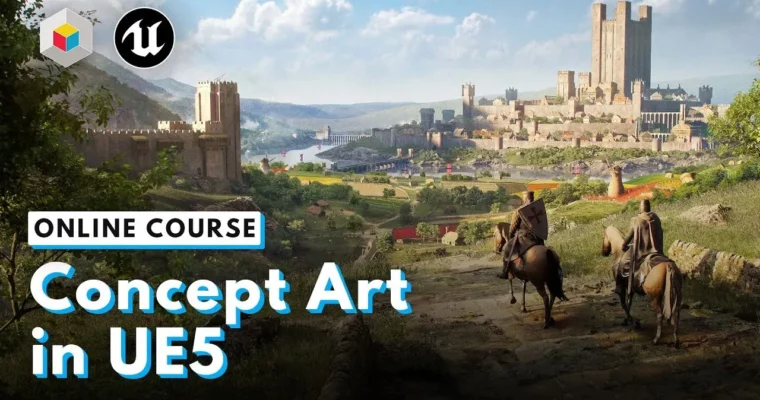
Learn to build stunning concept art environments in Unreal Engine 5 using Nanite and Lumen, then polish your final images in Photoshop.
Learn to build concept art directly in Unreal Engine 5. This course skips the traditional 2D-only pipeline and shows you how to use real-time tools like Nanite and Lumen to create, iterate, and finalize portfolio-ready environments. You’ll go from a simple blockout to a polished still frame and cinematic render, then finish it off with a 2D paintover in Photoshop.
🎯 What you’ll learn
Build a full environment blockout from a mood board and reference.
Sculpt landscapes and place 3D assets inside Unreal Engine 5.
Set up lighting and post-processing for cinematic renders.
Export still frames and create a final paintover in Photoshop.
✅ Requirements
Skills: Basic understanding of 3D space and familiarity with a digital painting tool like Photoshop.
Tools: 3-button mouse, drawing tablet.
Hardware: PC capable of running Unreal Engine 5 (dedicated GPU, 16GB+ RAM recommended).
📝 Description
This isn’t a traditional concept art course. Instead of spending weeks on a single 2D painting, you’ll learn to use Unreal Engine 5 as your primary canvas. Ellie Cooper shows you how to block out a scene, sculpt a landscape, and populate it with assets—all in real-time. The benefit? You can iterate on lighting, composition, and scale instantly without repainting.
The course is built around a practical project: a fantasy castle environment. You’ll start with a mood board and reference gathering, then move straight into a blockout. From there, you’ll use Nanite for high-detail geometry and Lumen for dynamic lighting, giving your scene a cinematic look straight out of the engine. The final step is a paintover in Photoshop, where you’ll use 2D techniques to push the image further.
As a bonus, you get Ellie’s full “Unreal Engine 5 Basics” course, which covers the UI, navigation, and core tools for absolute beginners. This makes the package work for both newcomers to UE5 and experienced artists looking to add real-time rendering to their pipeline.
🧑🎓 Who this course is for
Concept artists who want to integrate 3D and real-time tools into their workflow.
3D artists looking to move into environment design and concept art.
Intermediate users of Unreal Engine 5 who want to focus on visual storytelling and composition.
🧑🏫 About the Author
Ellie Cooper is a digital artist and the founder of Athena Productions. She has created environments and visuals for major studios like MPC and Goodbye Kansas Studios, with clients including Disney, Paramount Pictures, and Bandai Namco. Her work spans video games, film, and TV, and she brings that production experience directly into her teaching.
🏁 Final Result
A fully realized fantasy environment rendered in Unreal Engine 5.
A final still frame and a cinematic video render of your scene.
A polished 2D paintover of your best render, ready for a portfolio.
Curriculum
📋 Course content
Module 1: Blockout
Introduction0:57
Course Overview3:53
Breaking Into the Industry6:37
Should You Freelance?8:15
Managing Stress2:24
Realtime vs Traditional1:26
Using Unreal3:36
Visit the Free Companion Course2:06
Starting on Our Projects0:55
Coming Up with a Concept2:28
Building a Mood Board8:05
3D Packs and Models5:52
Tips for Using Reference6:07
Planning the Project Homework0:49
Blockout Introduction2:30
Note on Video Speeds1:03
Initial Scene Setup6:38
Basic Castle Blockout11:36
Early Blockout Homework0:21
Basic Landscape Sculpting16:02
Using External Software for Sculpting3:21
Blocking in Other Shapes10:07
Faraway Landscape Blocking5:21
Landscape Sculpting Homework1:06
Module 2: Building the Scene
[Lesson content includes filling out the blockout with 3D assets, setting up lighting, and post-processing.]
Module 3: Rendering
[Lesson content includes crafting the main hero element, adding finishing touches, and rendering still and cinematic versions.]
Module 4: Paintover
[Lesson content includes taking the still frame into Photoshop for a final 2D paintover.]
Module 5: Full Course: Unreal Engine 5 Basics
[Bonus beginner-friendly course included with purchase.]
Unreal Engine 5 Basics
1. Module 1: Absolute Basics
* Meet Ellie (01:02)
* Course Overview (01:44)
* How to Use This Course (01:12)
* Unreal Version Used (00:25)
* Lesson Overview (00:20)
* Installing the Launcher (01:09)
* Epic Launcher Sections (05:32)
* Creating a New Project (00:59)
* Intro to the Unreal UI (05:40)
* Organizing Your Outliner (01:00)
* Moving Around the Scene (02:02)
* Moving Objects (05:27)
* Focus on an Object (00:15)
* Setting a Material (00:32)
* Scene Design with Basic Objects (06:23)
* Basic Scene Challenge Homework (00:35)
2. Module 2: Assets and Lighting
* Lesson Overview (00:24)
* Quixel Bridge (05:34)
* Adding From Your Vault (03:18)
* Where to Find Assets (00:39)
* Importing Custom Assets (06:23)
* Assets Homework (00:40)
* Adding a Simple Light (03:28)
* Mobility (01:23)
* Spotlight Settings (03:43)
* Point and Rec Light Settings (01:28)
* Lumen (03:20)
* Lighting from the Sky (04:19)
* Lighting a Scene (14:48)
* Basic Lighting Challenge Homework (00:22)
3. Module 3: Cameras
* Lesson Overview (00:23)
* What Is Nanite? (03:26)
* When to Use Nanite (02:15)
* Enabling Nanite (01:06)
* Build Nanite on Imported Assets (01:36)
* Camera Bookmarks (01:46)
* Setting Up a Camera (03:38)
* Lock Camera (00:45)
* Camera Settings (07:22)
* Framing a Shot (02:00)
* Camera Challenge Homework (00:25)
4. Module 4: Post-Processing
* Lesson Overview (00:23)
* Post-Process Volume (02:07)
* Bloom (01:15)
* Chromatic Aberration (01:13)
* Dirt Mask (01:14)
* Lens Flare (01:52)
* Vignette Image Effect (00:50)
* Temperature (00:50)
* Color Grading (03:20)
* Misc Color Grade Settings (01:17)
* Film Settings (00:26)
* Global Illumination (00:40)
* Reflections (00:39)
* Post-Processing Homework (00:16)
5. Module 5: Landscapes
* Lesson Overview (00:22)
* Creating a Landscape (01:41)
* Manage Tab (01:19)
* Alpha Brushes (03:05)
* Sculpting a Basic Landscape (01:21)
* Landscape Material (12:58)
* Foliage (13:13)
* Using the Included Landscape Material (06:08)
* Landscape Challenge Homework (00:17)
6. Module 6: Rendering
* Lesson Overview (00:16)
* Intro to the Sequencer (00:47)
* Camera Cuts (02:18)
* Keyframes (05:03)
* Rendering (02:32)
* Sequencer Homework (00:20)
7. Module 7: HDRI
* Lesson Overview (00:14)
* Adding HDRI (01:07)
* Changing the HDRI (00:56)
* Initial HDRI Settings (01:07)
* HDRI Best Practices (02:58)
* HDRI Homework (00:27)
8. Module 8: Customizing Materials
* Lesson Overview (00:25)
* Applying Materials (02:21)
* Creating a New Material (00:46)
* Preview Mesh (00:29)
* Details (00:37)
* Result Node (00:33)
* Adding a Node (01:41)
* Updating Materials in Your Scene (01:17)
* Adding a Texture (00:40)
* Connecting Nodes (01:40)
* Comments (00:39)
* Applying Changes (00:13)
* Changing Roughness (00:55)
* Creating a Material Instance (03:11)
* Material Instance Example (02:02)
* Altering a Scene Through Materials (05:52)
* Customized Materials Challenge Homework (00:22)
9. Module 9: MetaHumans
* Lesson Overview (00:52)
* Installing the MetaHuman Creator (00:48)
* Using MetaHuman Creator (11:55)
* Importing MetaHumans (03:20)
* Posing the Body (03:59)
* Posing the Face (03:39)
* Adding a MetaHuman into a Scene (13:06)
* MetaHumans Challenge Homework (00:29)
10. Module 10: Expanding Your Horizons
* Lesson Overview (00:31)
* Official Unreal Resources (03:24)
* Recommended Resources (03:39)
* Companion Course (00:33)
* Creating Personal Projects (00:55)
* Set Up a Portfolio (01:52)
* The Journey is Only Beginning (00:42)




 Channel