Blender To Unreal Engine 5 – Stylized Interactive Pirate Chest by 3D Tudor

Actual Duration:7h 57m
Release date:2026, August
Publisher:Superhive Market
Skill level:Intermediate
Language:English
Exercise files:Yes
Software:Blender 5.2, Unreal Engine 5.8
Course URL:https://superhivemarket.com/products/blender-to-unreal-engine-5-stylized-interactive-pirate-chest?num=1&src=new-ultimate
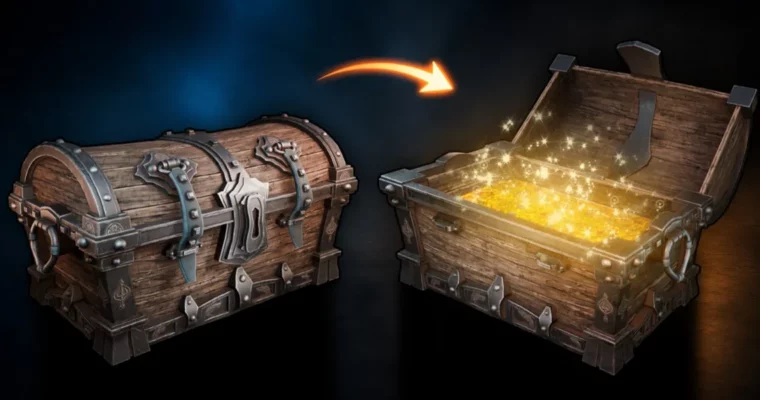
This course walks you through the entire production pipeline for a single stylized game prop, from the first blockout in Blender to a fully interactive asset in Unreal Engine 5. You’ll model a pirate chest, set up clean UVs, bake masks, export through GLB and FBX, then rebuild everything with procedural materials and a Blueprint that handles opening and closing animations. It’s a practical, no-nonsense workflow that you can adapt to other props, doors, or reward containers.
🎯 What you’ll learn
- Model a stylized pirate chest from scratch in Blender
- Create dedicated open and closed mesh states for clean animation swaps
- Unwrap curved and multi-material parts with controlled UV density and wood-grain direction
- Bake ambient occlusion, curvature, and cavity masks using a Python utility
- Export assets through GLB and FBX formats
- Build reusable master materials and instances in Unreal Engine 5.8
- Create a Blueprint with proximity detection, timelines, and a timed mesh swap
✅ Requirements
- Skills: Basic understanding of 3D space and familiarity with Blender or similar software
- Tools: 3-button mouse, Blender 5.2, Unreal Engine 5.8
- Hardware: Dedicated GPU, minimum 16GB RAM
📝 Description
This course takes one asset and pushes it through the entire production workflow, so you see exactly how a stylized prop moves from Blender to a real-time engine. Luke from 3D Tudor starts with simple shapes and builds up the chest with soft bevels, strong curvature, and clearly separated materials. The modeling phase covers wooden planks, a curved lid, metal straps, leather belts, bolts, hinges, and a central lock, all with practical topology that won’t fight you during unwrapping or export.
The clever part comes next. Instead of rigging the lid with a hinge or simulating straps with physics, the course creates two dedicated mesh states: one closed, one open. Each state is art-directed directly in Blender, then a short scaling animation in Unreal Engine hides a precisely timed swap between them. It’s a simple, reliable approach that keeps the interaction snappy and the art direction fully under your control.
UVs get the attention they deserve. You’ll manage seams, stretching, and density across curved and mirrored parts, and treat wood-grain direction as a design decision so the texture supports the chest’s construction. The included Python utility bakes ambient occlusion, curvature, and cavity masks, which then drive edge wear, recessed detail, and ageing inside the material system.
In Unreal Engine 5.8, you’ll build reusable master materials and instances instead of locking the chest to one look. Generated masks and noise expose practical controls for wood color, metal response, gold treatments, moss, and wear. The final Blueprint uses proximity detection, input, state tracking, a timeline, and a timed mesh swap to create both opening and closing behavior. By the end, you’ll have a polished prop and a repeatable method for other interactive assets.
🧑🎓 Who this course is for
- Blender users who want to create a polished stylized prop and organize it for a real-time engine
- Prop and environment artists who need a complete Blender-to-Unreal Engine workflow
- Unreal Engine users who want editable materials and a practical interactive prop
- Complete beginners who need step-by-step guidance, plus intermediate artists who want the generated-mask, material-instance, and state-swap methods
🧑🏫 About the Author
3D Tudor is led by Luke, an experienced 3D artist and educator known for creating detailed, production-focused courses on Blender and Unreal Engine. His teaching style emphasizes practical workflows and real-world application, breaking down complex pipelines into clear, manageable steps. With a strong background in stylized game art, Luke has helped thousands of students improve their modeling, texturing, and engine integration skills through hands-on projects.
🏁 Final Result
- A complete stylized pirate chest with dedicated closed and open meshes
- Organized UVs with controlled density and wood-grain direction
- Generated ambient occlusion, curvature, and cavity masks
- GLB and FBX exports ready for engine integration
- Reusable Unreal Engine master materials with adjustable wood, metal, gold, wear, ageing, cavity, and moss controls
- A Blueprint that opens and closes the chest through an animated mesh swap, tested in an example scene
 Channel