


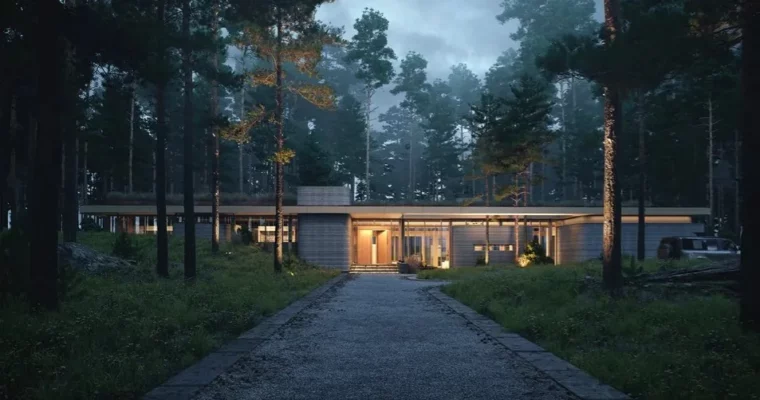
Architectural Visualization Course by Yuriy Bobak

Actual Duration:23h 32m
Release date:2023, April
Publisher:Bobak School
Skill level:Intermediate
Language:English
Exercise files:Yes
Software:3ds Max, Corona Renderer, Photoshop
Course URL:https://www.bobak.school/
This course from Bobak School is all about taking your architectural visualization skills to the next level. If you’ve got a handle on 3ds Max, Corona Renderer, and Photoshop, this is your chance to really shine and boost your career. We’ll walk you through building 3D scenes from scratch and using Corona Renderer to make them look incredibly real.
🎯 What you’ll learn
- Advanced 3D modeling techniques for architectural elements.
- Creating realistic lighting and atmospheric effects in scenes.
- Mastering Corona Renderer for high-quality image output.
- Post-production workflows in Photoshop to enhance renders.
- Developing a portfolio-ready series of architectural images.
✅ Requirements
- Skills: Basic understanding of 3ds Max, Corona Renderer, and Photoshop.
- Tools: A computer capable of running 3ds Max and Corona Renderer.
- Hardware: A dedicated GPU is recommended for smoother rendering performance.
📝 Description
Ready to make your architectural visualizations pop? This course dives deep into the practical side of creating stunning visuals. We focus on building believable 3D scenes, from the initial modeling stages to the final polish. You’ll learn how to leverage Corona Renderer‘s powerful features to achieve photorealism, paying close attention to lighting and atmosphere. The curriculum is structured to build your confidence, moving from foundational techniques to more complex workflows. We emphasize practical application, ensuring you can translate what you learn directly into your projects.
🧑🎓 Who this course is for
- 3D artists looking to specialize in architectural visualization.
- Architects and interior designers wanting to create better project presentations.
- Anyone with existing 3D software knowledge aiming to produce professional architectural renders.
🧑🏫 About the Author
Yuriy Bobak is a seasoned professional in the field of architectural visualization and the founder of Bobak School. With years of industry experience, Yuriy has worked on numerous high-profile projects, honing his skills in 3ds Max, Corona Renderer, and Photoshop. He is passionate about sharing his knowledge and has developed a unique teaching methodology focused on practical, real-world application.
🏁 Final Result
By the end of this course, you’ll have a series of atmospheric architectural images ready to showcase in your portfolio, demonstrating your mastery of 3D scene creation, realistic rendering, and post-production techniques.
 Channel





Who to extract the Scene files?
for extracting you can use 7-zip or winrar lots of archivers support 7z format just google how to extract a 7z file
Neither WinRAR or 7-Zip worked for me.
When opening the file, for example “BOBAK STUDIO – SAFE TOWN.7z.001 (2.00 GB × 3 volumes)”, it says there are three parts, but you haven’t provided a link to download the other parts, only part 001.
So, when you open that archive preview page (like for *babak safetown.7z.001*), you’ll see a “Download” button on the right if you’re on PC. 📥 It’ll say it’s the first part (2GB) of 7z archive.
Scroll down a bit, and you’ll find the other parts like .002 and .003. You need to download everything down to the “recovery data” section and save them all in the same folder.
Once you open that first .001 file, your archiving software should unpack everything for you automatically. ✊🤠
Are you sure? I open all the Mediafile links and there’s nowhere to find a folder, button, or links to download the other parts, only part 001. I tried in other browsers too.
Ok, I find now after click on download and scrolling the next page. Thanks