Ad Clicks : Ad Views : Ad Clicks : Ad Views : Ad Clicks : Ad Views : Ad Clicks : Ad Views :
Oh Snap!

It looks like you're using an adblocker. Adblockers make us sad. We use ads to keep our content happy and free. If you like what we are doing please consider supporting us by whitelisting our website. You can report badly-behaved ads by clicking/tapping the nearby 'Advertisement' X text.

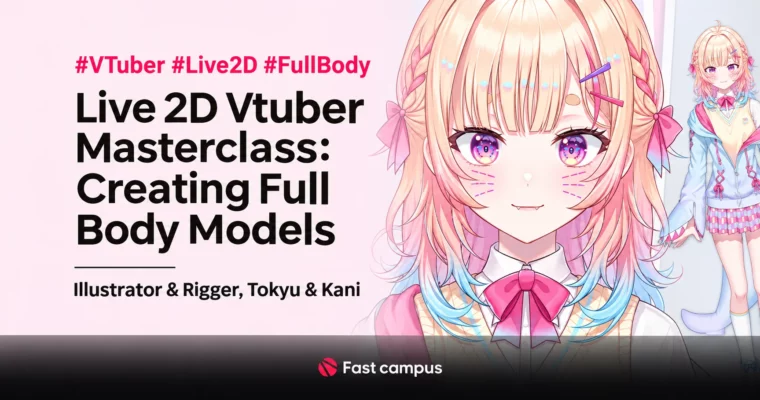
Live 2D Vtuber Masterclass – Creating Full Body Models by Tokyu & Kani (illustrator Tokyu, rigger Kani/Carney)

Live 2D Vtuber Masterclass – Creating Full Body Models by Tokyu & Kani (illustrator Tokyu, rigger Kani/Carney)

/

Author:Tokyu & Kani (illustrator Tokyu, rigger Kani/Carney)

Duration:72 clips, about 40 hours

Actual Duration:79h 55m

Release date:2023, September 25

Publisher:FastCampus

Skill level:Intermediate

Language:English

Exercise files:Yes

Software:Clip Studio Paint 2.0, Live2D Cubism, Vtube Studio, OBS Studio

Course URL:https://fastcampus.co.kr/dgn_online_neovtuber2

Build a pro full-body Live2D VTuber, from head-to-toe illustration to rigging and debut.

Go from head to toe as a pro VTuber: illustrate a full-body character, rig every part in Live2D, and debut with Vtube Studio and OBS, guided by illustrator Tokyu and rigger Kani.

๐ŸŽฏ What you’ll learn

  • Full-body character illustration: proportions, body lines, concept, drawing, color, extra parts
  • Layer part separation for rigging plus self-review and final inspection
  • Live2D rigging: mesh, warp deformers, draw order, face, body, clothes, tail and breathing
  • Detail and animation: physics blends, expressions, tears, gestures, saving the character
  • Debut setup: Vtube Studio profiles and OBS character loading

โœ… Requirements

  • Skills: Basic digital drawing orientation is enough; no prior Live2D experience required
  • Tools: Clip Studio Paint 2.0, Live2D Cubism, Vtube Studio, OBS Studio
  • Hardware: A PC that runs Live2D Cubism and streaming tools comfortably

๐Ÿ“ Description

Single-course path from blank canvas to a moving full-body VTuber: concept and drawing first, then part separation, full rigging, animation, and debut setup. The publisher page claims 70 clips and about 35 hours, but the source pack holds 72 videos; the delivery manifest totals 39:58:14, so the card states the measured 72 clips and about 40 hours. Full release Sep 25, 2023 (early open) comes from the publisher page. The source pack ships Korean customer subtitles (plain, 72 files); English subtitles in delivery are TTS-matched. No public preview video was found on the publisher page, so the card keeps video_preview null.

๐Ÿง‘โ€๐ŸŽ“ Who this course is for

  • Aspiring VTubers who want a full-body Live2D model made by their own hands
  • Illustrators and riggers curious about the pro full-body pipeline through debut

๐Ÿง‘โ€๐Ÿซ About the Author

Tokyu is an illustrator teaching VTuber character art and Kani (Carney) is a rigger and YouTuber focused on Live2D VTuber production. Together they cover full-body illustration, part separation, rigging, and debut streaming practice.

๐Ÿ Final Result

  • A moving full-body Live2D VTuber with expressions and gestures, debut-ready via Vtube Studio and OBS.
Curriculum

๐Ÿ“‹ Course content

  1. Part 1. Character illustration, head to toe
    • CH 01. Debut as a VTuber, this time with an LD character
      • CH01_01. Teacher intro: illustrator Tokyu
      • CH01_02. Teacher intro: YouTuber and rigger Kani
    • CH 02. Digging into Clip Studio 2.0 features
      • CH02_01. Basic tools, shortcuts and layers
      • CH02_02. Useful Clip Studio 2.0 features
    • CH 03. Full-body illustration, easy even first time
      • CH03_01. Body proportions through a simple frame
      • CH03_02. Pretty body lines that flatter full-body characters
    • CH 04. Your virtual character: concept
      • CH04_01. Character setup and design planning
      • CH04_02. Point-design silhouettes that stress the concept
      • CH04_03. Eye-catching color matches
    • CH 05. Your virtual character: drawing
      • CH05_01. Body drawing
      • CH05_02. Charming face drawing
      • CH05_03. Hair drawing
      • CH05_04. Outfit drawing
      • CH05_05. Pre-splitting line art for part separation
    • CH 06. Your virtual character: color
      • CH06_01. Easy fast color planning
      • CH06_02. Coloring skin and facial features
      • CH06_03. Coloring hair
      • CH06_04. Coloring outfits
      • CH06_05. Coloring accessories
      • CH06_06. Coloring finish
    • CH 07. Learning layer part separation
      • CH07_01. Separating facial feature parts
      • CH07_02. Separating face parts
      • CH07_03. Separating hair parts
      • CH07_04. Separating clothes and accessory parts
      • CH07_05. Rig-ready layer cleanup with self-feedback
    • CH 08. Extra character parts
      • CH08_01. Hood extra parts
      • CH08_02. Extra parts for hairstyle changes
      • CH08_03. Extra parts for expressions
      • CH08_04. Extra hand-pose parts
      • CH08_05. Extra-part layer cleanup and final review
  2. Part 2. Live2D rigging, head to toe
    • CH 01. Live2D tutorial
      • CH01_01. Downloading and installing Live2D
      • CH01_02. Full pipeline at a glance, illustration to Live2D

      • CH01_03. Live2D glossary
      • CH01_04. Basic tool usage and favorite shortcuts
    • CH 02. Before moving the character
      • CH02_01. Checking work before meshing
      • CH02_02. Meshing the full body
      • CH02_03. Organizing with warp deformers
      • CH02_04. Character draw order
    • CH 03. Natural face rigging
      • CH03_01. Eyes and brows
      • CH03_02. Prettier pupils
      • CH03_03. Mouth shapes
      • CH03_04. Moving hair, basics
      • CH03_05. Moving hair, advanced
      • CH03_06. Face angles
      • CH03_07. Fitting eyes, nose and mouth to angles
      • CH03_08. Fixing hair to angles
      • CH03_09. Hair X and Y values
      • CH03_10. Face Z value
    • CH 04. Body rigging, torso to legs
      • CH04_01. Upper body (1): torso, arms, hands
      • CH04_02. Clothes sway (1): skirt
      • CH04_03. Clothes sway (2): sleeves, ribbon, hood strings
      • CH04_04. Upper body (2): seal-hug animation
      • CH04_05. Upper-body Z value
      • CH04_06. Moving the lower body
    • CH 05. Extra-part rigging
      • CH05_01. Extra clothes: hood head and outfit
      • CH05_02. Extra clothes: hood arms
      • CH05_03. Polishing extra parts
      • CH05_04. Tongue-out
      • CH05_05. Moving the seal
      • CH05_06. Tail sway
    • CH 06. Character detail
      • CH06_01. Breathing
      • CH06_02. Physics blend setup
      • CH06_03. Removing neck and mouth lines
    • CH 07. Applying animation
      • CH07_01. Switching faces: hearts, sparkles, growing
      • CH07_02. Crying
      • CH07_03. Gestures (1): V-sign
      • CH07_04. Gestures (2): finger hearts
      • CH07_05. Gestures (3): sulking
      • CH07_06. Saving the Live2D character
  3. Part 3. Vtube Studio and OBS
    • CH 01. Debut prep
      • CH01_01. Downloading Vtube Studio and loading the character
      • CH01_02. Vtube Studio profiles and character settings
      • CH01_03. Loading the character in OBS

๐Ÿ“ข Guys, this is a Group Buy campaign, check the GBC forum thread to get access

You can find the course preview in the download section below.

Watch online or Download for Free
Live 2D Vtuber Masterclass – Creating Full Body Models by Tokyu & Kani (illustrator Tokyu, rigger Kani/Carney)
NAME
SIZEDURATION
Neovtuber2 Eng Dub
167.5 MB1h 16m
Part 1. Character Illustration, Head to Toe
58.4 MB38m
CH 01. Debuting with an LD Character
9.4 MB3m
CH 02. Clip Studio 2.0 Features
5 MB5m
CH 03. Easy Full-Body Illustration
6.1 MB5m
CH 04. Your Character – Concept
7.4 MB5m
CH 05. Your Character – Drawing
4.4 MB5m
CH 06. Your Character – Color
9.8 MB5m
CH 07. Layer Part Separation
9.4 MB5m
CH 08. Extra Character Parts
6.9 MB5m
Part 2. Live2D Rigging, Head to Toe
97.7 MB32m
CH 01. Live2D Tutorial
9.8 MB2m
CH 02. Before Moving the Character
9.8 MB5m
CH 03. Natural Face Rigging
13.4 MB5m
CH 04. Body Rigging, Torso to Legs
14.9 MB5m
CH 05. Extra-Part Rigging
20.4 MB5m
CH 06. Character Detail
13.4 MB5m
CH 07. Applying Animation
16 MB5m
Part 3. Using Vtube Studio and OBS
11.5 MB4m
Neovtuber2 Eng Sub
20.3 MB5m
Part 1. ๋จธ๋ฆฌ๋ถ€ํ„ฐ ๋ฐœ๋๊นŒ์ง€, ์บ๋ฆญํ„ฐ ์ผ๋Ÿฌ์ŠคํŠธ
9.4 MB3m
CH 01. ๋ฒ„ํŠœ๋ฒ„ ๋ฐ๋ท”! ์ด๋ฒˆ์—” LD ์บ๋ฆญํ„ฐ๋กœ ์ค€๋น„ํ•ด๋ณด์ž!
9.4 MB3m
Part 3. Vtube Studio์™€ OBS ์ด์šฉ
10.9 MB1m

Download all

Join us on
  Channel    and      Group

Leave a Comment

Your email address will not be published. Required fields are marked *