Ad Clicks : Ad Views : Ad Clicks : Ad Views : Ad Clicks : Ad Views : Ad Clicks : Ad Views :
Oh Snap!

It looks like you're using an adblocker. Adblockers make us sad. We use ads to keep our content happy and free. If you like what we are doing please consider supporting us by whitelisting our website. You can report badly-behaved ads by clicking/tapping the nearby 'Advertisement' X text.

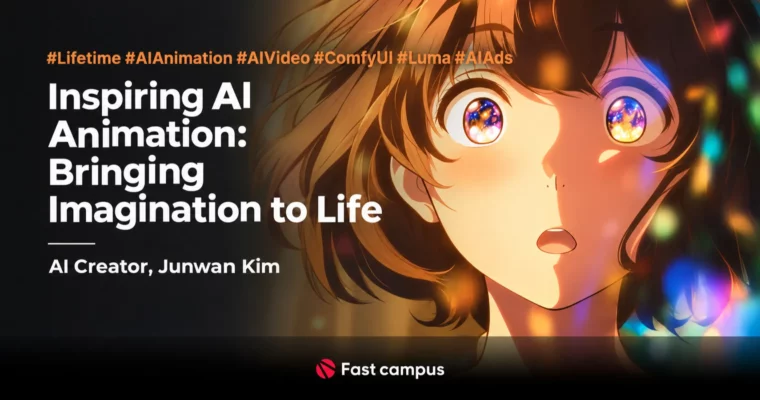
Inspiring AI Animation – Bringing Imagination to Life by Junwan Kim

Inspiring AI Animation – Bringing Imagination to Life by Junwan Kim

/

Author:Junwan Kim

Duration:21 hours

Actual Duration:42h 56m

Release date:2025, June 27

Publisher:FastCampus

Skill level:Beginner

Language:Korean

Exercise files:Yes

Software:ChatGPT, ComfyUI, Luma Dream Machine, Supertone, Suno AI, CapCut, Runway Gen-4, Midjourney

Course URL:https://fastcampus.co.kr/data_online_aianimation

Build a broadcast-ready anime ad with AI only, from storyboard to final edit in one optimized workflow.

Forget clicking once and hoping for magic. This course shows you a real, repeatable pipeline to make AI animation that actually looks like anime and works as an ad, using Nijijourney, ComfyUI, and Luma Ray2 from idea to final cut.

🎯 What you’ll learn

  • Plan a commercial anime ad β€” topic, storyboard, script and shot list with ChatGPT
  • Generate stylish subculture images with Nijijourney, SREF, character reference and personalization
  • Detail and fix images in ComfyUI β€” inpainting, ControlNet, IPAdapter, Face Detailer and upscaling
  • Create consistent animation clips in Luma Ray2 with keyframes, extend and camera motion
  • Generate natural Korean dubbing with Supertone and custom BGM with Suno AI
  • Edit like a pro in CapCut β€” cuts, SFX, transitions, color grading and text animation
  • Finish a full portfolio project: subculture-style marketing animation

βœ… Requirements

  • Skills: Basic computer skills, no prior AI or animation experience needed
  • Tools: Paid Midjourney / Nijijourney, ChatGPT, Luma accounts, free installs of ComfyUI, Supertone, Suno AI, CapCut
  • Hardware: Windows PC for ComfyUI practice, stable internet for cloud AI tools

πŸ“ Description

Most AI videos look cheap for one reason: no workflow. This course fixes that with a 2-step image system. You first lock the look in Nijijourney for style and composition, then you clean it up in ComfyUI for consistency, hands, faces, and product shots. That split is what makes the motion hold up later.

You will work like a small ad team. ChatGPT handles topic, story, and shot-by-shot prompts. Nijijourney builds Ghibli, subculture, and 2.5D looks. ComfyUI does the dirty work β€” ControlNet for pose, inpainting for fixes, Live Portrait for expressions, and Redux for compositing a real product with your character.

Then it gets fun. In Luma Ray2 you turn stills into moving shots with keyframes, extend, reframe, and 25 camera moves. You learn what to do when motion breaks, how to keep faces stable, and how to cut around weird frames instead of fighting the tool for hours.

Audio and edit is where it stops looking like a test. You make a clean Korean voiceover in Supertone, build a track in Suno AI, then finish everything in CapCut with SFX, transitions, LUTs, and text animation. No expensive NLE needed. By the end you have a short anime-style commercial made 100% with AI, plus a workflow you can reuse for the next client.

πŸ§‘β€πŸŽ“ Who this course is for

  • Beginners who have ideas but never touched AI video and want a clear start-to-finish path
  • Designers, editors and marketers who want to add AI anime ads to their service list
  • Subculture / anime fans who want to turn illustrations into moving stories with sound

πŸ§‘β€πŸ« About the Author

Junwan Kim is an AI Technical Artist at Lezhin Entertainment, previously AI 3D Technical Designer at NdotLight. He builds production-ready generative AI pipelines for companies and works as a CPP for Vidu AI and Pollo AI.

He has taught ComfyUI and generative AI offline for university students, plus CG and visual scripting workshops for Adobe Korea, TikTok, and Snap. This class packs that field experience into hands-on demos β€” less theory, more fixing real shots until they look right.

🏁 Final Result

  • A finished subculture-style AI anime commercial β€” storyboard, stylized shots, animated clips, AI dubbing, custom BGM, and graded CapCut edit ready for portfolio or client pitch.
Curriculum

πŸ“‹ Course content

  1. Module 1:  Subculture Marketing Intro
    • Subculture Marketing Intro00:07:23
    • Eye-catching Domestic and Global Ad Cases00:06:43
  2. Module 2:  Prompt Engineering with ChatGPT
    • ChatGPT Intro00:09:22
    • Prompt Writing Basics00:21:30
    • Role Prompts in Practice00:07:24
    • ChatGPT Vision in Practice00:09:23
    • Story, Script Writing and Translation with ChatGPT00:13:33
    • Image Generation and Editing with ChatGPT00:10:24
    • SoraAI Included in ChatGPT Subscription00:10:01
  3. Module 3:  Stylish Subculture Images with Nijijourney
    • What is NijiJourney – Difference from Midjourney00:06:22

    • Signup and Web-based Workflow Setup00:05:34
    • Basic Usage and Interface Walkthrough00:05:28
    • Niji Style Types Explained00:06:13
    • Find Your Own Style with Search Tool00:05:16
    • Basic Prompt Writing and Keyword Combos00:19:39
    • Variation, Remix, Upscale, Return Explained00:13:02
    • Editor Explained00:15:03
    • Image Prompts in Practice00:13:47
    • Character Reference Explained00:12:42
    • Style Reference Explained00:12:55
    • Websites to Use SREFs Easily00:08:34
    • Personalization Feature Explained00:11:33
    • Character Consistency with Character Sheets00:23:45
    • Using Seed00:08:16
    • Ghibli Style00:12:55
    • Niji Style00:18:33
    • 2.5D Style00:13:51
  4. Module 4:  Designer-Style ComfyUI Workflow
    • ComfyUI Intro and Install00:15:48
    • Checkpoints and LoRA Concepts00:11:38
    • Interface Structure and Basic Node Flow00:51:46
    • Image Generation with Flux, SDXL, SD1.5 Checkpoints00:44:56
    • ControlNet for Pose and Composition – Depth00:16:12
    • ControlNet for Pose and Composition – OpenPose00:14:34
    • Inpainting with Noise and Mask00:29:17
    • Lively Expressions with Live Portrait00:18:21
    • Face Fix and Consistency with Flux Fill, Face Detailer00:14:36
    • Product and Character Compositing with Redux Model00:14:09
    • Hand Refine with MeshGraphormer00:15:22
    • Boost Quality with SD Upscaler00:18:46
  5. Module 5:  Animation Video Production with Luma Ray2
    • Overview of AI Video Generation Tools00:11:46
    • Luma Intro and Video Generation Models00:08:37
    • Interface and Features Tour00:22:07
    • Video Creation with T2V00:15:56
    • Video Creation with I2V00:11:19
    • Using Keyframe Feature00:16:20
    • Extend00:11:13
    • Camera Motion Explained00:21:11
    • More Like This00:12:11
    • Reframe00:16:18
    • Upscale00:08:25
  6. Module 6:  Natural TTS with Supertone
    • What is TTS?00:10:15
    • Supertone Intro00:13:59
    • TTS Production with Supertone Play00:26:03
    • Style, Pitch Shift, Pitch Variance, Speed Explained00:20:50
  7. Module 7:  Make Your Own Song with Suno AI
    • Suno Service Intro00:06:19
    • Suno Features Tour00:27:37
    • BGM Production with Suno00:39:13
  8. Module 8:  Easy and Detailed Editing with CapCut
    • CapCut Intro00:10:09
    • CapCut Features and Interface00:12:20
    • Presets Tour00:16:52
    • Basic Cut Editing Method00:26:34
    • Adding BGM, SFX and Dubbing00:33:26
    • Stylish Directing with Transitions00:12:28
    • Color Grading and Filters00:23:59
    • Text Effects and Animation00:15:35
  9. Module 9:  Final Project – Subculture Marketing Animation
    • Topic Selection, Story Setup and Script Writing00:13:49
    • Nijijourney Prompting for Shot-by-Shot Images00:16:41
    • Subculture Image Generation and Detailing 0100:30:03
    • Subculture Image Generation and Detailing 0200:21:24
    • Detail Boost with ComfyUI00:27:04
    • Animation Production with Luma Ray2 0100:24:49
    • Animation Production with Luma Ray2 0200:13:48
    • Natural TTS to Match Your Video00:27:12
    • Concept-driven BGM Creation00:19:07
    • Basic Cut Edit with Generated Resources00:26:33
    • Detail-rich Final Video with CapCut Presets00:42:36

πŸ“’ Guys, this is a Group Buy campaign, check the GBC forum thread to get access

You can find the course preview in the download section below.

Watch online or Download for Free
Inspiring AI Animation – Bringing Imagination to Life by Junwan Kim
NAME
SIZEDURATION
Junwan Kim Eng Dub
154.4 MB50m
Part 1. Subculture Marketing
52.5 MB10m
Chapter 1. Introduction to Subculture Marketing
3.3 MB5m
Chapter 2. Subculture Marketing Success Stories
49.2 MB5m
Part 2. Prompt Engineering with ChatGPT
3.3 MB5m
Chapter 1. Getting Started with ChatGPT
3.3 MB5m
Chapter 2. Prompt Engineering
0 B
Chapter 3. Using ChatGPT
0 B
Part 3. Creating Eye-Catching Subculture Images with NijiJourney
45.5 MB15m
Chapter 1. Getting Started with NijiJourney
27.1 MB5m
Chapter 2. NijiJourney Basics
6.4 MB5m
Chapter 3. Image-to-Image Generation in NijiJourney
0 B
Chapter 4. Advanced NijiJourney
0 B
Chapter 5. Generating Images in Various Art Styles
12 MB5m
Part 4. ComfyUI the Way Designers Use It
8.6 MB5m
Chapter 1. Getting Started with ComfyUI
0 B
Chapter 2. Generating Images in ComfyUI
0 B
Part 5. Animation Video Production with Luma Ray2
22.2 MB5m
Chapter 1. Overview of AI Video Generation Tools
0 B
Chapter 2. Getting Started with Luma
0 B
Chapter 3. Making Videos with Luma
0 B
Chapter 4. Learning More Luma Features
22.2 MB5m
Part 6. Natural-Sounding TTS with SuperTone
0 B
Chapter 1. TTS
0 B
Chapter 2. Using SuperTone
0 B
Part 7. Making Your Own Songs with Suno AI
0 B
Part 8. Easy and Detailed Video Editing with CapCut
11.5 MB5m
Chapter 1. Getting Started with CapCut
11.5 MB5m
Chapter 2. Editing Videos with Your Generated Assets
0 B
Chapter 3. Polishing Your Videos with CapCut Features
0 B
Part 9. Final Project – Producing a Subculture-Style Marketing Animation
10.7 MB5m
Chapter 1. Writing the Scenario with ChatGPT
0 B
Chapter 2. Creating Striking Scene Images with NijiJourney
0 B
Chapter 3. Adding Detail with ComfyUI
10.7 MB5m
Chapter 4. Producing Animated Videos with Luma Ray2
0 B
Chapter 5. Natural-Sounding TTS with SuperTone
0 B
Chapter 6. Creating Concept-Driven BGM with Suno AI
0 B
Chapter 7. Detail-Rich Video Editing with CapCut
0 B
Junwan Kim Eng Sub
13.8 MB10m
Part 1. μ„œλΈŒμ»¬μ³ λ§ˆμΌ€νŒ…
3.3 MB5m
Chapter 1. μ„œλΈŒμ»¬μ³ λ§ˆμΌ€νŒ… μ†Œκ°œ
3.3 MB5m
Chapter 2. μ„œλΈŒμ»¬μ³ λ§ˆμΌ€νŒ… 성곡 사둀
0 B
Part 2. ChatGPTλ₯Ό μ‚¬μš©ν•œ ν”„λ‘¬ν”„νŠΈ μ—”μ§€λ‹ˆμ–΄λ§
0 B
Chapter 1. ChatGPT μ‹œμž‘ν•˜κΈ°
0 B
Chapter 2. ν”„λ‘¬ν”„νŠΈ μ—”μ§€λ‹ˆμ–΄λ§
0 B
Chapter 3. Chat GPT ν™œμš©
0 B
Part 3. Nijijourneyλ₯Ό ν™œμš©ν•œ 감각적인 μ„œλΈŒμ»¬μ³ 이미지 생성
0 B
Chapter 1. Nijijourney μ‹œμž‘ν•˜κΈ°
0 B
Chapter 2. Nijijourney 기초
0 B
Chapter 3. Nijijourney μ—μ„œ 이미지λ₯Ό μ‚¬μš©ν•œ 이미지 생성
0 B
Chapter 4. κ³ κΈ‰ Nijijourney ν™œμš©
0 B
Chapter 5. λ‹€μ–‘ν•œ ν™”ν’μœΌλ‘œ 이미지 생성 ν•˜κΈ°
0 B
Part 4. λ””μžμ΄λ„ˆκ°€ μ‚¬μš©ν•˜λŠ” ComfyUI ν™œμš© 방법
0 B
Chapter 1. comfyui μ‹œμž‘ν•˜κΈ°
0 B
Chapter 2. comfyui μ—μ„œ 이미지 생성 해보기
0 B
Chapter 3. comfyui μ—μ„œ 이미지 μˆ˜μ •
0 B
Part 5. Luma Ray2 λ₯Ό ν™œμš©ν•œ μ• λ‹ˆλ©”μ΄μ…˜ μ˜μƒ μ œμž‘
0 B
Chapter 1. AI μ˜μƒ 생성 툴 μ†Œκ°œ
0 B
Chapter 2. Luma μ‹œμž‘ ν•˜κΈ°
0 B
Chapter 3. Luma λ₯Ό μ‚¬μš©ν•œ λ™μ˜μƒ μ œμž‘
0 B
Chapter 4. Luma λ‹€μ–‘ν•œ κΈ°λŠ₯ 배우기
0 B
Part 6. SuperTone을 ν™œμš©ν•œ μžμ—°μŠ€λŸ¬μš΄ TTS
0 B
Chapter 1. TTS
0 B
Chapter 2. SuperTone ν™œμš©
0 B
Part 7. Suno AI 와 ν•¨κ»˜ν•˜λŠ” λ‚˜λ§Œμ˜ λ…Έλž˜ λ§Œλ“€κΈ°
0 B
Part 8. CAPCUT 을 μ‚¬μš©ν•œ 쉽고 λ””ν…ŒμΌν•œ μ˜μƒ νŽΈμ§‘
0 B
Chapter 1. μΊ‘μ»· μ‹œμž‘ν•˜κΈ°
0 B
Chapter 2. μƒμ„±ν•œ λ¦¬μ†ŒμŠ€λ₯Ό μ‚¬μš©ν•œ μ˜μƒ νŽΈμ§‘
0 B
Chapter 3. μΊ‘μ»· κΈ°λŠ₯을 ν™œμš©ν•œ μ˜μƒ λ””ν…ŒμΌ λŒμ–΄ 올리기
0 B
Part 9. μ‹€μ „ ν”„λ‘œμ νŠΈ – μ„œλΈŒμ»¬μ³ν’ λ§ˆμΌ€νŒ… μ• λ‹ˆλ©”μ΄μ…˜ μ œμž‘
10.5 MB5m
Chapter 1. ChatGPT λ₯Ό μ‚¬μš©ν•œ μ‹œλ‚˜λ¦¬μ˜€ μ œμž‘
0 B
Chapter 2. Nijijourney λ₯Ό μ‚¬μš©ν•œ 감각적인 μž₯λ©΄ 이미지 μ œμž‘
0 B
Chapter 3. comfyUI λ₯Ό μ‚¬μš©ν•œ λ””ν…ŒμΌ λŒμ–΄ 올리기
0 B
Chapter 4. Luma Ray2 λ₯Ό ν™œμš©ν•œ μ• λ‹ˆλ©”μ΄μ…˜ μ˜μƒ μ œμž‘
0 B
Chapter 5. SuperTone을 ν™œμš©ν•œ μžμ—°μŠ€λŸ¬μš΄ TTS
0 B
Chapter 6. Suno AI λ₯Ό ν™œμš©ν•œ 컨셉이 λŠκ»΄μ§€λŠ” BGM 생성
0 B
Chapter 7. Capcut 을 ν™œμš©ν•œ λ””ν…ŒμΌμ΄ μ‚΄μ•„ μžˆλŠ” μ˜μƒ νŽΈμ§‘
10.5 MB5m

Download all

Join us on
  Channel    and      Group

Leave a Comment

Your email address will not be published. Required fields are marked *