3D Action-Adventure Game In Godot – Unit 2 – Inventory by Zenva

Release date:2025, June
Publisher:Zenva
Skill level:Intermediate
Language:English
Exercise files:Yes
Software:Godot
Course URL:https://academy.zenva.com/product/godot-3d-adventure-inventory-course/
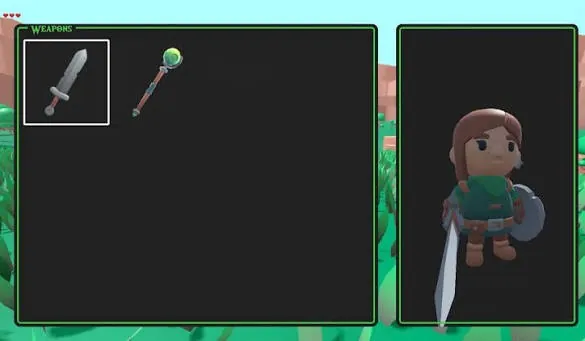
If your action-adventure game needs real item management, this is the unit that gets it done. You build a full inventory for weapons, shields and style items, wired up with UI and a live 3D preview so players can see what they equip.
🎯 What you’ll learn
- Build dynamic UI layouts with Godot
- Create inventory systems for equippable items
- Implement 3D item preview functionality
- Work with anchors, containers and layout nodes
- Develop interactivity using GDScript logic
- Add visual enhancements to improve aesthetics
✅ Requirements
- Skills: Solid understanding of Godot, GDScript basics and UI systems
- Tools: Godot Engine installed
- Hardware: Standard PC or laptop capable of running Godot 3D projects
📝 Description
Most inventory tutorials stop at a grid of icons. This one doesn’t. You build a system players actually want to use – pick a weapon, swap a shield, change the look, and see it update instantly with a 3D preview. It’s the kind of feature that makes a game feel finished.
You start with layout. Godot gives you anchors, containers and layout nodes, and you put them to work to make a UI that holds up at different resolutions. No overlapping buttons, no broken panels. Just a clean setup you can reuse in other projects.
Then you wire it up with GDScript. Item data, equip slots, click handling, updating stats and visuals – all the boring-but-important logic behind a solid inventory system. By the end you add polish to the look and feel, so the menu fits a real action-adventure game and not just a prototype.
🧑🎓 Who this course is for
- Godot devs who know the basics and want to add a proper inventory to their 3D game
- Action-adventure and RPG makers who need equippable items with visual feedback
🧑🏫 About the Author
Zenva is an online learning platform focused on game development, programming and real-time tech. Their team has taught over a million learners with project-based courses in Godot, Unity, Unreal and Python. They keep things practical – short lessons, working files, and skills you can drop straight into your own games.
🏁 Final Result
- A complete 3D action-adventure inventory with equippable weapons, shields and style items plus live 3D preview, ready to plug into your portfolio project.
 Channel