Introduction to 3D Background Modeling Through Live-Action Scene Configuration by Ancall

Duration:40 lessons / 23 hours 47 minutes
Actual Duration:47h 31m
Release date:2021, September 24
Publisher:Coloso
Skill level:Beginner
Language:English
Exercise files:Yes
Software:3ds Max, ZBrush, Substance Painter, Unreal Engine
Course URL:https://coloso.co.kr/products/gamegraphic_ancall
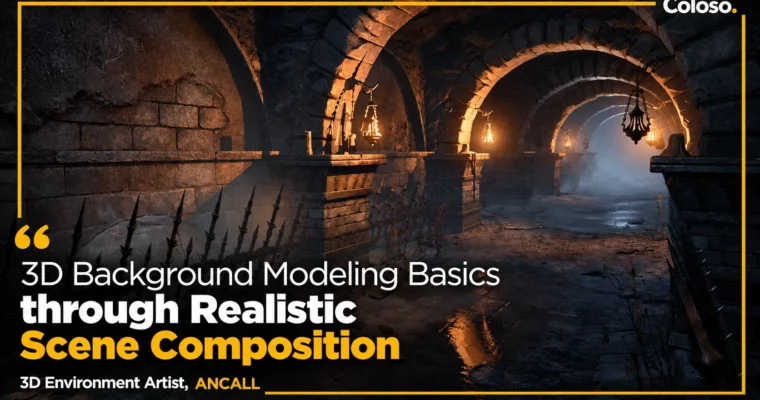
A complete, beginner-friendly 3D background pipeline in one class. Across 40 lessons / 23 hours 47 minutes, senior background artist Ancall takes you from tiny props (plate, pot, tongs) to a finished realistic dungeon scene in Unreal Engine — modeling, sculpting, texturing, level assembly and lighting, step by step.
🎯 What you’ll learn
- Model small game props in 3ds Max — plate, pot, tongs, wall lamp, bars, walls, pillars and arches (Shell, FFD, Lathe, Boolean, TurboSmooth, hard-surface basics)
- Sculpt detail and build additional dummies in ZBrush — brushes, alphas, masks, Surface Noise, Trim, Extract, tiled brick textures
- Understand normal maps, shaders, low-poly retopology, Decimation Master and Unwrap UVW before texturing
- Texture every asset by material in Substance Painter — bake by mesh name, ID maps, Filters/Generators, Smart Materials, Metal Edge Wear, Dirt
- Import, assemble and present the scene in Unreal Engine 4.26 — LOD, collision, sRGB, parent/instance materials, Landscape, Foliage, lights, Reflection Capture, Fog, Vertex Paint, Decal, Megascans
- Finish with post-process, effects, extra rock/plank sculpts, custom parent materials and a portfolio review
- Judge density and balance in a scene — where to push detail and where to save effort, the way working background artists do
✅ Requirements
- Skills: Beginner-friendly — no prior background-art experience required; basic 3D navigation helps. The class teaches each tool’s interface from zero and pairs modeling theory with hands-on practice.
- Tools: 3ds Max 2020 (2018+ OK), ZBrush 2021.6 (2021.6+ OK), Substance Painter 7.1 (7.1+ OK), Unreal Engine 4.26 (4.26+ OK). Lecture materials / project files included. Programs themselves are not provided — install separately.
- Hardware: A PC that comfortably runs 3ds Max, ZBrush, Substance Painter and Unreal Engine 4 (discrete GPU, 16GB+ RAM recommended; follow Unreal’s recommended specs for 4.26).
📝 Description
Background art has a lot of fragmented, scattered information — beginners burn most of their time just finding what to learn. This class fixes that by teaching the entire working pipeline in modeling > sculpting > texturing > leveling & lighting order, in a single 40-lesson curriculum.
You start with the smallest dummies — plate, pot, tongs, wall lamp, bars, walls and pillars — because game background artists really do model small props before composing whole scenes. 3ds Max covers the hard-surface foundation (Shell, FFD, Lathe, Boolean, Array, Path Deform, TurboSmooth); ZBrush adds detail and naturalism plus extra dummies that are faster to sculpt (bones, candles, tiled bricks); a dedicated low-poly/unwrap section explains what normal maps actually are and what should be baked versus modeled; Substance Painter then gives every dummy realistic PBR character via Base Color / Metallic / Roughness, bake-by-mesh-name, ID maps, generators and Smart Materials; finally Unreal Engine brings it all together — import, layout, Landscape/Foliage, lights, reflections, fog, vertex paint, decals, Megascans, LOD/collision/material setup, effects and post-process.
The course concept is a realistic (live-action style) dungeon: stone architecture, metal props, bone and candle dressing, cobwebs and broken stone for the final quality pass. A recurring theme is density and balance — seeing how your model actually reads in-engine and learning where to push value versus where to hold back, instead of working everything to the same flat level.
Bonus Section 08 adds the extras working artists always need — a mid-size rock and wooden planks sculpted and textured end-to-end, building reusable Unreal parent materials from core nodes — and closes with a portfolio session comparing job-seeker versus professional portfolios, with interview advice.
Original language is Korean (GBC release adds dub and official English subtitles). Class materials are included. Released Sep 24, 2021 on Coloso; product page lists 40 sessions at 23h 47m (GBC thread lists 23:46).
🧑🎓 Who this course is for
- Beginners who feel stuck teaching themselves 3D background modeling and want a guided path from props to a full scene
- Aspiring game background/level artists who want the real studio pipeline — modeling through lighting — in one place
- 3D artists who know one tool but want the four-tool workflow (Max / ZBrush / Painter / Unreal) and per-material texturing judgment
- Portfolio builders who want a finished realistic environment piece plus portfolio/interview guidance
- Self-learners considering background work as a long-term career (the instructor discusses market outlook and day-to-day studio reality)
🧑🏫 About the Author
Ancall (안콜, An Seong-ju) is a 3D background artist with 9 years in the industry, currently background team lead at PananaStudio, working as a background modeler and level artist. His credits span mobile and PC, realistic and stylized, back-view / quarter-view / side-scroll projects, including Smilegate’s Lost Ark, XLGAMES’ Civilization Online, NCsoft’s Lineage 2M, Nexon’s Project Overkill, Smilegate’s Project AK, and NX Studio’s Dragon’s Heart (용의 심장). He runs the Ancall3D YouTube channel and has coached job-seekers through online tutoring, which shaped this class toward the questions beginners actually struggle with — especially reading a scene in-engine and managing effort across assets.
🏁 Final Result
- A fully polished realistic-style 3D background scene (dungeon environment) assembled and lit in Unreal Engine — from small props through stone architecture to final lighting and post-process
- A portfolio-ready environment piece demonstrating the complete pipeline: Max modeling, ZBrush sculpt, PBR texturing, in-engine leveling/lighting
- Bonus assets and skills: sculpted/textured rock and planks, custom Unreal parent materials, Megascan/vertex-paint/decal integration
- Portfolio judgment: how to present background work from applicant level to professional level, with interview pointers
📢 Guys, this is a Group Buy campaign, check the GBC forum thread to get access
You can find the course preview in the download section below.
 Channel