Bring Action and Motion to your Characters by Richard Anderson

Duration:1 hour 20 minutes
Actual Duration:2h 33m
Release date:2019, April
Publisher:Artstation
Skill level:Beginner
Language:English
Exercise files:Yes
Software:Adobe Photoshop
Course URL:https://www.artstation.com/marketplace/p/6edA/learn-to-bring-action-and-motion-to-your-characters
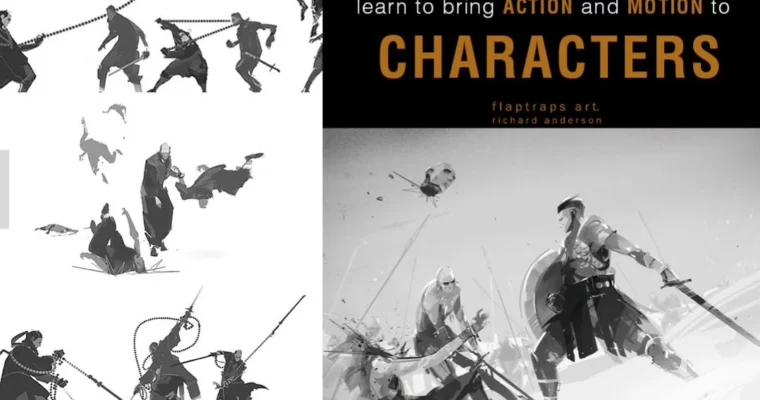
Richard Anderson shows you exactly how he gets characters moving — the thinking, the sketching, and the daily reps that make it stick. You get a 1 hour 20 minute narrated walkthrough of his process, a full time-lapse of a finished illustration, the layered PSD, and the custom brush he built for the job. It’s approachable, it’s honest about the work involved, and it treats action and motion as something you practice rather than something you either have or don’t.
🎯 What you’ll learn
- Translate movement from your imagination onto the canvas instead of freezing up on poses
- Apply core principles and techniques that give a character believable action
- Build a repeatable daily exercise routine that improves your figures over time
- Paint a complete character illustration in Photoshop from start to finish
- Create a custom flat angled brush for stylized shapes and edges
- Read a layered PSD file and a production brush set like a working artist would
✅ Requirements
- Skills: Basic drawing ability and comfort with simple figure or pose studies
- Tools: Adobe Photoshop and a drawing tablet
- Hardware: A computer that runs Photoshop smoothly, plus a tablet with pen pressure
📝 Description
Most artists can draw a character standing still. Put that same character in a lunge, a swing, or a sprint and everything falls apart. This tutorial is Richard Anderson’s answer to that problem — the exact routine he uses to get action and motion out of his imagination and onto the canvas.
The core of the course is a 1 hour 20 minute narrated video where he talks through his process instead of just painting in silence. You hear the decisions being made: why a pose gets pushed further, where the line of action sits, and how to keep a stylized character readable once the limbs start overlapping. Alongside that you get a 1+ hour time-lapse of a full illustration, so you can watch the same ideas executed at speed.
There’s also a practical component a lot of tutorials skip. Richard breaks down how he built his flat angled brush — the one doing most of the heavy lifting in his work — and ships the .PSD brush file so you can start using it the same day. The layered PSD of the finished piece is included too, which means you can open it and dig through the actual layer stack instead of guessing how something was done.
The daily exercise section is the part worth writing down. It’s a short set of drills you repeat to build muscle memory for poses and movement. That’s what makes this course function as a habit rather than a one-off watch.
🧑🎓 Who this course is for
- Illustrators who can draw static characters but stall out the moment a pose needs energy
- Beginner and intermediate artists who want a repeatable practice routine instead of random sketching
- Concept artists and character designers who need faster, more dynamic poses for client work
🧑🏫 About the Author
Richard Anderson is a freelance illustrator and character designer working under the name Flaptraps Art. His work leans into shape-driven characters — bold silhouettes, flat strokes, and poses that read instantly before any rendering happens. He’s spent years building the practice routine this tutorial documents, and he teaches it the way he actually uses it: narrating the choices out loud instead of hiding them behind a time-lapse. His release notes for this course even mention re-recording and improving the chapter 1 audio, which tells you he cares about the student experience.
🏁 Final Result
- A finished, portfolio-ready character illustration of a figure caught mid-action in a stylized, flat-brush look
- The layered .PSD file of that illustration, broken down and ready to study
- A working flat angled brush plus a .PSD brush pack you can drop straight into Photoshop
- A daily drill routine for practicing action and motion
 Channel