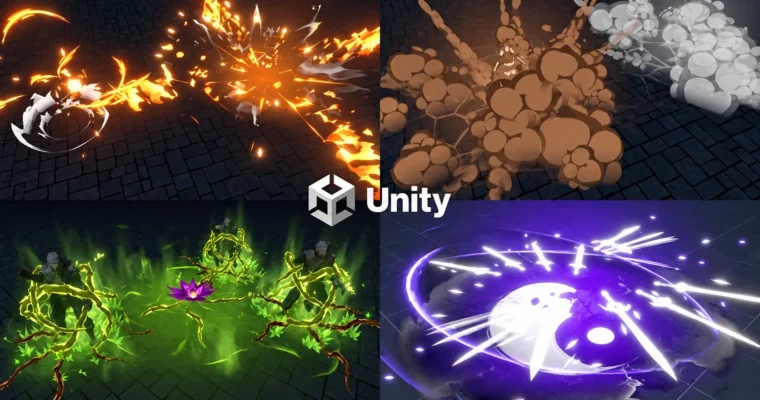
AAA Unity VFX Pipeline – Production-Ready Effects for Games by Vladyslav Horobets

Duration:4.5 hours on-demand video
Actual Duration:4h 25m
Release date:2026
Publisher:Udemy
Skill level:Intermediate
Language:English
Exercise files:Yes
Software:Unity, Photoshop, Blender, Krita
Course URL:https://www.udemy.com/course/unityvfxcourse/
This one is for folks who already poked around Unity and Photoshop and want to stop following along and start making their own stuff. You build a custom hit effect, turn it into a full fire projectile, learn how to present it right, then push into vines, smoke, dissolves, and AI-assisted shaders.
🎯 What you’ll learn
- Create optimized hit effects with your own theme from scratch
- Build projectile effects and chain them into a full fire spell
- Present VFX with Cinemachine for a clean portfolio shot
- Create vine cage effects and control mesh positioning
- Make custom smoke textures and custom dissolve setups
- Use Shader Graph and ChatGPT to prototype unique shaders faster
✅ Requirements
- Skills: Basic knowledge of Unity 6+, basic Photoshop and Blender, understanding of VFX basics. Not for complete beginners opening Unity for the first time.
- Tools: Unity 6.1 or newer, Photoshop or Krita for textures, Blender for basic mesh prep
- Hardware: Dedicated GPU for Unity 6 real-time VFX work, minimum 16GB RAM recommended
📝 Description
The course was built in Unity 6.1, and the whole point is speed plus optimization. You are not here to repeat clicks. You pick a theme and build your own hit effect in lesson one, then you reuse that logic to grow it into something bigger.
Lessons 2 to 4 are one straight line: take your hit, turn it into a fire projectile, add casting variations, then shoot it properly with Cinemachine. That presentation part matters. A decent effect with bad camera work looks cheap. A simple effect with good timing and framing looks AAA.
After that it gets more experimental. You get vine cage setups with practical mesh positioning tips, hand-made smoke, and different dissolve approaches you can reuse for fire, magic, or stylized nature effects. The last stretch covers Shader Graph functions and how to use ChatGPT to draft and debug shaders when you get stuck, plus a YinYang effect to tie stylized shapes and motion together.
Fair warning from the author: if you have zero experience with Unity and Photoshop, skip this for now. If you have basics and want a unique portfolio instead of the same tutorial clone everyone else has, this fits.
🧑🎓 Who this course is for
- Beginner VFX artists with basic Unity and Photoshop knowledge – NOT for first-time Unity users
- 3D Generalists with basic Unity knowledge who want to add real-time effects
- Game Designers and Unity programmers who need to make their own combat VFX
- Working VFX artists who want faster, more optimized workflows and new tricks
🧑🏫 About the Author
Vladyslav Horobets is a real-time VFX artist working in Unity, Photoshop, and Blender. His focus is practical, optimized effects for games – hits, projectiles, stylized magic – built to run fast and look good in a portfolio. He does not hand out completion certificates for just watching. You earn one only if you make solid effects or finish his special task, and so far only 4 people have it.
🏁 Final Result
- A portfolio-ready set of original effects: custom hit effect, full fire spell with projectile and casting variations, vine cage, smoke/dissolve tests, and YinYang effect, all presented with Cinemachine
 Channel