Advanced Character Modeling with Nomad Sculpt by Dave Reed

Duration:7h 26m
Actual Duration:7h 20m
Release date:2023
Publisher:Skillshare
Skill level:Advanced
Language:English
Exercise files:Yes
Software:Nomad Sculpt
Course URL:https://www.skillshare.com/en/classes/advanced-character-modeling-with-nomad-sculpt/1733737655
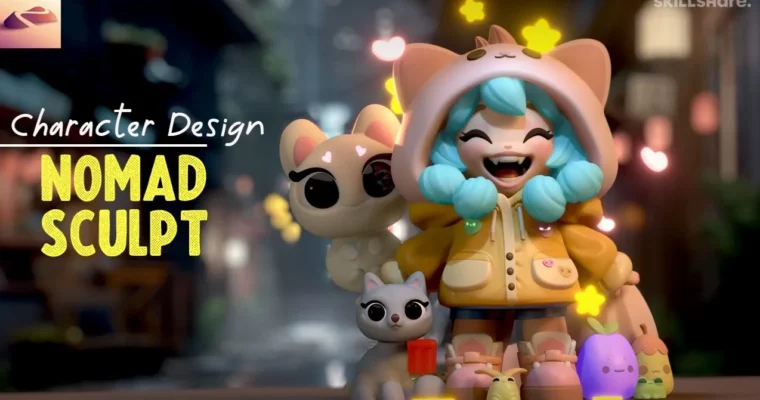
This one is for people who already poked around in Nomad Sculpt and want a real project. You start from a single sphere and end with a finished chibi character — hoodie, fangs, boots, tail, paint, and lighting included.
🎯 What you’ll learn
- Block out a stylized chibi body from a single sphere
- Sculpt faces, hair, hands and boots with clean proportions
- Build hard-surface-ish clothing: hood, coat, pockets, straps and soles
- Use custom tools, decimation and scene optimization for iPad workflow
- Add details like fangs, drawstrings, accessories and swirly tail
- Paint, light and render with custom HDRI and environment setup
✅ Requirements
- Skills: Basic familiarity with Nomad Sculpt UI, navigation and brushes
- Tools: Nomad Sculpt app (iOS / Android), Apple Pencil preferred
- Hardware: iPad or Android tablet capable of running Nomad Sculpt smoothly
📝 Description
This isn’t a button-tour. Dave jumps straight into a full build and talks through every decision as he goes. You start with custom tools, then block the hood, head, and body from primitives. The idea is simple: get big shapes right first, then carve in the fun stuff.
The middle section is all about clothing and structure. You’ll pull a coat out of the blockout, carve folds, add pockets, drawstrings, boots, soles, and straps. Dave shows how to keep topology manageable on a tablet, when to use voxel remeshing, and when to hit decimation so your scene doesn’t choke.
Then comes personality. Fangs, hair clumps, tail swirl, little sidekick creatures — that’s what sells a stylized character. You get his accessory files and final sculpt to pull apart, plus reference photo, custom HDRI backgrounds, and his round environment for reflections and tone.
Last part is paint and presentation. Vertex painting, lighting setup, material tweaks, and final detail passes. He also teases a separate YouTube video on taking this sculpt into Blender, if you want to keep pushing it.
🧑🎓 Who this course is for
- Nomad Sculpt users who finished beginner tutorials and want a harder full character
- 2D illustrators and hobbyists who want to sculpt their chibi designs in 3D on iPad
🧑🏫 About the Author
Dave Reed is a 2D & 3D illustrator based in Brooklyn, NY and a Top Teacher on Skillshare. He teaches approachable, project-based Nomad Sculpt classes focused on cute stylized characters. Students get his working files, environments, and practical tablet workflow picked up from years of daily sculpting and illustration work.
🏁 Final Result
- Finished chibi girl with hooded coat, fangs, painted hair, boots and swirly tail, lit and rendered in Nomad Sculpt with custom HDRI — plus bonus accessory sculpts ready to drop into your scene.
 Channel