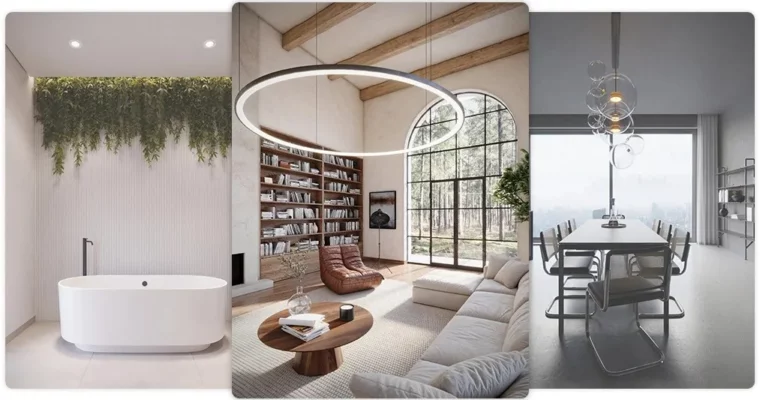
3ds Max + Corona renderer – How to create interior visualizations by Mateusz Ciećwierz

Duration:10 hours 30 minutes
Actual Duration:10h 40m
Release date:2026, May 2
Publisher:CG Wisdom
Skill level:Beginner
Language:English
Exercise files:Yes
Software:3ds Max, Corona Renderer, Affinity
Course URL:https://cgwisdom.com/online-course/3ds-max-corona-renderer-course-creating-interior-visualizations.html
Ready to make your interior designs pop like never before? This course dives into creating jaw-dropping photorealistic visualizations using 3ds Max and Corona Renderer. You’ll go from basic models to scenes so real, people won’t believe they’re not photos. It’s all about practical skills, real-world examples, and making your work stand out.
🎯 What you’ll learn
- Create photorealistic visualizations that impress clients.
- Master best practices for efficient and high-quality visualization creation.
- Achieve clean renders with professional polish.
- Craft convincing materials and textures.
- Implement effective scene lighting techniques.
- Utilize the powerful LightMix tool for dynamic lighting control.
- Understand 3D modeling techniques for interiors.
- Handle Frame Buffer adjustments for final output.
- Leverage AI in post-production for enhanced results.
- Create animations using AI tools.
✅ Requirements
- Skills: Basic knowledge of 3ds Max.
- Tools: 3ds Max, Corona Renderer, Affinity (or similar post-production software).
- Hardware: A computer capable of running 3ds Max and Corona Renderer smoothly.
📝 Description
This course is your deep dive into crafting photorealistic interior visualizations that truly captivate. We’ll walk through the entire process, from initial modeling in 3ds Max to the final touches in post-production, all powered by the incredible capabilities of Corona Renderer. You’ll learn not just how to do things, but why they work, focusing on the subtle details that elevate a render from good to absolutely stunning. We’ll tackle three distinct interior projects – a minimalist bathroom, a modern living space, and a cozy rustic home – each designed to teach you different techniques and styles. Expect to master lighting, materials, texturing, and even explore the exciting world of AI in post-production to add that extra layer of polish and dynamism. This isn’t just about software; it’s about understanding light, form, and material to create visuals that tell a story.
🧑🎓 Who this course is for
- Aspiring 3D artists looking to specialize in architectural visualization.
- Architects and interior designers who want to present their concepts with high-impact visuals.
- Existing 3D artists aiming to improve the realism and quality of their interior renders.
- Anyone with a foundational understanding of 3ds Max eager to master Corona Renderer for stunning results.
🧑🏫 About the Author
Mateusz Ciećwierz is an Architect and 3D Designer with a strong academic background from the Warsaw University of Technology. As the founder of CG Wisdom, he’s a seasoned educator, having authored over 25 courses focused on 3ds Max and V-Ray. His passion for games, comics, and vintage cars likely fuels his creative approach to visualization.
🏁 Final Result
- A portfolio-ready collection of photorealistic interior visualizations across diverse styles (minimalist bathroom, modern interior, rustic home).
- Proficiency in using 3ds Max and Corona Renderer for professional architectural visualization.
- Skills in advanced material creation, lighting, texturing, and post-production, including the use of AI tools.
 Channel