3D Para Dibujantes 2D con Feather 3D (iPad) | Integra el 3D fácilmente en tus ilustraciones by Adrián García

Duration:3 hours
Actual Duration:3h 43m
Release date:2025
Publisher:Gumroad
Skill level:Intermediate
Language:Spanish
Exercise files:Yes
Software:Feather 3D, Artstudio Pro
Course URL:https://gartzia.gumroad.com/l/ernpz
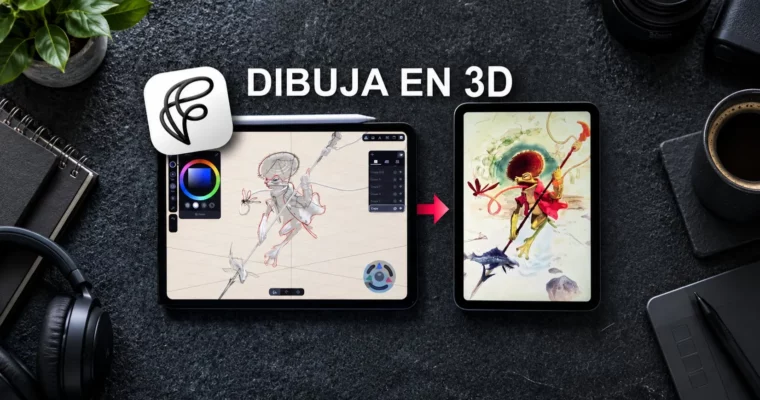
Preview: This course is all about bridging the gap between 3D and 2D for illustrators who work on iPad. You’ll learn to build quick 3D scenes in Feather 3D, use them as rock-solid references, and then transform them into a finished watercolor-style illustration in Artstudio Pro. No complex software, no steep learning curve—just a practical workflow that saves time and boosts your composition game.
🎯 What you’ll learn
- Build 3D scenes quickly and intuitively in Feather 3D
- Create stronger compositions using 3D references
- Improve perspective and coherence in your illustrations
- Integrate 3D elements into a 2D artist’s workflow
- Transform a 3D scene into a digital watercolor illustration
- Apply color, lighting, and final touches in Artstudio Pro
- Optimize your process to save time without losing artistic quality
✅ Requirements
- Skills: Basic familiarity with digital drawing on iPad
- Tools: iPad with Apple Pencil, Feather 3D app, Artstudio Pro app
- Hardware: iPad compatible with Feather 3D and Artstudio Pro
📝 Description
If you’ve ever felt that 3D tools are too technical or intimidating, this course flips that idea on its head. Feather 3D is designed to be approachable, and Adrián shows you exactly how to use it as a practical aid for your 2D work—not as a replacement for your artistic skills.
The entire process is recorded in real time, so you’re not just seeing what buttons to press. You’re getting insight into why each decision is made. Why this camera angle? Why this lighting setup? Why this brush for the watercolor effect? That kind of thinking is what separates a tutorial from a methodology.
The course wraps up with a complete walkthrough in Artstudio Pro, where the 3D scene becomes a fully painted illustration with a digital watercolor aesthetic. But here’s the thing: the techniques aren’t locked to that style. Whether you’re into comic art, manga, concept art, or children’s illustration, using 3D as a foundation will make your images more solid and your workflow faster.
You also get the project files—the 3D models and the final layered Artstudio Pro document—so you can dissect every step and practice on your own.
🧑🎓 Who this course is for
- Illustrators and digital artists who draw on iPad and want to explore 3D without the technical overhead
- Concept artists looking to speed up perspective and composition work
- Anyone curious about mixing 3D references into a traditional 2D workflow
🧑🏫 About the Author
Adrián García is a digital artist and illustrator who specializes in blending traditional art techniques with modern digital tools. His work focuses on creating images that feel handcrafted, often using watercolor textures and organic linework. Through his courses, he shares practical workflows that help other artists integrate new tools like Feather 3D into their existing pipelines without losing their personal style.
🏁 Final Result
By the end of this course, you’ll have a complete watercolor-style illustration created from a 3D base, plus a repeatable workflow you can apply to any future project. You’ll also have the project files to study and a clear understanding of how to use 3D references to level up your compositions.
 Channel