Unreal Engine 5.6 DMX Lighting Masterclass – Resolume Arena by Volkan Ata

Duration:2 hours on-demand video
Actual Duration:1h 49m
Release date:2026, June
Publisher:Udemy
Skill level:Beginner
Language:English
Exercise files:Yes
Software:Unreal Engine 5.6, Resolume Arena, Quixel Bridge
Course URL:https://www.udemy.com/course/unreal-engine-56-dmx-lighting-masterclass-resolume-arena/
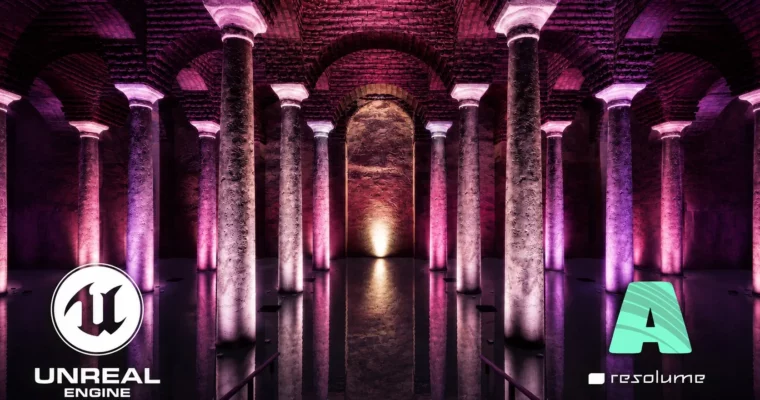
This course walks you through the entire process of building a DMX lighting visualization in Unreal Engine 5.6, from scratch. You’ll model a historical environment, set up Lumen lighting, connect Resolume Arena via Art-Net, and sync everything to music. No prior Unreal or DMX experience needed—just a PC that can run the engine.
🎯 What you’ll learn
- Set up the DMX plugin and lighting workflow in Unreal Engine 5.6.
- Create professional environments using Modeling Tools, UVs, and Quixel materials.
- Build realistic Lumen lighting and integrate DMX fixtures into Unreal Engine.
- Connect Resolume Arena with Art-Net and synchronize DMX lighting to music.
- Create cinematic camera animations and export high-quality renders with Sequencer.
✅ Requirements
- Skills: Basic computer skills. No prior Unreal Engine or DMX experience required.
- Tools: Resolume Arena is recommended but not required for learning the workflow.
- Hardware: A Windows PC capable of running Unreal Engine 5.6.
📝 Description
This course is built around a single, practical goal: get you from zero to a working DMX lighting show inside Unreal Engine 5.6. You’ll start by enabling the right plugins—DMX, Modeling Tools, Sequencer—and then jump straight into building a scene. Using Unreal’s Modeling Tools and Quixel Bridge, you’ll create a historical environment with proper UVs and high-quality materials.
Once the scene is ready, you’ll set up Lumen for real-time global illumination and place DMX fixtures with proper addressing. The real magic happens when you connect Resolume Arena via Art-Net, allowing your lights to react live to music. You’ll use Level Sequencer to animate cameras and sync lighting to a WAV audio track, then render the final result with Movie Render Queue for a polished, portfolio-ready video.
The entire course is delivered with AI-generated voice narration, but all technical instruction and workflows were created and verified by the instructor. It’s a straight-to-the-point, hands-on approach for anyone who wants to learn professional DMX visualization without the fluff.
🧑🎓 Who this course is for
- Lighting designers working with architectural, stage, or entertainment lighting.
- Unreal Engine artists who want to learn professional DMX visualization workflows.
- Students and professionals interested in Resolume Arena and Art-Net integration.
- Anyone who wants to create music-synchronized lighting shows in Unreal Engine.
🧑🏫 About the Author
Volkan Ata is a Dynamic Lighting & 3D Art Specialist with over 10 years of experience. He creates architectural lighting, stage designs, and immersive visual experiences using Unreal Engine, DMX, Resolume Arena, and MagicQ. He specializes in music-synced lightshows and photorealistic 3D environments. In his courses, he shares practical workflows and techniques to help you build striking, interactive visual projects.
🏁 Final Result
- A complete real-time DMX lighting visualization in Unreal Engine 5.6, synced to music and rendered as a high-quality cinematic video.
 Channel