It looks like you're using an adblocker.
Adblockers make us sad. We use ads to keep our content happy and free. If you like what we are doing please consider supporting us by whitelisting our website. You can report badly-behaved ads by clicking/tapping the nearby 'Advertisement' X text.
Unity Game Development Beginner to Pro (2024) by Rohan Wasudeo
Go from zero install to a playable 3D game by learning Unity and C# together, step by step.
Never touched Unity before? This one takes you from zero install to shipping a playable 3D game. You will learn Unity and C# side by side, building real UI, physics, and animation instead of just watching theory.
🎯 What you’ll learn
Learn fundamentals of Unity with C#
Understand the basics of C# with Unity
Learn to create a game design with Unity UI
Apply game logic in 2D, 3D games
Create and apply 2D, 3D animations in a game
Create a playable 3D game in Unity
✅ Requirements
Skills: No prior Unity experience needed, basic computer literacy
Tools: Unity, Visual Studio, 3-button mouse
Hardware: PC or Mac capable of running Unity, minimum 8GB RAM
📝 Description
This is a straight-up beginner track. No fluff, no assumed knowledge. You install Unity, hook up Visual Studio, and write your first C# script in the first few lessons. Short videos, one idea at a time.
From there you get the C# basics that actually matter for games. Variables, operators, if-statements, loops, and Collections like List and Dictionary. It is all shown inside Unity, so you see right away where the code runs and what breaks when it is wrong.
Then it gets practical. You build out full Unity UI with Canvas, Text, Image, Button, ScrollView, InputField and Slider. You wire up event functions, custom functions, and delegates so buttons do stuff and objects react. After that you add player control with the Input System, move things with Rigidbody and physics, and handle collisions and triggers.
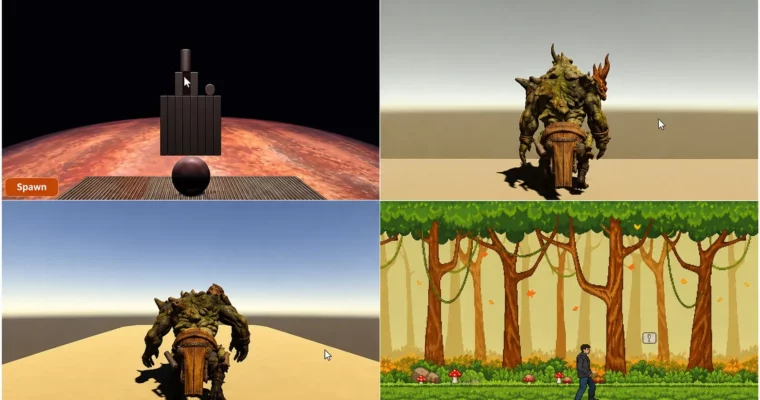
Last part is the fun payoff. You do 2D sprite animation and 3D humanoid animation, then put it all together in a Knock the Cans 3D game. Level layout, knock-down logic, prefabs and instantiation, plus a simple win/lose system. You finish with something you can actually play and show.
🧑🎓 Who this course is for
Students and working professionals keen on learning game development with Unity
Complete beginners with no prior Unity or C# experience who want to build their first playable game
🧑🏫 About the Author
Rohan Wasudeo teaches Unity and C# for total beginners, with a focus on clear, bite-size lessons. His approach is practical and project-based, moving from basic scripting to UI, physics, and animation. Good fit if you want step-by-step explanations without getting lost in theory.
🏁 Final Result
A fully playable 3D Knock the Cans game with level design, Rigidbody physics, prefab instantiation, and win/lose logic built in Unity
Curriculum
📋 Course content
Module 1:Introduction to Unity & C# Setup
Introduction to Unity & installation3:20
Create a 3D project in Unity2:35
Configure Visual Studio with Unity5:04
Create your first C# script in Unity1:56
Understanding the structure of a C# script in Unity – Part 12:36
Understanding the structure of a C# script in Unity – Part 22:12
Print ‘Hello code’ in Unity console2:30
Module 2:C# Basics – Data Types, Operators & Control Flow
Data types & Variables in Unity C#3:48
Introduction to Operators in Unity C#2:33
Arithmetic Operators1:07
Relational Operators3:11
Logical Operators3:38
Conditional Operators2:42
Introduction to Control Flow Statements in Unity C#0:55
Decision making statements – if statement1:21
Decision making statements – if-else statement1:14
Decision making statements – if-else-if statement2:26
Switch-Case statements3:05
Looping statements5:09
Module 3:Collections in C#
Introduction to Collections4:00
List in Unity C#2:51
Sorted List in Unity C#2:19
Dictionary in Unity C#1:49
Arraylist in Unity C#2:53
Hashtable in Unity C#3:37
Stack in Unity C#3:42
Module 4:Unity UI Design
UI Canvas in Unity4:02
UI Text in Unity3:34
UI Image in Unity5:10
UI Button in Unity6:21
UI ScrollView in Unity – Part 15:14
UI ScrollView in Unity – Part 25:12
UI ScrollView in Unity – Part 34:28
UI InputField in Unity – Part 14:12
UI InputField in Unity – Part 26:31
UI Slider in Unity – Part 13:40
UI Slider in Unity – Part 23:51
Anchoring of UI Components in Unity5:15
Module 5:Events, Functions & Delegates
Introduction to Event Functions in Unity4:08
Understanding Event Functions within a C# script5:24
Introduction to Custom Functions in Unity3:30
Write a basic function in Unity2:24
Write a function with return type in Unity2:31
Write a function with parameters in Unity3:10
Introduction to Delegates in Unity2:14
Create a Single-cast Delegate in Unity8:02
Create a Multi-cast Delegate in Unity4:05
Introduction to Delegate-Events in Unity3:02
Move an image to left and right using Delegate-Events in Unity4:33
Module 6:Input System, Physics & Collisions
Introduction to Input system in Unity3:49
Keyboard Inputs in Unity5:07
Mouse Inputs in Unity2:57
Axis Inputs in Unity5:05
Introduction to Physics Engine & Rigidbody in Unity2:34
Create a Sphere and apply Rigidbody to the Sphere in Unity4:21
Move the Sphere GameObject using Rigidbody – Part 13:13
Move the Sphere GameObject using Rigidbody – Part 22:13
Move the Sphere GameObject using Rigidbody – Part 38:56
Introduction to Collisions & Triggers in Unity4:30
Detect Collisions in Unity – Part 14:11
Detect Collisions in Unity – Part 24:56
Module 7:2D & 3D Animation in Unity
Introduction to Animations in Unity3:13
Create a 2D animation on a Sprite – Part 15:03
Create a 2D animation on a Sprite – Part 23:37
Create a 2D animation on a Sprite – Part 36:02
Create a 2D animation on a Sprite – Part 47:22
Create a 3D animation on a humanoid character – Part 15:01
Create a 3D animation on a humanoid character – Part 211:11
Create a 3D animation on a humanoid character – Part 36:34
Module 8:Final Project – Knock the Cans 3D Game
Create Knock the cans game – Part 18:43
Create Knock the cans game – Part 27:08
Create Knock the cans game – Part 35:38
Create Knock the cans game – Part 45:31
Create Knock the cans game – Part 57:00
Watch online or Download for Free
Unity Game Development Beginner to Pro (2024) by Rohan Wasudeo




 Channel