Ad Clicks : Ad Views : Ad Clicks : Ad Views : Ad Clicks : Ad Views : Ad Clicks : Ad Views :
Oh Snap!

It looks like you're using an adblocker. Adblockers make us sad. We use ads to keep our content happy and free. If you like what we are doing please consider supporting us by whitelisting our website. You can report badly-behaved ads by clicking/tapping the nearby 'Advertisement' X text.

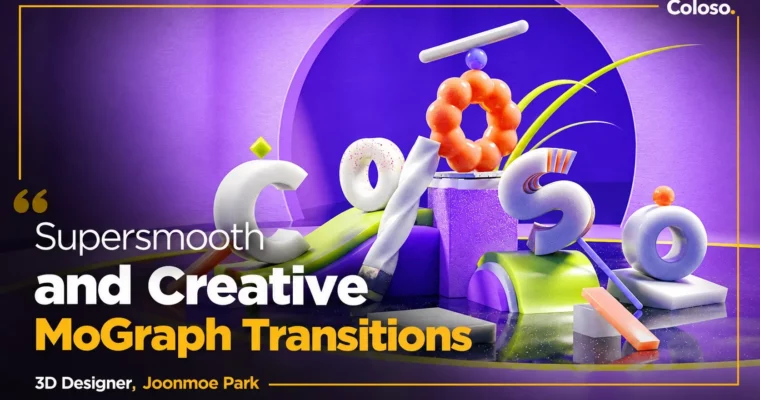
Supersmooth and Creative MoGraph Transitions by Joonmoe Park

Supersmooth and Creative MoGraph Transitions by Joonmoe Park

Author:Joonmoe Park

Duration:15 Hours 18 Minutes

Actual Duration:45h 28m

Release date:2024

Publisher:Coloso

Skill level:Beginner

Language:Korean

Exercise files:Yes

Software:Cinema 4D, Octane Render, After Effects

Course URL:https://coloso.global/en/products/3dmotiongraphic-parkjoonmoe-us

Learn how to connect style frames with clean, bouncy motion and transitions that feel natural.

If your style frames look good but your motion feels stiff, this class fixes that. Joonmoe Park walks you through his full process for building bright 3D scenes and linking them with smooth, punchy transitions.

🎯 What you’ll learn

  • Build stable style frames with layout, light and shade, and color harmony
  • Animate with PSR – Position, Rotation, Scale – and fix awkward motion with graphs
  • Create object transitions using spline motion and speed similarity
  • Direct camera transitions and dependent camera motion for scene development
  • Build linear, rotation, and diffuse transitions for dynamic flow
  • Light and texture with Octane Renderer and GSG textures for dense looks
  • Finish work with After Effects color correction and post-processing

✅ Requirements

  • Skills: Basic understanding of Cinema 4D interface and keyframe animation
  • Tools: Cinema 4D, Octane Renderer, Grayscale Gorilla plugin, After Effects
  • Hardware: Dedicated NVIDIA GPU for Octane rendering, minimum 16GB RAM

📝 Description

This class is not about random tricks. It is about why some motion feels cheap and how to fix it. Joonmoe starts with the stuff people skip — light and shade, color harmony, and layout — then shows how those choices make your transitions easier later.

You will work through the same loop on every example: model a simple scene in Cinema 4D, light and texture it with Octane Renderer and GSG, animate it, then polish in After Effects. Repetition is the point. By the third or fourth scene, you start to predict how a shot should connect to the next one.

The middle of the course covers PSR animation properly. Position, Rotation, Scale sounds basic, but he shows how to use graphs, timing, and sweep to add snap and chewiness without making it wobbly. From there you move into the core transition types: object morphs along splines, camera-driven scene changes, plus linear, rotation, and diffuse transitions.

What makes it useful is the focus on speed similarity and scale difference. You learn to match velocity between outgoing and incoming scenes so cuts disappear. If you freelance broadcast titles, brand films, or social motion, that one idea alone will clean up your work fast.

🧑‍🎓 Who this course is for

  • Beginners in 3D motion graphics who can make stills but struggle with natural movement
  • Cinema 4D users who want a repeatable workflow for style frames to final animation

🧑‍🏫 About the Author

Joonmoe Park is a 3D motion graphics designer currently at Naver Z, formerly at Super Barrymore. He started in broadcast, working on broadcast titles and channel branding for tvN, Discovery Korea, Channel A, NQQ, OLIFE, and SK broadband.

He has since led product graphics and brand films for ZEPETO and NAVER Z, alongside personal projects like Wake Up the Shape. Known on Instagram for clean motion and cheerful color, he teaches the exact planning-to-finish process he uses to deliver high-quality work fast.

🏁 Final Result

  • A set of finished 3D motion graphics clips built around 5 transition types — object, camera, linear, rotation, and diffuse — with Octane-lit style frames, animated and finished in After Effects, ready for your reel.
Curriculum

📋 Course content

  1. Module 1:  OT – Introduction and Setup
    • Lecture Introduction
    • How to Use the Course
    • Octane Renderer Installation
    • Grayscale Gorilla (GSG) Installation
  2. Module 2:  Basics – Theory and Cinema 4D Interface
    • Light and Shade, Color, Shape and Speed Similarity Theory
    • Cinema 4D Basic Interface and Features
    • Modeling and Stable Layout Design
  3. Module 3:  Octane Basics and Look Development
    • Octane Renderer Basics and Main Features
    • Light Placement for Stable Contrast
    • Increase Image Density with GSG Textures
    • AE Color Correction and Finishing
  4. Module 4:  Animation Basics – PSR
    • Modeling with Boole Functions and NULL Structure for Motion
    • Complete Look with Octane and GSG Texture
    • Position, Rotation, and Scale Properties
    • Tension-Filled Motion with Animation Graphs
    • PRS Examples, Fixing Awkward Motion, and Sweep Function for Speed
  5. Module 5:  Object Transitions
    • Main Logo Animation Production
    • Scene Structuring for Motion Production
    • Align to Spline – Object Motion Along a Spline
    • Complete Look with Octane and GSG Texture
    • AE Post-Editing and Example Completion
  6. Module 6:  Camera Transitions
    • Camera Switching Main Scene Creation
    • Octane Lighting and Texturing
    • Dependent Camera Motion Basics
    • Scene Development and Object Animation with Camera Motion Part 01
    • Scene Development and Object Animation with Camera Motion Part 02
  7. Module 7:  Linear Transitions
    • Linear Conversion Main Scene Creation and Look Completion
    • Sub-Scene Production Matching Main Scene Tone and Manner
    • AE Post-Editing and Example Completion
  8. Module 8:  Rotation Transitions
    • Background Design and Animation for Rotation Transitions
    • Octane Lighting and Texturing Part 01
    • Octane Lighting and Texturing Part 02 and AE Finishing
  9. Module 9:  Diffuse Transitions
    • Scene Creation and Look Development with Octane and GSG Part 01
    • Ceramic Bowl Modeling, Look Development and Animation Part 02
    • Sub-Scene Production and AE Post-Editing
  10. Module 10:  Outro
    • Conclusion – Wrapping Up the Lecture

📢 Guys, this is a Group Buy campaign, check the GBC forum thread to get access

You can find the course preview in the download section below.

Watch online or Download for Free
Supersmooth and Creative MoGraph Transitions by Joonmoe Park
NAME
SIZEDURATION
Joonmoe Park Eng Dub
16.4 MB15m
Section 03 – Octane Basics
0 B
Section 04 – Animation Basics PRS
0 B
Section 05 – Object conversion
0 B
Section 06 – Camera switching
0 B
Section 07 – Linear conversion
0 B
Section 08 – Rotation transition
0 B
Section 09 – Diffusion scene change
0 B
Section 10 – Outro
0 B
Joonmoe Park Eng Sub
26 MB20m
Section 01 – OT
3.2 MB5m
Section 02 – Basic interface
0 B
Section 03 – Octane Basics
0 B
Section 04 – Animation Basics PRS
0 B
Section 05 – Object conversion
0 B
Section 06 – Camera switching
10.4 MB5m
Section 07 – Linear conversion
0 B
Section 08 – Rotation transition
0 B
Section 09 – Diffusion scene change
6.5 MB5m
Section 10 – Outro
5.9 MB5m

Download all

Join us on
  Channel    and      Group

Leave a Comment

Your email address will not be published. Required fields are marked *