Premiere Pro Create Scroll-Stopping Masking Effects by Skillshare

Duration:1h 27m
Actual Duration:1h 12m
Release date:2025, February 7
Publisher:LinkedIn
Skill level:Intermediate
Language:English
Exercise files:Yes
Software:Adobe Premiere Pro
Course URL:https://www.linkedin.com/learning/premiere-pro-create-scroll-stopping-masking-effects
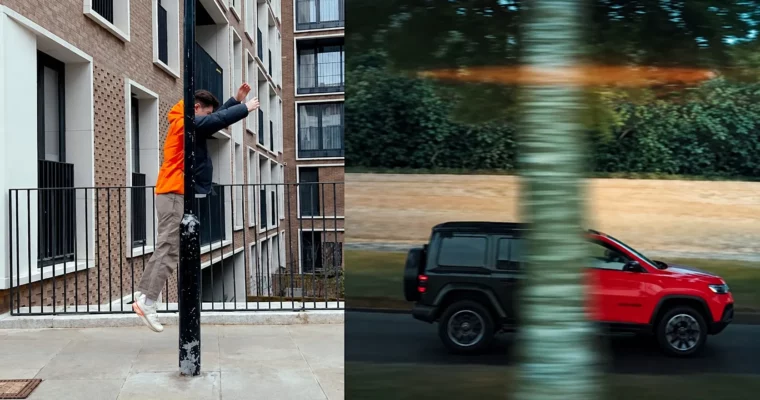
You know those Reels and TikToks where someone walks through text or clones themselves and you think, how did they do that? This course breaks it down in Premiere Pro with real examples. You will learn video masking, tracking, and transitions you can actually reuse for client work and your own feed.
🎯 What you’ll learn
- Use masks to hide, reveal, and blend parts of a video clip
- Blur out faces, logos, and unwanted objects with tracked masks
- Build custom titles and text reveals with mask mattes
- Create clone, wipe, and seamless transition effects
- Track masks to moving subjects for clean, stable results
- Plan and shoot clips specifically for masking effects
✅ Requirements
- Skills: Basic familiarity with Premiere Pro timeline, trimming, and layers
- Tools: Adobe Premiere Pro
- Hardware: Laptop or desktop capable of HD video editing, minimum 16GB RAM
📝 Description
Keenan Lam doesn’t do theory for an hour. He shows you the exact masking setups he uses for his own Instagram videos and brand jobs. You start with the basics — drawing a mask, feathering edges, keyframing — then jump straight into stuff you will use every week. Think blurring distractions, fixing problem shots, and blending takes without it looking cheap.
Then it gets fun. You will build mask reveals, text interactions, and in-camera transitions that look like After Effects work but stay entirely in Premiere Pro. Keenan walks through how to shoot for the effect, line up your tripod shots, and keep lighting consistent so the composite sells. No fancy plugins, just smart planning and clean mattes.
It’s short on purpose — 1h 27m — so you can watch it in an afternoon and edit along. If you post to Instagram Reels, TikTok, or YouTube Shorts, this is the kind of toolkit that makes people rewatch your video just to figure it out.
🧑🎓 Who this course is for
- Intermediate Premiere Pro editors who want punchier effects for social media
- Freelancers and content creators making videos for brands, YouTube, and Reels
🧑🏫 About the Author
Keenan Lam is a cinematographer and editor with over 100k followers on Instagram, known for slick video masking tricks and clean transitions. He shoots and edits personal projects plus collaborations with top brands like Xbox, Panasonic, and Porsche. This course was created by Skillshare and is hosted in the LinkedIn Learning library.
🏁 Final Result
- A finished short-form vertical video with at least 2-3 masking effects — blur/track, title reveal, and a creative transition — ready to post to your portfolio or social feed.
 Channel