Ad Clicks : Ad Views : Ad Clicks : Ad Views : Ad Clicks : Ad Views : Ad Clicks : Ad Views :
Oh Snap!

It looks like you're using an adblocker. Adblockers make us sad. We use ads to keep our content happy and free. If you like what we are doing please consider supporting us by whitelisting our website. You can report badly-behaved ads by clicking/tapping the nearby 'Advertisement' X text.

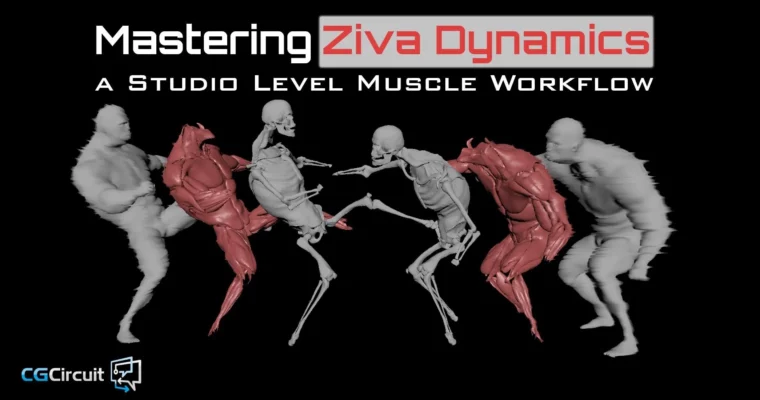
Mastering Ziva Dynamics – A Studio Level Muscle Workflow by Noah Schnapp

Mastering Ziva Dynamics – A Studio Level Muscle Workflow by Noah Schnapp

/

Author:Noah Schnapp

Duration:17h 53m

Actual Duration:17h 51m

Release date:2021

Publisher:CGCircuit

Skill level:Intermediate

Language:English

Exercise files:Yes

Software:Maya, Ziva Dynamics, Python, Wrap3D

Course URL:https://www.cgcircuit.com/products/mastering-ziva-dynamics

Build, migrate, and simulate studio-level muscles in Ziva without burning weeks on slow sims.

If you have ever watched a muscle sim crawl and thought there has to be a faster way, this is it. Noah walks you through a real studio workflow for building, migrating, and optimizing Ziva muscles so you can hit art direction notes fast and still make episodic or commercial deadlines.

🎯 What you’ll learn

  • Build a complete Ziva muscle, tissue, bone and fascia setup from scratch
  • Migrate an existing muscle rig to a new character and cut setup time in half
  • Create clean fascia meshes and transfer them across different topologies
  • Write Python build scripts, muscle attribute IO tools and a simple muscle UI
  • Set up a rig breakout with muscle, tissue and fascia LODs for faster sims
  • Control muscle behavior with excitation, line-of-actions and set-driven-keys
  • Run and debug shot simulations, including solver settings, preroll and caching
  • Composite animation and simulation caches with a fast non-wrap solution

✅ Requirements

  • Skills: Intermediate Maya, basic understanding of rigging and skinning, basic Python reading skills
  • Tools: Maya, Ziva Dynamics plugin, Wrap3D for reconforming, code editor for Python
  • Hardware: Fast multi-core CPU for simulation, 32GB+ RAM recommended, 3-button mouse

📝 Description

Muscle sims are heavy. No machine is fast enough to brute-force them. This course is about working smart with Ziva Dynamics, so you get a stable muscle system up and running without waiting days for simulation time to finish.

You start with the basics – viewport setup, Ziva menus, attachments, collisions, materials, cloth, isomesher – then you get into the stuff that actually saves you in production. That means building clean fascia from scratch, fixing armpits, neck and crotch areas, and transferring muscles and fascia between characters with fascia wraps, harmonic warp and Wrap3D.

Then it turns into a proper pipeline course. You will write Python build scripts, parse Ziva nodes, wire up a muscle control system with line-of-actions, and build save/load tools plus a small UI so other artists can use your rig. The big win is the rig breakout system with LODs and fast cache compositing – you sim only what you need, version your caches cleanly, and blend animation and sim together at the end.

Last section is all shot work. Scaling rigs, tuning behavior, setting solver settings, dealing with preroll, debugging fascia explosions, and compositing in Maya for final output. If you do the work, you end up with a repeatable workflow from modeling to sim to render that fits episodic timelines.

🧑‍🎓 Who this course is for

  • Intermediate Maya riggers and CFX artists who want a production-ready Ziva workflow
  • Tool-minded TDs who want to automate muscle builds with Python and LOD breakouts

🧑‍🏫 About the Author

Noah Schnapp is a Rigging TD and tool developer with 15+ years in animation, episodic, film and games, working out of Los Angeles and Vancouver. His credits include Black Panther, Justice League, Netflix features, Super Bowl spots, and shows like 911, Snowpiercer and Orville.

His thing is efficiency – pipeline development, smart rig breakouts, and tools that let artists answer notes faster. When he is not in the studio he is 3D printing, designing, and racing drones professionally.

🏁 Final Result

  • A fully rigged and simulated character with muscles, tissues, bones and fascia, plus Python build tools, LOD breakout rig, and composited shot caches ready for reel breakdown.
Curriculum

📋 Course content

  1. Module 1:  Overview and Common Questions Answered
    • What is Ziva?5:08
    • Who should learn Ziva?7:00
    • Common misconceptions about Muscle Pipelines7:38
    • Course Overview10:55
    • Example files2:23
  2. Module 2:  Fundamentals
    • Maya Viewport settings6:37
    • Ziva Menus12:30
  3. Module 3:  Examples
    • Anatomical Arm8:11
    • One of each attachment type8:01
    • One of each collision type9:56
    • Spatially varying materials10:52
    • Cloth – Rest – Scale – Pressure13:45
    • Isomesher11:15
    • Goaling, Ziva Cache, Self Collisions13:06
  4. Module 4:  Ziva Workflow and Advanced Examples
    • Ziva Mr. Ink First Look and Ziva’s Recommended Workflow11:10
    • The Modified Workflow10:45
    • Advanced Examples, Tutorials, and downloading Mr. Ink10:23
    • Downloading and organizing files and Tutorial objectives11:20
  5. Module 5:  Bone, Tissue, and Muscle Rig Character Migration
    • Muscle Data and Nodes Transfer9:09
    • Fascia Data and Nodes Transfer8:00
    • Reconforming Muscles (part 1: Overview)8:32
    • Reconforming Muscles (part 2: Wrap3D)12:34
    • Reconforming Muscles (part 3: Ziva Harmonic Warp)12:54
    • Reconforming Muscles (part 4: Manual Cleanup and Secondary Rigs)13:16
    • Bone Rig Transfer12:36
    • Exciting Muscles with Set-Driven-Keys10:20
    • Exciting Muscles with Line-of-Actions11:59
    • The Perfect Bindpose for your character10:41
  6. Module 6:  Reordering Topology for Our Workflow
    • Topology and Point Order Importance12:37
    • Overview and Head Separation11:38
    • Body Group Separation12:30
    • Scripting Introduction and Helpful Debug tricks12:27
    • Setting up our Coding workflow9:56
    • Writing our Reordering Topology script11:26
    • Testing our Reordering Topology script9:11
    • Blendshaping between Different Point Orders10:03
  7. Module 7:  Fascia Creation
    • Fascia Overview, Fascia Topology Creation Introduction8:21
    • Using Anatomy Transfer Between Characters8:27
    • Creating the fascia outer mesh8:07
    • Creating the fascia inner mesh10:44
    • Attachment Anchors10:00
    • General Fit10:07
    • Armpits A10:59
    • Armpits B10:23
    • Neck7:55
    • Crotch11:07
    • Manual Cleanup10:50
    • Bridge Creation11:30
    • Merging The Fascia11:23
  8. Module 8:  Fascia Data Transfer
    • Overview9:56
    • Wrap3D10:51
    • Creating Fascia Bridge and Cleanup13:08
    • Transferring to Different Topology10:32
    • Transferring to Different Vertex Positions7:07
  9. Module 9:  Prepping Components for Our Workflow
    • Fascia Mesh Cleanup8:11
    • Fascia Group Finalization9:19
    • Cross-topology Blendshape Workflow11:10
    • Model Cleanup7:37
    • Muscle Cleanup A10:15
    • Muscle Cleanup B13:38
    • Rig Cleanup13:16
  10. Module 10:  Coding Our Buildscript
    • Overview10:22
    • Build Function7:42
    • Load Muscle Nodes14:12
    • Muscle Attributes12:46
  11. Module 11:  Muscle Control System
    • Overview11:12
    • Parsing Ziva Nodes14:57
    • Connection Ziva Nodes14:40
    • Connection LOAs15:01
  12. Module 12:  Rig Breakout
    • Overview12:45
    • Muscle LODs11:24
    • Fascia and Bone LODs14:01
    • Non Ziva Node LODs8:37
    • Error Debugging11:26
    • Testing Tissue LODs10:50
    • Composite LOD16:38
    • Conclusion10:07
  13. Module 13:  Muscle Attributes IO and Muscle UI
    • Save muscle Attributes (part 1: Writing)13:43
    • Save muscle Attributes (part 2: Testing)4:57
    • Load muscle Attributes (part 1: Writing)7:25
    • Load muscle Attributes (part 2: Testing)10:33
    • Muscle UI (part 1: Overview)12:14
    • Muscle UI (part 2: Core Functions)8:16
  14. Module 14:  Using The Character in a Shot
    • Scaling Ziva Rigs13:14
    • Controlling Muscle Behavior11:26
    • Comparing Different Muscle Behavior9:54
    • Simulating Tissues And Bones9:36
    • Export Geo Cache9:21
    • Import Geo Cache9:00
  15. Module 15:  Simulating Fascia in a Shot
    • Identifying the Source of Problems9:42
    • Fascia Debug and Rebuilding11:14
    • Envelope Rampup and Preroll11:21
    • Solver Settings and Caching Methods12:33
    • Compositing Anim and Muscle Caches A9:52
    • Compositing Anim and Muscle Caches B9:14
  16. Module 16:  Cache Compositing Workflow
    • Production Shot Example Overview8:51
    • Muscle Result and Solving Common Problems10:33
    • Shot-space and Origin-space12:36
    • Version Counts and Cache Workspace Overview3:52
    • Mr. Ink Limitations and Solutions7:50
    • Monitor TaskManager During Simulations6:35
    • Common Fascia Problems and Isolation Cameras11:13
    • Final Thoughts5:46
    • Hungry for more?0:38
Watch online or Download for Free
Mastering Ziva Dynamics – A Studio Level Muscle Workflow by Noah Schnapp
NAME
SIZEDURATION
01 – Overview and Common Questions Answered
21.9 MB32m
02 – Fundamentals
24.4 MB19m
09 – Prepping Components for Our Workflow
260.4 MB1h 13m
10 – Coding Our Buildscript
60 MB44m
11 – Muscle Control System
77.4 MB55m

Download all Videos (103)
3.1 GB17h 51m


Download all

Join us on
  Channel    and      Group

Leave a Comment

Your email address will not be published. Required fields are marked *