Ad Clicks : Ad Views : Ad Clicks : Ad Views : Ad Clicks : Ad Views : Ad Clicks : Ad Views :
Oh Snap!

It looks like you're using an adblocker. Adblockers make us sad. We use ads to keep our content happy and free. If you like what we are doing please consider supporting us by whitelisting our website. You can report badly-behaved ads by clicking/tapping the nearby 'Advertisement' X text.

Lighting & Color Made Easy by Xiaofan Zhang

Lighting & Color Made Easy by Xiaofan Zhang

Author:Xiaofan Zhang

Duration:6+ Hours of on-demand videos

Release date:2025

Publisher:21-Draw

Skill level:Intermediate

Language:English

Exercise files:Yes

Software:Photoshop, Wacom Cintiq

Course URL:https://www.21-draw.com/course/color-lighting/

Master dramatic lighting and color to make your artwork pop with stunning visual appeal.

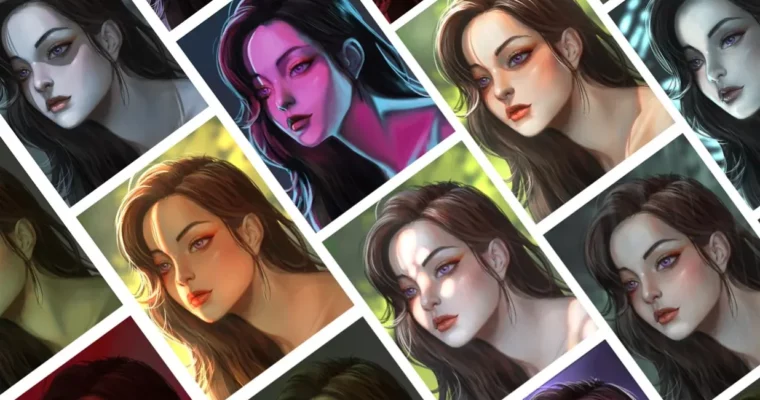
Want your art to grab attention? This course is all about making your illustrations pop with incredible lighting and color. You’ll learn how to use just a couple of layer masks and blend modes to paint light and shadows like a pro, making the process surprisingly easy.

🎯 What you’ll learn

  • Create 13 different lighting effects, from bright daylight to eerie moonlight.
  • Study how light, shadow, and color interact using photo references.
  • Understand reflections on various materials like glass and metal.
  • Paint lighting effects using different blend modes.
  • Confidently select colors that enhance your storytelling.
  • Master solid shading and blending techniques for depth.
  • Add volume and dimension to your artwork with simple tricks.
  • Draw accurate human proportions from different angles.
  • Create digital portraits with realistic skin tones, highlights, and shadows.
  • Recreate cinematic moods with effects like golden hour, horror glows, and sci-fi neon.
  • Learn common lighting setups used in photography and film.
  • Grasp essential color theory for vibrant artwork.

✅ Requirements

  • Skills: A good grasp of sketching.
  • Tools: Digital drawing software such as Photoshop or similar.
  • Hardware: You’ll learn more if you have a drawing tablet.

📝 Description

Light is key to making images compelling and drawing viewers in. If you want your art to shine with amazing lighting, this course is your shortcut! Xiaofan’s straightforward method, using just two layer masks and blend modes, makes painting light and shadows incredibly simple. She demonstrates her process by creating the same artwork 13 times, each with a different lighting style – from warm sunset glows to cool neon vibes. You’ll finally understand how light behaves, including reflections, color interactions, surface textures, and transparency, in a way that just clicks. Plus, you’ll learn a reliable way to paint from scratch, starting in grayscale and then adding color for vibrant results. You get access to her custom brushes and layered PSD files to practice along. Discover cinematic lighting tricks, similar to the moody shadows in The Batman or the dreamy pastels of Barbie, and master realistic skin tones, hair, metal, and glass. This course is designed to boost your artistic confidence and creativity, whether you’re just starting out or looking to refine your skills.

🧑‍🎓 Who this course is for

  • Beginner artists eager to understand how light works and apply it in their illustrations.
  • Intermediate artists looking to deepen their knowledge and pick up new techniques.

🧑‍🏫 About the Author

Xiaofan Zhang is a concept artist and illustrator known for her captivating work in horror and sci-fi genres. Her cinematic style is heavily influenced by dramatic lighting, which she expertly uses to define her visuals. She brings a wealth of practical experience and a clear teaching approach to this course.

🏁 Final Result

  • Students will be able to create compelling digital art with dynamic lighting and sophisticated color choices, ready to be showcased in a portfolio. You’ll have the skills to paint various lighting scenarios and materials realistically.
Curriculum

📋 Course content

  1. Learning to See – Theory
    • Learning to See03:37
    • Light and Color02:55
    • Homework02:48
    • Interpreting What You See06:37
  2. Learning to See – Demo
    • Painting the Background03:42
    • Painting the Character03:08
    • Painting the Hair03:06
    • Detailing the Face04:27
    • Detailing the Hair04:20
    • Finalizing the Painting05:45
  3. Referencing 3D Rendering
    • Referencing 3D Rendering Part 106:49
    • Referencing 3D Rendering Part 206:04
    • Demo – High and Low Roughness09:13
    • Demo – Metalness and Opacity08:51
  4. Lighting Set-Ups – Photography 1 (Theory)
    • Referencing Photography Part 105:29
    • Referencing Photography Part 205:58
    • Face Proportions – BONUS11:02
    • Character Line Art06:27
    • Grey Scale Values Part 106:51
    • Grey Scale Values Part 204:55
    • Grey Scale Values Part 306:32
    • Adding Color04:22
    • Blending and Shading Part 104:49
    • Blending and Shading Part 202:44
    • Face Detailing and Hair Part 104:16
    • Face Detailing and Hair Part 205:04
    • Makeup and Highlights04:17
  5. Lighting Set-Ups – Photography 1 (Demo)
    • Painting Two Light Sources – BONUS01:48
    • Open Shade05:55
    • Direct Sunlight Part 106:21
    • Direct Sunlight Part 205:10
    • Golden Hour07:34
    • Rainy Day04:15
    • Moonlight05:11
  6. Lighting Set-Ups – Photography 2
    • Referencing Photography05:15
    • Three-Point Light08:43
    • Incandescent Light02:41
    • Florescent Light01:35
    • Neon Light – Part 105:36
    • Neon Light – Part 205:37
    • Neon Light – Part 309:45
  7. Lighting Set-Ups – Cinematography
    • Referencing Cinematography06:58
    • Back Light Part 106:29
    • Back Light Part 206:58
    • Bottom Light06:59
    • Dappled Light05:49
    • Interface Light10:55
  8. Color Theory
    • Color Theory04:46
    • Common Color Schemes07:29
    • Body Proportions – BONUS07:26
    • Perspective – BONUS10:06
  9. Putting it all Together – Line Art
    • Drawing the Window Frame07:39
    • Drawing the Body Structure07:02
    • Drawing the Character Details06:05
    • Drawing the Clothes – Part 105:04
    • Drawing the Clothes – Part 202:38
    • Drawing the Hair03:50
    • Finishing Up the Clothes03:48
    • Drawing the Background04:21
    • Adding Flat Colors – Part 105:39
    • Adding Flat Colors – Part 203:13
  10. Putting it all Together – Shading and Lighting
    • Painting Light and Shadows – Part 104:49
    • Painting Light and Shadows – Part 207:41
    • Painting Light and Shadows – Part 304:30
    • Detailing the Face05:03
    • Rendering the Knit Sweater – Part 104:06
    • Rendering the Knit Seater – Part 203:11
    • Leggings, Cushion, Wall and Table03:49
    • Painting the Curtains and Socks05:07
    • Second-Pass Render and Painting the Hair05:53
    • Painting the Hand and Window Frame04:02
    • Curtains, Cookies and Added Lighting04:33
    • Final Touches and Farewell08:00
Watch online or Download for Free
Lighting & Color Made Easy by Xiaofan Zhang
NAME
SIZEDURATION
1. Learning to See – Theory
57.5 MB
7. Lighting Set-Ups – Cinematography
117.3 MB


Join us on
  Channel    and      Group

Leave a Comment

Your email address will not be published. Required fields are marked *