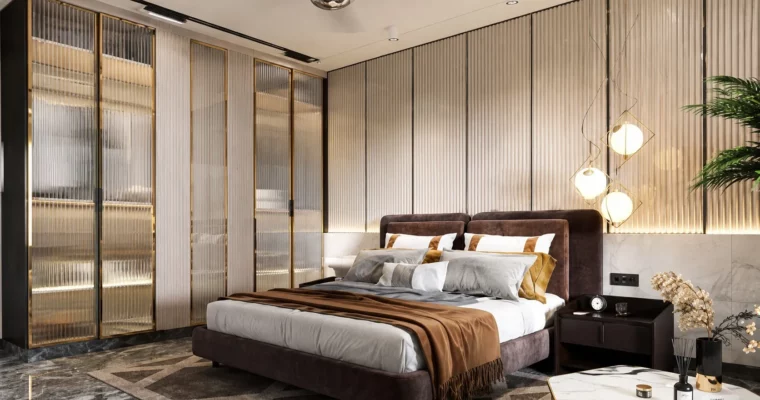
Interior Lighting & Walkthrough in 3ds Max & V-Ray by Sushil Singh

Duration:3 hours 10 minutes
Actual Duration:3h 4m
Release date:2025, July
Publisher:Udemy
Skill level:Beginner
Language:English
Exercise files:Yes
Software:3ds Max, V-Ray, Chaos Vantage, Adobe Photoshop, Adobe After Effects
Course URL:https://www.udemy.com/course/interior-lighting-walkthrough-in-3ds-max-v-ray
This course walks you through the entire process of creating a photorealistic interior render and a walkthrough animation. You’ll start from a blank scene in 3ds Max, model the key architectural elements, set up V-Ray materials and lighting, and finish with post-production in Photoshop and After Effects. It’s a practical, project-based approach that skips the theory and gets you building a real bedroom scene.
🎯 What you’ll learn
- Model interior walls, ceilings, and custom furniture like wardrobes and TV panels.
- Create and apply realistic materials using V-Ray.
- Set up a natural lighting scenario and optimize render settings.
- Produce a final walkthrough animation in Chaos Vantage.
- Polish your still renders in Photoshop and your animation in After Effects.
✅ Requirements
- Skills: Basic knowledge of 3ds Max and V-Ray interface and navigation.
- Tools: 3ds Max, V-Ray, Chaos Vantage, and Adobe After Effects installed.
- Hardware: A computer capable of running 3ds Max and V-Ray for rendering.
📝 Description
This isn’t a theory-heavy lecture series. It’s a straight-to-the-point project where you build a complete bedroom interior. You’ll start by modeling the core architecture—walls, ceiling, and custom joinery like a wardrobe and TV panel. The focus is on practical modeling techniques that get the job done without unnecessary complexity.
Once the geometry is solid, you’ll move into the look development phase. You’ll create a range of V-Ray materials, from bed linens to wood panels, learning how to tweak reflection, glossiness, and bump to get that realistic surface feel. The lighting section is where the scene comes to life, using a daylight setup to create natural shadows and a soft, inviting atmosphere.
The course doesn’t stop at a single still image. You’ll learn how to set up a camera, dial in your final render settings for quality, and then take the scene into Chaos Vantage to build a real-time walkthrough. Finally, you’ll polish the still render in Photoshop and the animation in After Effects, giving you a complete pipeline from start to finish.
🧑🎓 Who this course is for
- Architecture students and interior designers looking to add 3D visualization to their skillset.
- Beginners in 3ds Max and V-Ray who want to follow a complete, project-based workflow.
- Real estate professionals who need to create compelling visuals and walkthroughs for clients.
🧑🏫 About the Author
Sushil Singh is a 3D Artist with over 7 years of industry experience. He specializes in transforming concepts into photorealistic 3D visuals using software like 3ds Max, V-Ray, Corona, and Unreal Engine. He is passionate about sharing his workflow and techniques to help others break into architectural visualization.
🏁 Final Result
- A fully modeled and textured bedroom interior scene.
- A high-resolution, photorealistic still render ready for portfolio use.
- A short walkthrough animation exported from Chaos Vantage and color-graded in After Effects.
 Channel