Genshin-Impact Water Shader in Unreal Engine 5 by Thomas Smith

Duration:30 minutes
Actual Duration:15m
Release date:2025
Publisher:Stylized Station
Skill level:Beginner
Language:English
Exercise files:Yes
Software:Unreal Engine 5
Course URL:https://courses.stylizedstation.com/p/your-first-water-shader-in-unreal-engine-5
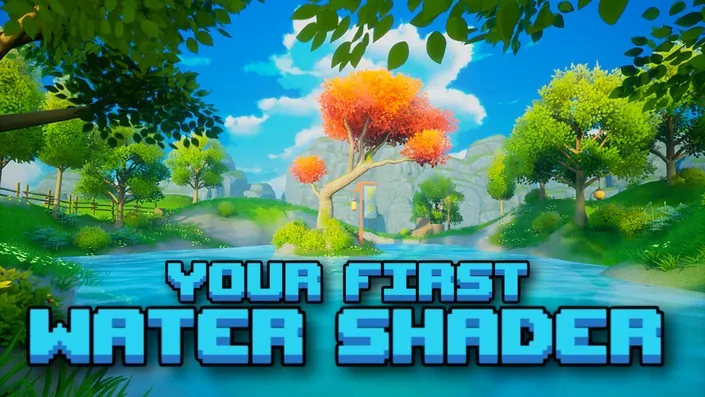
A quick 30-minute build for anyone who wants readable, anime-style water in Unreal Engine 5. You make a simple shader from scratch and get that clean Genshin look without getting stuck in math.
🎯 What you’ll learn
- Build an anime-style water material in Unreal Engine 5 from scratch
- Use refraction to get light and movement in the water
- Add depth-based color for shallow to deep transitions
- Tune highlights, ripples, and shadows for a clean stylized look
✅ Requirements
- Skills: Basic familiarity with Unreal Engine 5 viewport and content browser
- Tools: Unreal Engine 5 installed, 3-button mouse
- Hardware: Dedicated GPU with DirectX 11/12 support, minimum 16GB RAM
📝 Description
This is a short, focused build. No long theory, no node spaghetti. You open the Material Editor, plug in a few core nodes, and you get water that actually reads as water in a stylized scene.
You start with the base — transparency and color. Then you add refraction so light bends through the surface and the water stops looking flat. After that you layer in movement with simple ripples and highlights that sell that anime feel.
The second half is about depth. You will use depth fade and simplified scattering to blend shallow edges into deeper blue. That is what gives you the soft shoreline look from Genshin. Same trick also helps hide hard intersections with rocks and sand.
By the end you have a clever, lightweight water shader you can drop into any stylized level and tweak in seconds. Change two or three parameters and it fits a pond, a river, or a coastline.
🧑🎓 Who this course is for
- Beginners who want their first working water shader in UE5
- Stylized and anime-style artists tired of flat, lifeless water
- Unreal users who want a fast, practical shader without heavy math
🧑🏫 About the Author
Thomas Smith teaches stylized workflows through Stylized Station, with a focus on readable, game-ready anime looks. His work centers on Unreal Engine 5 materials and real-time rendering tricks you can actually reuse in projects. He breaks down technical topics into short, hands-on builds for artists.
🏁 Final Result
- A finished Genshin-inspired anime water shader with refraction, ripples, and depth color, ready to show in your portfolio or reuse in UE5 scenes.
 Channel