Cinematic Lighting Shot Production by Graham Cunningham

Duration:4h 3m 28s
Actual Duration:4h 4m
Release date:2024, October
Publisher:Gnomon
Skill level:Advanced
Language:English
Exercise files:Yes
Software:Maya, Katana, Arnold, Nuke
Course URL:https://www.thegnomonworkshop.com/workshops/cinematic-lighting-shot-production
Graham Cunningham walks you through the full pipeline of lighting and compositing a cinematic shot, from setting up OCIO for ACEScg in Maya to the final color grade in Nuke. This is a practical, no-fluff workshop for artists who already know the basics and want to see how a senior pro handles a real production shot.
🎯 What you’ll learn
- Set up an ACEScg color pipeline across Maya, Katana, Arnold, and Nuke.
- Convert materials to MaterialX and export scenes to Arnold USD.
- Create custom Katana macros and AOVs for multi-channel EXR output.
- Optimize lighting setups and build custom HDRI textures.
- Manage render passes with visibility controls and sampling optimization.
- Composite multi-pass renders and manipulate individual light contributions in Nuke.
- Integrate atmospheric effects using volume renders and stock footage.
- Use cryptomattes for precise selections and apply finishing effects like grain.
✅ Requirements
- Skills: Solid understanding of Maya, Arnold, and Nuke. Familiarity with lighting and compositing principles.
- Tools: 3-button mouse, drawing tablet recommended.
- Hardware: Minimum 16GB RAM, dedicated GPU.
📝 Description
This workshop skips the hand-holding. Graham starts by showing you how to set up a proper ACEScg color pipeline—something that’s often glossed over but critical for consistent results across software. You’ll see how he preps assets in Maya, converts materials to MaterialX, and exports everything to Arnold USD.
Then it’s into Katana, where he updates a shot template, builds custom macros, and sets up AOVs for multi-channel EXR output. The lighting section is where things get interesting: he shows you how to optimize a scene, build up lighting from multiple sources, and create custom HDRI textures using a quick detour into Nuke.
The compositing section is the real meat. Graham demonstrates a non-destructive workflow for splitting out light AOVs, adjusting colors and intensities, and adding atmosphere using volume renders and stock footage. He also covers cryptomattes for fine-tuning, lens flares, film grain, and a final color grade. By the end, you’ll have a clear picture of how a professional lighting and compositing artist thinks and works.
🧑🎓 Who this course is for
- Intermediate to advanced lighting artists and compositors working in film, TV, or high-end commercials.
- Pipeline TDs and CG generalists who want to understand the full lighting-to-composite workflow.
- Aspiring lighting supervisors looking for insight into professional production practices.
🧑🏫 About the Author
Graham Cunningham is a senior lighting, compositing, and look-dev artist with over 27 years in the industry. He started as a generalist at boutique VFX studios in Toronto before joining Blizzard Entertainment in 2007. At Blizzard, he contributed to cinematics for Diablo III, Diablo IV, StarCraft II, Overwatch, and World of Warcraft, among others. He’s known for evolving Blizzard’s color pipeline, image-based lighting, and subsurface scattering workflows. His peers describe him as one of the most technically proficient artists in the field.
🏁 Final Result
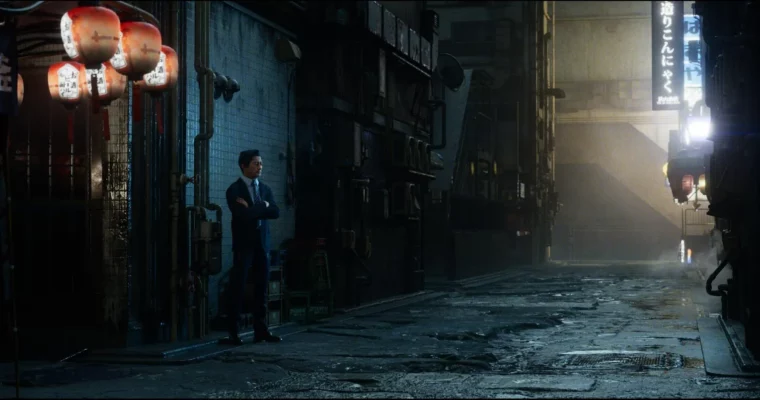
- A fully lit and composited cinematic shot of a Tokyo back alley, complete with volumetric fog, stock footage FX, and a polished color grade.
 Channel