Ad Clicks : Ad Views : Ad Clicks : Ad Views : Ad Clicks : Ad Views : Ad Clicks : Ad Views :
Oh Snap!

It looks like you're using an adblocker. Adblockers make us sad. We use ads to keep our content happy and free. If you like what we are doing please consider supporting us by whitelisting our website. You can report badly-behaved ads by clicking/tapping the nearby 'Advertisement' X text.

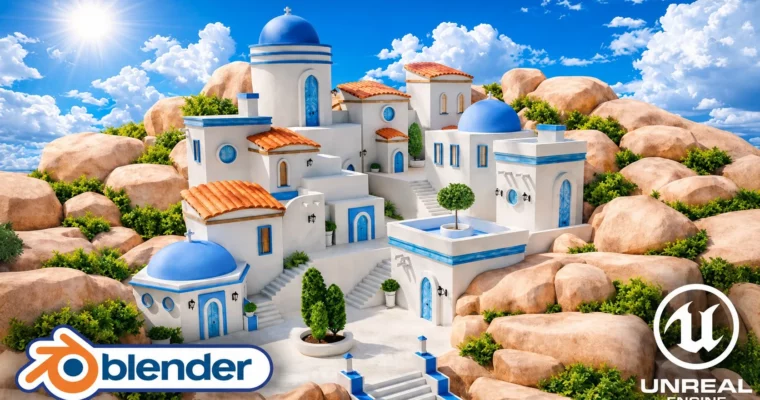
Blender to Unreal Engine 5 Stylized Greek Environment by 3D Tudor

Blender to Unreal Engine 5 Stylized Greek Environment by 3D Tudor

/

Author:3D Tudor

Duration:13.5 hours on-demand video

Actual Duration:6h 23m

Release date:2026, July 23

Publisher:Udemy

Skill level:Intermediate

Language:English

Exercise files:Yes

Software:Blender, Unreal Engine 5

Course URL:https://www.udemy.com/course/blender-to-unreal-engine-5-stylized-greek-environment

Build a reusable modular Greek island architecture kit in Blender, export it cleanly via GLB, and assemble a polished, stylized village in Unreal Engine 5.

Build a reusable modular Greek island architecture kit in Blender, then export it cleanly via GLB and assemble a polished, stylized village in Unreal Engine 5. This course focuses on the full production pipeline, from planning and modeling to lighting and final cinematic presentation.

๐ŸŽฏ What you’ll learn

  • Plan a stylized environment with references, human scale, blockouts, and silhouette checks
  • Build a reusable modular Greek island architecture kit with buildings, roofs, stairs, doors, and props
  • Create clean UVs and seamless materials with controlled texel density and tile variation
  • Export a clean GLB asset library with useful pivots and separate meshes for Unreal Engine 5
  • Assemble a layered village with a clear focal point, rock foundation, and supporting foliage
  • Present the finished environment with a cinematic 16:9 camera, simple animation, and final video render

โœ… Requirements

  • Skills: Basic navigation in Blender and Unreal Engine 5 is helpful, but the full workflow is shown step by step.
  • Tools: A computer capable of running Blender and Unreal Engine 5.
  • Hardware: Minimum 16GB RAM, dedicated GPU recommended.

๐Ÿ“ Description

This course isn’t about making one building and hoping nobody notices the seams. It’s about building a modular environment-art workflow that actually works from start to finish.

You’ll start in Blender, planning your stylized Greek village with references, human scale, and blockouts. Then you’ll build a reusable kit of white-plaster buildings, blue domes, terracotta roofs, stairs, doors, windows, lanterns, and props. The focus is on clean geometry, useful pivots, and consistent UVs so every piece snaps together like a real building block.

Once the kit is ready, you’ll export it through GLB and bring it into Unreal Engine 5. This is where most courses gloss over the hard parts. Here, you’ll fix tangents, set up a custom skybox, dial in the sun and fog, and assemble the village from separate, editable meshes. You’ll also create custom shrubs using procedural vegetation tools and place them for natural-looking clusters.

The final stage covers color grading, CineCamera framing, and a simple camera animation for a polished real-time render. The result is a complete, portfolio-ready environment and a repeatable pipeline you can use for any future project.

๐Ÿง‘โ€๐ŸŽ“ Who this course is for

  • Blender artists ready to go beyond isolated props who want a clear system for building complete environments
  • Stylized environment artists and worldbuilders who want strong shapes, clean color separation, and reusable architecture
  • Unreal Engine learners who want to understand why pivots, normals, tangents, and UVs matter in the Blender hand-off
  • Indie game developers and technical artists who need practical, editable modular building blocks
  • Portfolio builders who want one project covering modeling, UVs, modular design, engine assembly, lighting, and presentation

๐Ÿง‘โ€๐Ÿซ About the Author

3D Tudor is a well-known instructor on Udemy, specializing in Blender and Unreal Engine environment art. With a focus on practical, project-based learning, 3D Tudor has created multiple top-rated courses that guide students through complete production pipelines. Their teaching style emphasizes clean workflows, modular design, and real-world problem-solving, making complex topics accessible to intermediate artists.

๐Ÿ Final Result

  • A complete, stylized Greek island environment presented in Unreal Engine 5
  • A reusable modular asset workflow rather than a one-off scene recipe
  • A clean GLB asset library with practical pivots and separate meshes
  • A polished hero image and optional short CineCamera animation
Curriculum

๐Ÿ“‹ Course content

  1. Module 1: Blender Foundation & Modular Kit
    • Lesson 1 – Setting Up the Blender Resource Pack for Unreal Engine8:22
    • Lesson 2 – Bevel and Weighted Normal Modifiers for Clean Bases13:18
    • Lesson 3 – Building Scaled Primitives with Bevel and Cylinders15:18

    • Lesson 4 – Creating Modular Floor Rings with Bevel Weights (:08)
    • Lesson 5 – Duplicating Upper Details with Bevel Weights14:47
    • Lesson 6 – Modeling Rounded Roofs with Vertex Bevel9:53
    • Lesson 7 – Roof Variations Using Edge Bevel Weight Control10:58
    • Lesson 8 – Cycles Lighting and Ambient Occlusion Preview Setup11:39
    • Lesson 9 – Smart UV Project and Material Setup in Blender9:54
    • Lesson 10 – Manual UV Unwrapping for Perfect Wood Grain11:40
    • Lesson 11 – Procedural Roof Tiles with Array Modifiers14:38
    • Lesson 12 – Roof Tile UVs and Lattice Deformation15:43
    • Lesson 13 – Curved Roof Tiles with Array, Bevel and Lattice11:18
    • Lesson 14 – Fix Roof Shading and N-gons After Lattice Deform11:49
    • Lesson 15 – Correct Roof Materials and Clean Wood Assignments6:36
    • Lesson 16 – Create Rounded Roof Details with Subdivided Sphere11:46
    • Lesson 17 – Modeling a Rounded Arch Door with Solidify and Bevel14:07
    • Lesson 18 – Mirror Modifier Workflow and Detailed Wooden Door12:23
    • Lesson 19 – Professional UV Unwrapping and Boolean Trim Details13:52
    • Lesson 20 – Scaling Door Variants and Fixing UV Distortion16:02
    • Lesson 21 – Modeling Circular Windows with Clean UV Mapping10:15
    • Lesson 22 – Creating Wooden Shutters and Square Windows11:04
    • Lesson 23 – Texturing Windows and Building an Arched Variant15:52
    • Lesson 24 – Modeling Decorative Supports, Crosses, and Pillars13:14
    • Lesson 25 – Modeling Mediterranean Plant Pots with Shading13:21
    • Lesson 26 – Finishing Pots and Building a Stylized Chimney8:21
    • Lesson 27 – Modeling a Decorative Lantern with Panel Details11:00
    • Lesson 28 – Creating a Curved Lantern Wall Mount with Bezier Curves12:46
    • Lesson 29 – Fix Shading with Auto Smooth and Custom Normals9:16
    • Lesson 30 – Modular Block and Geometry Nodes Staircase Setup18:33
    • Lesson 31 – Beveled Staircase Details with Clean UV Mapping14:31
    • Lesson 32 – Modeling Curved Walls and Seamless Corners13:58
    • Lesson 33 – Rock Generator and Sculpt Mode Shaping13:45
    • Lesson 34 – Optimizing Rocks with Decimate and Clean Unwraps12:32
    • Lesson 35 – Rounded Stair Variant and Randomized Roof Tiles14:33
    • Lesson 36 – Organizing, Renaming and Fixing Normals for Export10:32
  2. Module 2: Export & Unreal Engine 5 Import
    • Lesson 37 – Exporting GLB with Correct glTF Settings7:55
    • Lesson 38 – Importing GLB into Unreal Engine 5 Properly11:35
    • Lesson 39 – Fixing Mesh Naming and Manual Exposure Setup8:05
    • Lesson 40 – Building a Custom Skybox Material with Parameters15:54
    • Lesson 41 – Warm Skylight, Exponential Height Fog and Additive Sun11:18
    • Lesson 42 – Ground Plane UV Layout and Building Placement8:54
    • Lesson 43 – Detailed Windows, Stairs and Viewport Bookmarks13:44
    • Lesson 44 – Blocking the Silhouette and Refining Lighting13:41
    • Lesson 45 – Distance Field Ambient Occlusion for Materials10:44
    • Lesson 46 – Fixing Tangents and Enhancing Ambient Occlusion9:25
    • Lesson 47 – Stepped Wall Details and Beam Silhouette Control8:49
    • Lesson 48 – Layered Stepped Buildings for Stronger Composition14:26
    • Lesson 49 – Tall Building Silhouette and Window Composition10:57
    • Lesson 50 – Building Platforms and Aligning Diagonal Rooflines13:14
    • Lesson 51 – Refining Building Silhouettes with Modular Blocks11:44
    • Lesson 52 – Detailing the Front Building with Roofs and Beams12:18
    • Lesson 53 – Final Environment Details: Windows, Stairs, Pots11:59
    • Lesson 54 – Bending a Curved Church Door with Warp Bend5:59
    • Lesson 55 – Blocking Out Large Rock Silhouettes for Strong Composition10:54
    • Lesson 56 – Refining Rock Placement with Clusters and Overlaps16:56
    • Lesson 57 – Enabling Procedural Vegetation and Styling Megaplants Foliage15:06
    • Lesson 58 – Shaping a Custom Rock Shrub with Procedural Vegetation Nodes11:20
    • Lesson 59 – Adding Branches and Leaves with Graft and Foliage Distributors16:43
    • Lesson 60 – Creating a Spherical Shrub with Procedural Vegetation13:38
    • Lesson 61 – Building a Tall Vertical Shrub Variant9:10
    • Lesson 62 – Creating a Small Shrub and Exporting Nanite Foliage10:20
    • Lesson 63 – Animating Custom Foliage with Blueprint Wind Controls15:35
    • Lesson 64 – Placing and Scaling Shrubs for Natural Interior Foliage10:58
    • Lesson 65 – Building Lush Exterior Vegetation with Shrub Clusters13:58
    • Lesson 66 – Color Grading and Cloud Light Function for Directional Light8:13
    • Lesson 67 – CineCamera Actor Animation with Level Sequence9:24
Watch online or Download for Free
Blender to Unreal Engine 5 Stylized Greek Environment by 3D Tudor
NAME
SIZEDURATION

Download all Videos (60)
10.5 GB6h 23m


Download all

Join us on
  Channel    and      Group

Leave a Comment

Your email address will not be published. Required fields are marked *