Ad Clicks : Ad Views : Ad Clicks : Ad Views : Ad Clicks : Ad Views : Ad Clicks : Ad Views :
Oh Snap!

It looks like you're using an adblocker. Adblockers make us sad. We use ads to keep our content happy and free. If you like what we are doing please consider supporting us by whitelisting our website. You can report badly-behaved ads by clicking/tapping the nearby 'Advertisement' X text.

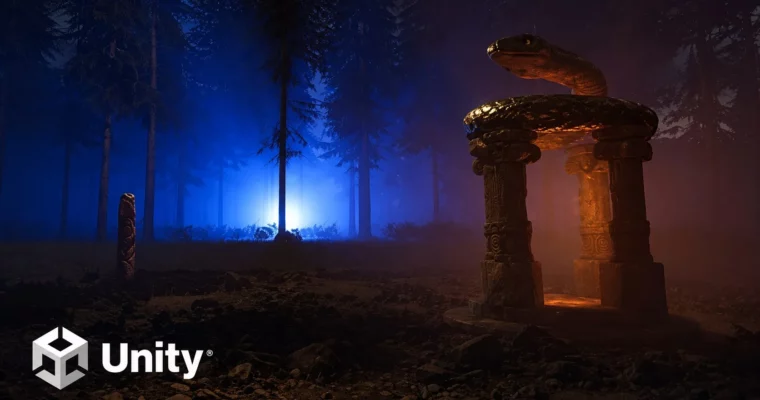
Lighting in Unity by Pete Jepson

Lighting in Unity by Pete Jepson

/

Author:Pete Jepson

Duration:13 hours on-demand video

Actual Duration:12h 59m

Release date:2025, June

Publisher:Udemy

Skill level:Intermediate

Language:English

Exercise files:Yes

Software:Unity

Course URL:https://online-courses.club/

Master lighting for games across Unity's built-in, URP, and HDRP pipelines with hands-on projects and color theory.

This course is a straight-up guide to lighting in Unity, covering the built-in renderer, URP, and HDRP. You’ll learn the theory behind color, shadows, and light placement, then apply it to three distinct game environments. No fluff—just practical setups for realistic and stylized scenes.

🎯 What you’ll learn

  • Lighting techniques for games
  • Baking lightmaps
  • Using light probe groups
  • Creating volumetric lights for HDRP
  • Post processing for that AAA look
  • Realistic lighting setups for your project

✅ Requirements

  • Skills: An interest in game design
  • Hardware: A high performance computer with a dedicated graphics card that can handle the HDRP pipeline in Unity

📝 Description

This course skips the theory lectures and jumps straight into building real scenes. You’ll start with the basics—directional lights, skyboxes, and ambient lighting—then move into baked lightmaps and light probes for static and dynamic objects. The real meat is in the three project-based sections.

First, you’ll light a bar room in the built-in renderer, matching color temperatures to real-world values for an authentic feel. Then, you’ll switch to URP to light a cartoony horror graveyard, using saturated colors and stylized contrasts. Finally, you’ll tackle HDRP, setting up volumetric fog, physically based skies, and post-processing stacks to get that AAA look. Each section ends with a final bake and results review, so you see exactly what works.

🧑‍🎓 Who this course is for

  • Anyone wanting to master lighting for games
  • You want to make your games stand out from the crowd with impressive visuals

🧑‍🏫 About the Author

Pete Jepson is a game development instructor on Udemy with a focus on Unity lighting and rendering pipelines. He has created multiple courses covering everything from beginner setup to advanced HDRP techniques, helping students build portfolio-ready scenes.

🏁 Final Result

  • Three fully lit game environments: a realistic bar room, a stylized horror graveyard, and a dynamic HDRP outdoor scene with volumetric lighting.

Curriculum

📋 Course content

  1. Introduction and Setup
    • Introduction2:14
    • Install Unity3:24
    • Setting up the scene9:02
  2. Lighting Fundamentals
    • Directional light10:58
    • Sky settings10:41
    • Ambient lighting7:58
    • Point light10:13
    • Spot light9:38
    • Cookies12:25
    • Halo7:23
    • Lens flares6:30
    • Projectors17:57
  3. Baked Lighting and Probes
    • Baked lighting24:58
    • Bake modes8:10
    • Bake map settings6:23
    • Baked area light8:47
    • Reflection probes8:34
    • Baking emission11:35
    • Light probes7:51
    • HDRI skies and realtime global illumination23:36
    • HDRI baking6:48
  4. Color Theory and Lighting Techniques
    • Post Processing17:33
    • Setting up color theory scene10:37
    • Monochromatic colors19:40
    • Complementary colors11:00
    • Split complementary colors12:17
    • Triadic colors10:45
    • Tetradic colors13:34
    • Analogous colors7:44
    • Lighting techniques setup3:23
    • Single light source14:23
    • Background lighting11:06
    • Multiple lights9:35
  5. Built-in Renderer: Bar Room Scene
    • Install room project3:51
    • Color temperature9:24
    • Lightmap scale22:14
    • Setting up first light12:46
    • Pool table light10:00
    • Wall lights14:03
    • Table lamp9:14
    • Reflection probe4:30
    • Final bake test2:51
    • Post processing13:55
    • Fixing small issues6:20
    • Bake final lightmap5:42
    • Final bake results3:01
  6. Universal Render Pipeline (URP): Horror Environment
    • Create new URP project3:32
    • Taking a look at the scene6:12
    • URP quality settings9:05
    • Checking lightmap resolution17:00
    • Setting up the sky background10:26
    • Lighting the rocks7:01
    • Test bake for rocks2:30
    • Lighting for the bridge3:04
    • Lighting the darker areas7:37
    • Bright spots of light7:21
    • Lighting the fence9:29
    • Lighting the gravestones10:40
    • Lighting the house6:14
    • Post Processing7:22
    • Fixing the moonlight3:55
    • Final bake2:06
    • Bake results5:57
    • Box volume post processing10:31
    • Scene results1:09
  7. High Definition Render Pipeline (HDRP): Realistic Scene
    • Setting up the HDRP project8:33
    • HDRP settings8:39
    • Physically based sky12:55
    • Sun and fog16:30
    • Clouds8:51
    • Camera exposure6:09
    • Creating a sunset25:43
    • Mid day sky9:33
    • Camera settings10:18
    • HDRI sky15:22
    • Local fog15:21
    • Final scene lighting setup9:30
    • Final post processing14:38
    • HDRP summary4:32
    • Course completion0:26
Watch online or Download for Free
Lighting in Unity by Pete Jepson
NAME
SIZEDURATION
03 – Lighting Techniques
40 MB38m

Download all Videos (83)
1.7 GB12h 59m

Project Files (Assets, Resources)
1.6 GB

Download all

Join us on
  Channel    and      Group

Leave a Comment

Your email address will not be published. Required fields are marked *