Master AI Rendering in 3ds Max – For All Levels of CGI Artist by Oleh Briukhan

Duration:1 hour
Actual Duration:48m
Release date:2024, September
Publisher:Udemy
Skill level:Beginner
Language:English
Exercise files:Yes
Software:3ds Max, tyFlow, Stable Diffusion
Course URL:https://www.udemy.com/course/ai-artist
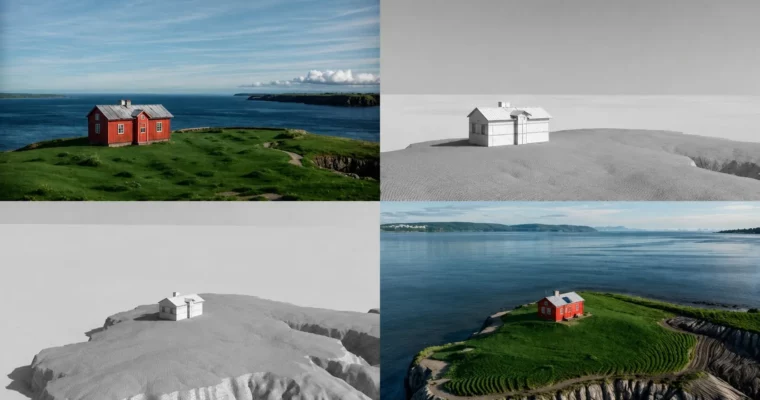
This course shows you how to skip the render button and generate high-quality visuals directly in the 3ds Max viewport using AI. You’ll learn to set up tyDiffusion with Stable Diffusion, create draft variations, and automate texturing and lighting—all without leaving your scene.
🎯 What you’ll learn
- Generate AI-powered renders directly in the 3ds Max viewport.
- Create multiple draft variations in different moods using AI.
- Set up custom lighting schemes and generate AI-enhanced renders.
- Use AI to generate and bake textures with UV layouts.
- Automate repetitive tasks like material selection and scene optimization.
✅ Requirements
- Skills: Basic knowledge of 3ds Max, understanding of rendering and 3D modeling.
- Tools: Access to a recent version of 3ds Max.
- Hardware: A dedicated GPU is recommended for Stable Diffusion performance.
📝 Description
Preview: This course is built around a simple idea: stop waiting for renders. You’ll learn to use tyDiffusion to run Stable Diffusion directly inside 3ds Max, turning your viewport into a real-time AI generator.
The workflow is straightforward. You set up basic geometry and lighting, then let AI generate draft variations in different moods. Need a different texture? Draw it in the viewport and let AI fill in the details. The course covers the full pipeline: installation, basic workflow, generating drafts, creating objects with drawing, and finally baking textures for final rendering.
What makes this practical is the focus on automation. Instead of manually tweaking materials or waiting for long renders, you use AI to handle the grunt work. This frees you up to explore more creative ideas faster. The course is short—just under an hour—so you can get up and running quickly without getting bogged down in theory.
🧑🎓 Who this course is for
- 3D artists, architects, and students looking to automate rendering in 3ds Max with AI.
- Beginners aiming to quickly master AI tools for rendering and boost productivity.
- Professionals seeking modern AI methods for rendering, lighting, and texturing.
- Game developers wanting to use AI for generating stylized textures on low-poly models.
🧑🏫 About the Author
Oleh Briukhan is an experienced 3D artist and RND director at MarygoldStudio, where he combines art and technology to automate processes and enhance visualization quality. With years in the CGI industry and collaborations with leading brands, he focuses on integrating AI into architectural rendering workflows.
🏁 Final Result
- A fully AI-generated render created directly in the 3ds Max viewport, complete with custom textures and lighting, ready for portfolio use.
 Channel