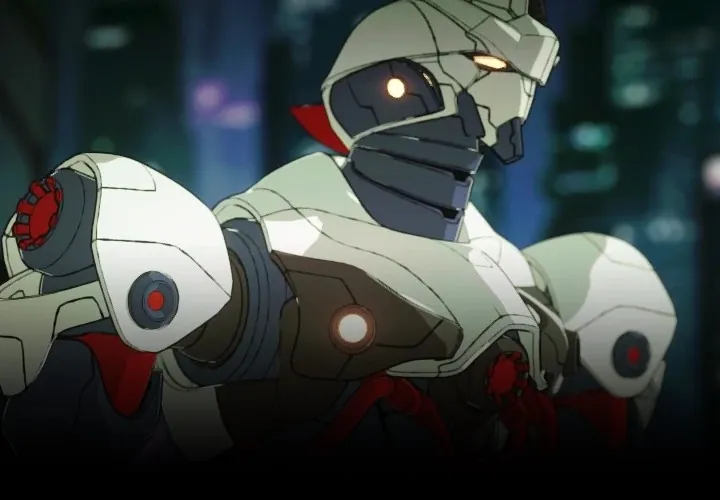
3D Anime Style Mecha Production in OctaneRender for Blender by Lino Grandi

Duration:21 hours 30 minutes
Actual Duration:21h 0m
Release date:2024
Publisher:Coloso
Skill level:Intermediate
Language:English
Exercise files:Yes
Software:Blender, OctaneRender for Blender
Course URL:https://coloso.global/en/products/3dartist-linograndi-us
Learn to build a complete, animation-ready 3D mecha from scratch using OctaneRender for Blender. This course, taught by an OTOY developer, covers the entire pipeline: hard surface modeling, toon shading, rigging, and posing. You’ll get real-time feedback on your NPR renders and walk away with a portfolio-ready mecha model.
🎯 What you’ll learn
- Set up and use OctaneRender for Blender for non-photorealistic (NPR) rendering.
- Create clean, hand-drawn looking toon shaders and edge tracing.
- Model a detailed mecha using hard surface subdivision techniques.
- Rig a complex mecha with a custom skeleton, IK, and constraints.
- Pose and light your mecha for a final, compelling shot.
✅ Requirements
- Skills: Basic familiarity with Blender’s interface and 3D navigation.
- Tools: A 3-button mouse with a scroll wheel.
- Hardware: A dedicated GPU (NVIDIA recommended for OctaneRender). OctaneRender is free for use with a single GPU.
📝 Description
This isn’t just a modeling tutorial; it’s a full production pipeline for creating anime-style mecha. Lino Grandi, a 3D artist at OTOY, walks you through the exact workflow he uses to build characters that look like they stepped out of a hand-drawn anime.
The course kicks off by getting you comfortable with OctaneRender for Blender, focusing specifically on its powerful toon shading and edge tracing capabilities. You’ll learn how to set up materials and lights that give you that clean, graphic look in real-time. From there, you’ll dive straight into modeling, breaking down a complex mecha design into manageable parts—head, chest, arms, legs—using hard surface subdivision techniques.
But the real value is in the rigging section. Lino doesn’t just show you how to make it look good; he shows you how to make it move. You’ll build a custom skeleton, set up IK and constraints, and create controls that let you pose your mecha naturally. By the end, you’ll have a fully functional, animation-ready asset and a solid understanding of how to apply these techniques to your own designs.
🧑🎓 Who this course is for
- Blender users who want to break into NPR rendering and toon shading.
- 3D artists looking to specialize in hard surface modeling and mecha design.
- Animators and riggers who want to learn how to build a rig specifically for mechanical characters.
🧑🏫 About the Author
Lino Grandi is a 3D Artist at OTOY, where he manages the development of OctaneRender for Blender and Sculptron. His career spans from working on the Amiga game “Breathless” to being part of the LightWave 3D development team. He has contributed to high-profile projects, including CG work for Daft Punk, 3D models for the “Ghost in the Shell: Global Neural Network” graphic novel, and assets for various anime productions. His deep technical knowledge of Octane and passion for mecha make him the ideal guide for this course.
🏁 Final Result
- A fully rigged, toon-shaded 3D mecha model, ready for animation and portfolio presentation.
📢 Guys, this is a Group Buy campaign, check the GBC forum thread to get access
You can find the course preview in the download section below.
 Channel