Ad Clicks : Ad Views : Ad Clicks : Ad Views : Ad Clicks : Ad Views : Ad Clicks : Ad Views :
Oh Snap!

It looks like you're using an adblocker. Adblockers make us sad. We use ads to keep our content happy and free. If you like what we are doing please consider supporting us by whitelisting our website. You can report badly-behaved ads by clicking/tapping the nearby 'Advertisement' X text.

How to Make a Retro Style 3D FPS in the Godot Game Engine by Narayana Walters

How to Make a Retro Style 3D FPS in the Godot Game Engine by Narayana Walters

/

Author:Narayana Walters

Duration:12 hours

Release date:2024, June

Publisher:Udemy

Skill level:Beginner

Language:English

Exercise files:Yes

Software:Godot

Course URL:https://www.udemy.com/course/how-to-make-a-retro-style-3d-fps-in-the-godot-game-engine

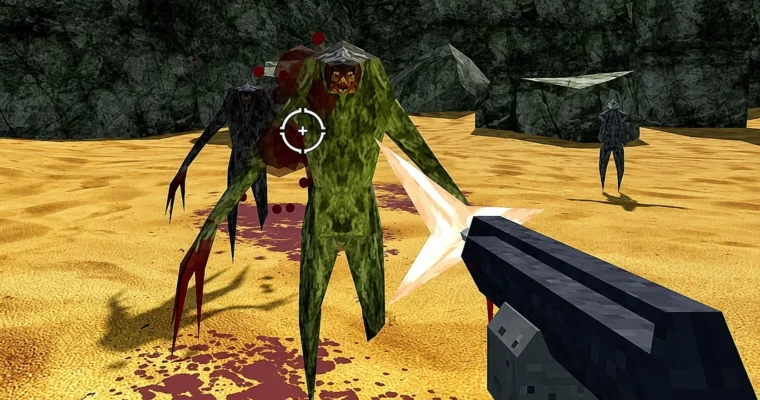
Build a fast-paced, old-school first-person shooter from scratch in Godot, covering everything from player movement to enemy AI and weapon systems.

Build a complete retro-style 3D FPS in the Godot Game Engine. This course walks you through creating a fast-paced first-person shooter with multiple weapons, enemy AI, and a full HUD.

๐ŸŽฏ What you’ll learn

  • Implement a fast-paced old-school first-person character controller in Godot
  • Fully implement a machine gun, shotgun, sword, and rocket launcher
  • Implement basic artificial intelligence and pathfinding for enemies
  • Create particle effects for explosions, smoke trails, and blood
  • Set up a basic GUI with health, ammo, and pickup displays

โœ… Requirements

  • Skills: Some familiarity with programming
  • Tools: Godot Game Engine
  • Hardware: A computer capable of running Godot

๐Ÿ“ Description

This course is straight to the point. You’ll build a complete retro-style 3D FPS in the Godot Game Engine, covering everything from the ground up. No fluff, just practical implementation.

You’ll start by setting up an environment with lighting and a skybox, then build a fast-paced player controller with mouse aim. From there, you’ll implement four distinct weapons: a machine gun, shotgun, machete, and rocket launcher. Each weapon has its own animations, muzzle flashes, and bullet effects.

The course also covers enemy AI. You’ll create two enemy typesโ€”one melee and one rangedโ€”with pathfinding, vision, and hearing systems. You’ll set up hitboxes, state machines, and death effects like blood sprays and gibbing.

Finally, you’ll build a full HUD with health, ammo, and pickup displays, add sound effects, and learn how to export your project. By the end, you’ll have a playable FPS that feels like a classic 90s shooter.

๐Ÿง‘โ€๐ŸŽ“ Who this course is for

  • Beginner game developers who want to learn how to build a complete FPS in Godot
  • Indie developers looking to create retro-style 3D games

๐Ÿง‘โ€๐Ÿซ About the Author

Narayana Walters is an independent game developer with nearly seven years of experience. He has worked on 2D and 3D games across multiple genres, from horror to puzzle. He also creates educational content on YouTube, helping other developers learn game development.

๐Ÿ Final Result

  • A fully playable retro-style 3D FPS with multiple weapons, enemy AI, pickups, and a complete HUD
Curriculum

๐Ÿ“‹ Course content

  1. Module 1:  Environment and Player Setup
    • Making The Environment9:10
    • Player Movement22:17
    • Player Health10:46
    • Setting Up the Scene7:08
    • Setting Up the Navmeshes2:40
    • Setting Up Lighting and Skybox2:54
    • Player Movement and Mouse Aim34:02
    • Player Health14:53
  2. Module 2:  Weapons and Combat
    • Weapon Manager15:16
    • Importing Weapon Models8:06
    • Weapon Animations12:34
    • Bullet Hit Effects11:55
    • Hit Scan Bullets15:54
    • Weapon Script12:11
    • Muzzle Flashes5:43
    • Making The Shotgun4:57
    • Making The Machete17:34
    • Making the Rocket Launcher27:17
    • Adding Crosshairs2:21
    • Animating the Weapon Manager5:35
    • Weapon Manager12:17
    • Importing the Models2:30
    • Making the Weapon Animations18:59
    • Making the Bullet Hit Effect7:46
    • Making Hitscan bullets16:00
    • Making the Weapon Script18:04
    • Making Muzzle Flashes4:18
    • Making the Shotgun4:25
    • Making the Machete7:24
    • Making Explosions12:31
    • Making Rockets14:52
    • Making the Rocket Launcher5:06
    • Adding Crosshairs2:05
    • Animating the Weapon Manager5:38
  3. Module 3:  Enemies and AI
    • Importing Monster Meshes and Setting Up Materials3:41
    • Setting Up Enemy Hitboxes21:41
    • Setting Up Enemy States and Dying6:00
    • Enemy Vision and Hearing16:59
    • Enemy Movement and Facing12:51
    • Enemy Melee Attacks14:32
    • Ranged Enemy and Fireball Projectile11:28
    • Blood Effects15:47
    • Gibbing17:52
    • Importing Meshes and Setting Up Materials2:06
    • Setting Up Hitboxes16:10
    • Setting Up State Machine and Enemy Health5:26
    • Setting Up Enemy Senses13:07
    • Setting up Enemy Movement12:48
    • Setting up Enemy Melee Attacks15:08
    • Making a Fireball Projectile11:03
    • Making the Range Enemy9:28
    • Making Blood Sprays7:24
    • Making Gibs13:41
  4. Module 4:  Pickups and UI
    • Making Health, Weapon, Ammo Pickups20:35
    • Player Death Screen10:05
    • Player Stats Display9:44
    • Player Health Effects3:30
    • Pickup History Display9:43
    • Making the Pickups9:21
    • Making the Pickup Manager10:59
    • Restart Message4:36
    • Health and Ammo DIsplay3:36
    • Health Effects2:52
    • Pickup Info6:43
  5. Module 5:  Audio and Export
    • Adding Sound Effects To Everything18:54
    • Exporting Your Project2:32
    • How to Use Sound Effects6:01
    • How to Export Your Game1:54
Watch online or Download for Free
How to Make a Retro Style 3D FPS in the Godot Game Engine by Narayana Walters

Join us on
  Channel    and      Group

Leave a Comment

Your email address will not be published. Required fields are marked *