


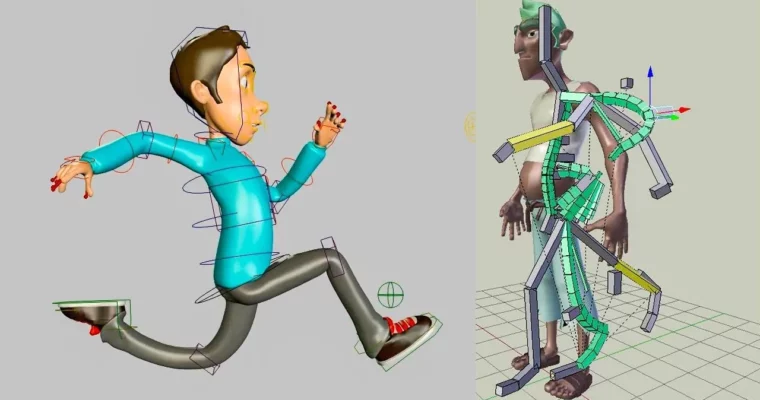
Cartoon Character Setup – Rigging Workshop 2 (In Blender) by Puppeteer Lounge

Duration:20 classes, approximately 1 hour each
Actual Duration:17h 34m
Release date:2025, May
Publisher:Puppeteer Lounge
Skill level:Intermediate
Language:English
Exercise files:Yes
Software:Blender
Course URL:https://puppeteerlounge.com/courses/rigging-workshop/character-rigging-workshops/cartoon-character-setup-rigging-workshop-2-in-blender/
Ready to build a character rig that animators will love? This workshop dives deep into creating a production-ready rig for cartoon characters in Blender. You’ll learn to break down a character’s anatomy and emotions to build a modular, animator-friendly rig that delivers top-notch performance and expression. It’s split into two main parts: a robust body rig and an expressive facial rig, all designed to be super intuitive.
🎯 What you’ll learn
- Create a flexible and stretchy IK-FK spine rig.
- Build advanced arm and leg rigs with bendy deformation and twist controls.
- Master skinning and weight painting for realistic deformations.
- Set up a detailed facial rig using blendshapes and deformers.
- Implement squash, stretch, and bendy controls for expressive facial animation.
- Rig non-flipping arms and shoulders for single-mesh characters.
- Utilize the SHAPES tool for efficient blendshape creation.
- Sculpt, combine, and drive facial shapes for production-quality results.
✅ Requirements
- Skills: Familiarity with Blender interface and basic 3D concepts. Experience with previous rigging or animation courses is beneficial.
- Tools: Blender (latest stable version recommended).
- Hardware: A computer capable of running Blender smoothly, especially when dealing with complex rigs and mesh deformations.
📝 Description
This workshop is all about building a production-ready cartoon character rig from the ground up using Blender. We’ll dissect the character’s anatomy and emotional range first, then systematically build a rig that’s a dream for animators to work with. The course is structured into two main phases: first, we tackle a robust and flexible body rig, and second, we dive into creating a highly expressive facial rig. You’ll learn techniques for stretchy IK-FK systems, advanced deformation controls for limbs, and precise weight painting.
The bonus materials are a game-changer, offering deep dives into advanced topics like Soft IK, Automated Pivot Control, IK-FK Snapping, Space Switching, and Smear Controls. You’ll also get specialized training on rigging non-flipping arms and shoulders, working with different clothing types, and mastering the SHAPES tool by Brave Rabbit. Plus, there’s an extensive section on creating production-quality facial blendshapes and corrective shapes through sculpting, combining, weight mapping, and shape driving for superior deformations.
🧑🎓 Who this course is for
- 3D Animators looking to specialize in character rigging.
- Rigging Artists wanting to refine their skills for cartoon characters.
- Technical Directors aiming to build efficient and animator-friendly rigs.
- Hobbyists eager to create their own animated characters in Blender.
🧑🏫 About the Author
[Puppeteer Lounge] is dedicated to providing high-quality, practical training for 3D animation professionals. They focus on real-world workflows and industry-standard techniques, empowering artists to achieve professional results. Their courses are known for their in-depth content and focus on building robust, production-ready assets.🏁 Final Result
By the end of this workshop, you will have a fully rigged, production-ready cartoon character in Blender, complete with an animator-friendly body and an expressive facial rig, ready to be animated for film or games. You’ll also have a solid understanding of advanced rigging techniques and tools.
 Channel


this is not the course in blender