Ad Clicks : Ad Views : Ad Clicks : Ad Views : Ad Clicks : Ad Views : Ad Clicks : Ad Views :
Oh Snap!

It looks like you're using an adblocker. Adblockers make us sad. We use ads to keep our content happy and free. If you like what we are doing please consider supporting us by whitelisting our website. You can report badly-behaved ads by clicking/tapping the nearby 'Advertisement' X text.

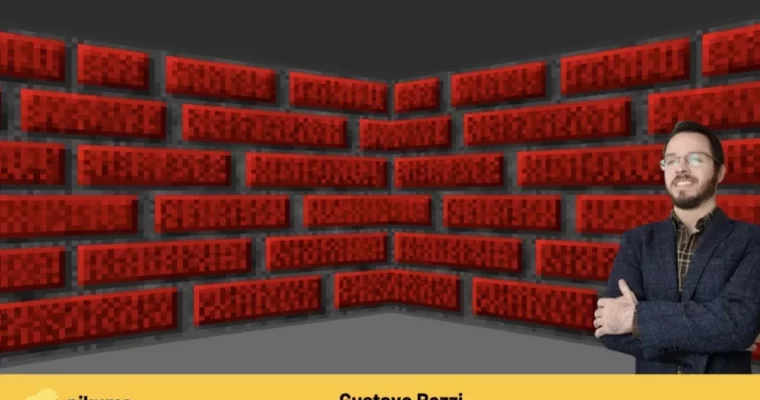
Raycasting Engine Programming by Gustavo Pezzi

Raycasting Engine Programming by Gustavo Pezzi

Author:Gustavo Pezzi

Duration:18 hours

Release date:2022, February

Publisher:Pikuma

Skill level:Beginner

Language:English

Exercise files:Yes

Software:JavaScript, C, SDL

Course URL:https://pikuma.com/courses/raycasting-engine-tutorial-algorithm-javascript

Build a classic 3D engine from scratch using JavaScript and C, just like Wolfenstein 3D.

Ready to build your own retro 3D game engine? This course dives into the raycasting technique, the magic behind classics like Wolfenstein 3D. You’ll learn the math and code it all yourself using JavaScript for the theory and C for a performance-boosted version.

🎯 What you’ll learn

  • Understand the math and trigonometry behind raycasting.
  • Implement player movement and 2D map rendering.
  • Project 3D walls and handle textured surfaces.
  • Code a functional raycasting engine in both JavaScript and C.
  • Explore optimization techniques for better performance.

βœ… Requirements

  • Skills: No prior experience needed; math and code are taught from scratch.
  • Tools: Web browser (JavaScript), C compiler (Windows, macOS, Linux), Pen and paper for math.
  • Hardware: Any computer capable of running a web browser and a C compiler.

πŸ“ Description

This course is all about building a raycasting engine, the tech that powered early first-person shooters like Wolfenstein 3D. We’ll start with JavaScript to get a solid grasp of the math and theory without getting bogged down in complex code. You’ll learn about trigonometry, field of view, and how to cast rays to detect walls.

Then, we switch gears to C for a compiled version. This is where we’ll tackle performance and optimization, implement textured walls, and add sprites. The instructor, Gustavo Pezzi, emphasizes a step-by-step approach, explaining every formula and line of code. You won’t find any skipped steps here; it’s all about building from the ground up.

πŸ§‘β€πŸŽ“ Who this course is for

  • Absolute beginners interested in game development and graphics programming.
  • Developers who want to understand the fundamentals of 3D engine creation.
  • Anyone curious about how classic games like Wolfenstein 3D achieved their 3D look.
  • Students looking for a practical, hands-on approach to learning C and JavaScript for game dev.

πŸ§‘β€πŸ« About the Author

Gustavo Pezzi is an award-winning university lecturer based in London, UK, and the founder of pikuma.com. With a background in computer science and mathematics from prestigious institutions like City University of London and the University of Oxford, Gustavo excels at breaking down complex topics. He’s known for his clear, fundamental teaching style, making advanced subjects accessible to all.

🏁 Final Result

  • A fully functional raycasting engine, capable of rendering a 3D environment with walls, textures, and sprites, coded in both JavaScript and C.
  • A portfolio piece demonstrating your understanding of core game engine principles and programming.
Curriculum

πŸ“‹ Course content

  1. Introduction
    • Motivations & Learning Outcomes
    • How to Take This Course
    • An High-Level Overview of the Raycasting Algorithm
    • Ray Casting or Ray Tracing?
    • Limitations of the Wolfenstein Raycasting Algorithm

  2. Trigonometry Review
    • Degrees and Radians
    • Sine, Cosine, and Tangent
    • Quiz: Trig Functions
    • A Note on Different Raycasting Techniques
  3. 2D Map and Player Movement
    • Defining the 2D Map Grid
    • The Map Class
    • Player Movement
    • Exercise: Map Collision
  4. Casting Rays
    • Defining the Field of View
    • FOV Increments
    • Wall Hits
    • Finding Horizontal Intersections
    • Finding Vertical Intersections
    • DDA Algorithm
    • Finding Grid-Cell Intersections
    • Fixing the Intersection Offset Error
    • Orientation using Angles vs. Vectors
    • Exercise: Ray Intersections
  5. Rendering Walls
    • Wall Projection
    • Computing the Wall “Strip” Height
    • Drawing the Minimap
    • Fixing the Fishbowl Distortion
    • Spherical vs. Linear Confusion
    • Exercise: Wall Shading Based on Depth
    • Bright/Dark Walls
    • Exercise: Walls with Different Colors
  6. Starting our C Code
    • Compiling our C Project
    • Configuring the C Compiler on Linux
    • Configuring the C Compiler on macOS
    • Makefiles
    • Configuring Visual Studio on Windows
    • Creating an SDL Window
    • SDL Rendering and SDL Event Polling
    • Rendering SDL Rectangles
    • Quiz: C Compilation
  7. Implementing a Game Loop
    • Game Loop Overview
    • Fixed Deltatime Game Loop
    • SDL Delay
    • Quiz: Game Loop
  8. Map and Player Movement
    • Drawing the Map with SDL
    • Player Movement and SDL Events
    • Exercise: Wall Collision in C
  9. Casting Rays in C
    • Ray Struct and Defining a Field of View
    • Finding Horizontal Intersections with C
    • Finding Vertical Intersections with C
    • Rendering Rays using SDL
  10. Defining a Colorbuffer
    • The Colorbuffer
    • Coding a Colorbuffer
    • Allocating and Freeing Memory
  11. Projecting Walls
    • A Function to Project and Render Walls
    • Exercise: Solid-Color Floor & Ceiling
  12. Textured Walls
    • Representing Textures in Memory
    • Creating Textures Manually
    • Mapping Textures to Walls
    • Working with Multiple Textures
    • Fixed-Size Data Types in C
    • Decoding PNG Files
    • Loading External PNG Files
    • Exercise: Reading Textures from PNG Files
  13. Fixing the Angle-Increment Distortion
    • Exercise: FOV Distortion
    • Understanding the Angle-Increment Distortion
    • Fixing the Angle-Increment Distortion
  14. Refactoring Project Files
    • Fullscreen Window
    • Refactoring the Graphics File
    • Exercise: Drawing Rectangles
    • Refactoring the Map File
    • Refactoring the Ray and the Player File
  15. Rendering Lines
    • The Line Equation
    • Rasterizing Lines
    • Implementing the DDA Algorithm
    • Exercise: Line Rendering
  16. Refactoring Wall Projection
    • Refactoring the Wall Projection Function
    • Sending Pointers via Parameter
    • Refactoring the Ray-Facing Code
    • Wall Texture Color Intensity
  17. Sprites
    • Raycasting Sprites
    • Sprite Typedef
    • Rendering Sprites in the Minimap
    • Identifying Visible Sprites
    • Visible Sprites in the Wolfenstein 3D Code
    • Computing Sprite Distance
    • Normalization of the Player Rotation Angle
    • Computing Sprite Projection Height
    • Computing Sprite X Position
    • Computing Sprite Rectangle Position in the Screen
    • Displaying Textured Sprite
    • Exercise: Sorting Sprites by Distance
    • Exercise: Sorting Behind Walls
    • Enemies and Sprite Animation
    • Concluding our Raycasting Implementation
  18. Moving Forward and Next Steps
    • A Discussion About Look-Up Tables
    • Conclusion and Next Steps
    • Moving Forward and Extra Resources
Watch online or Download for Free
Raycasting Engine Programming by Gustavo Pezzi
NAME
SIZEDURATION


Join us on
  Channel    and      Group

Leave a Comment

Your email address will not be published. Required fields are marked *