Ad Clicks : Ad Views : Ad Clicks : Ad Views : Ad Clicks : Ad Views : Ad Clicks : Ad Views :
Oh Snap!

It looks like you're using an adblocker. Adblockers make us sad. We use ads to keep our content happy and free. If you like what we are doing please consider supporting us by whitelisting our website. You can report badly-behaved ads by clicking/tapping the nearby 'Advertisement' X text.

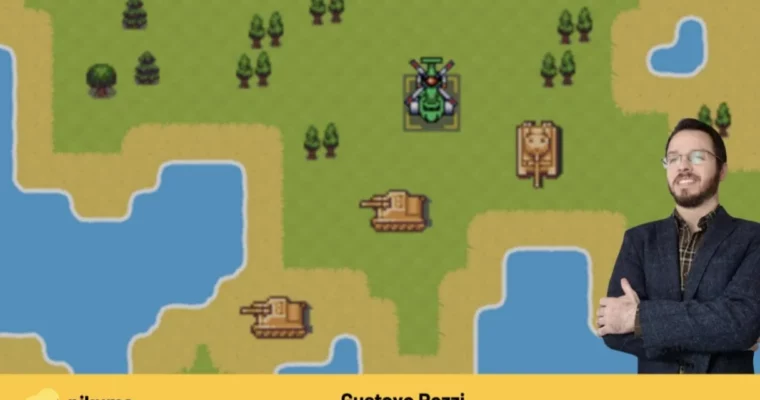
C++ Game Engine Programming by Gustavo Pezzi

C++ Game Engine Programming by Gustavo Pezzi

/

Author:Gustavo Pezzi

Duration:30 hours total length

Release date:2022, February

Publisher:Pikuma

Skill level:Beginner

Language:English

Exercise files:Yes

Software:C++, SDL2, Lua, GLM, Dear ImGui, Sol

Course URL:https://pikuma.com/courses/cpp-2d-game-engine-development

Build a 2D game engine from scratch using C++, SDL, and Lua scripting.

Want to peek under the hood of game development? This course dives into the core architecture of 2D game engines. You’ll learn common programming patterns and then actually build a small engine using modern C++, SDL, and Lua scripting. It’s all about understanding how the pieces fit together to make games tick.

🎯 What you’ll learn

  • Understand the fundamentals of 2D game engine architecture.
  • Implement a small ECS (Entity-Component-System) framework from scratch.
  • Learn how to organize game objects in memory for better performance.
  • Integrate Lua scripting into a native C++ engine.
  • Explore topics like data-oriented design, game loop mechanics, and asset management.

βœ… Requirements

  • Skills: Basic programming concepts (loops, functions, classes), familiarity with Object-Oriented Programming (OOP).
  • Tools: A code editor or IDE.
  • Hardware: Windows, macOS, or Linux operating system.

πŸ“ Description

This course isn’t just about making a single game; it’s about understanding the engine itself. You’ll build a functional C++ game engine from the ground up, learning how to manage entities, components, and systems with an ECS architecture. We’ll cover essential topics like data-oriented design for performance, handling game loops, managing assets, and implementing animation and collision systems. A key feature is integrating Lua scripting, allowing you to add dynamic behavior and level loading to your engine. This approach gives you a solid foundation for creating various types of 2D games.

πŸ§‘β€πŸŽ“ Who this course is for

  • Beginner programmers who want to understand C++ in the context of game development.
  • Developers familiar with basic programming logic and OOP concepts, regardless of their prior C++ experience.
  • Anyone interested in learning how game engines are structured and built internally.

πŸ§‘β€πŸ« About the Author

Gustavo Pezzi is an award-winning university lecturer based in London, UK, and the founder of pikuma.com. With an academic background spanning institutions like Pittsburg State University, City University of London, and the University of Oxford, Gustavo brings a deep understanding of computer science and mathematics to his teaching. He’s known for making complex topics accessible and practical.

🏁 Final Result

  • A working, small-scale 2D game engine written in C++ with SDL and Lua integration, capable of being used as a foundation for various game projects.
  • A portfolio piece demonstrating your understanding of game engine architecture and low-level game development.
Curriculum

πŸ“‹ Course content

  1. Introduction
    • Motivations & Learning Outcomes
    • How to Take This Course
  2. Libraries and Dependencies
    • Project Technologies and Libraries
    • Configuring Linux Dependencies
    • Configuring macOS Dependencies
    • Compilation
    • Linking
    • Makefiles
    • Configuring Visual Studio on Windows
    • Quiz: Compilation and Linking
    • Static vs. Dynamic Libraries
  3. Displaying the Game Window
    • Game Loop
    • Game Class
    • Creating an SDL Window
    • Polling SDL Events
    • Rendering the SDL Window
    • Fullscreen SDL Window
    • Fake Fullscreen vs. Real Fullscreen
    • SDL GPU Acceleration and VSync
    • Quiz: SDL Window
  4. Rendering SDL Objects
    • Drawing an SDL Rectangle
    • Double-Buffered Rendering
    • Loading PNG Textures
    • Quiz: Game Loop and SDL Window
  5. Game Loop Timestep
    • Object Movement and Velocity Vectors
    • Fixed Game Framerate
    • SDL Delay
    • Variable Delta Time
    • Uncapped Framerate
    • Game Loop and Determinism
    • Quiz: Game Loop Timestep
  6. Logging
    • Logger Class
    • Exercise: Logging Game Information
    • Coding the Logger Class
    • Popular C++ Logger Libraries
    • Quiz: Logger
  7. Project Folder Structure
    • Project Subfolders
    • Makefile Variables
  8. Organizing Game Objects
    • Creating C++ Objects
    • Examples of C++ Object Creation
    • Organizing Game Objects
    • Object Inheritance Design
    • Quiz: C++ Objects
  9. ECS Design
    • Component-Based Design
    • Entity-Component-System Design
    • ECS Folder Structure
    • System Component Signature
    • Working with C++ Templates
    • Component Type Template
    • Understanding Component
    • Exercise: System Functions
    • Adding and Removing Entities from Systems
    • The Erase-Remove Idiom
    • Operator Overloading for Entities
    • Quiz: ECS Design
  10. ECS Implementation
    • Pool of Components
    • The Pool Class
    • Coding the Pool Class
    • Registry Systems & Entity Signatures
    • Entity Creation
    • Adding Components
    • Removing Components
    • Implementing System Functions
    • Quiz: ECS Implementation
  11. Creating Entities and Components
    • Creating our First Entity
    • Smart Pointers
    • Converting ECS Code to Use Smart Pointers
    • Raw Pointers for SDL
    • Quiz: Smart Pointers
    • Adding our First Component
    • Careful with Types size_t and int
    • Exercise: Entity Class Managing Components
    • Entity Class Managing Components
    • Warning About Cyclic Dependency
  12. Creating Systems
    • Movement System
    • Movement System and Delta Time
    • Render System
  13. Managing Assets
    • Managing Game Assets
    • The Asset Store
    • Displaying Textures in our Render System
    • Exercise: Displaying the Tilemap
    • Displaying the Tilemap
    • Rendering Order
    • Sorting Sprites by Z-Index
  14. Animation System
    • Animated Sprites
    • Animation System
    • Identifying Animations By Name
  15. Collision System
    • Entity Collision Check
    • Implementing the Collision System
    • Exercise: Rendering a Collider Rectangle
    • Quiz: 2D Collision
  16. Killing Entities
    • Killing Entities and Re-Using IDs
    • Implementing Entity Removal
  17. Event System
    • Introduction to Event System
    • Event System Design Options
    • Event Handlers
    • Emitting Events & Subscribing to Events
    • Exercise: Key Pressed Event
    • Event System Design Patterns
    • Quiz: Event System
  18. Other Components and Systems
    • Keyboard Control System
    • Camera Follow System
    • Sprites with Fixed Position
    • Projectile Emitter Component
    • Projectile Duration
    • Health Component
    • Exercise: Shooting Projectiles
    • DRY Code
  19. Entity Tags and Groups
    • Tags & Groups
    • Optimizing Access of Tags & Groups
    • Projectiles Colliding with Player
    • Projectiles Colliding with Enemies
    • Compilation Times
  20. Data-Oriented Design
    • Data-Oriented Design
    • Cache Hits and Cache Misses
    • Avoiding Data Gaps
    • Packed Pool of Components
    • Array of Structs vs. Struct of Arrays
    • Cache Profiling with Valgrind
    • Popular C++ ECS Libraries
  21. Displaying True-Type Fonts
    • Adding Fonts to the Asset Store
    • Render Text System
    • Exercise: Rendering Health Value
  22. Dear ImGui
    • Introduction to Dear ImGui
    • Dear ImGui and SDL
    • Dear ImGui Demo Window
    • Immediate-Mode GUI Paradigm
    • Render GUI System
    • Button to Spawn Enemies
    • Exercise: Customization of New Enemies
    • Quiz: Dear ImGui
  23. Culling and Map Control
    • Killing Entities Outside Map Limits
    • Flipping Sprites on Collision
    • Invisible Entities & Obstacles
    • Exercise: Keeping the Player Inside the Map
    • Culling Sprites Outside Camera View
  24. Lua Scripting
    • Game Scripting
    • The Lua Scripting Language
    • Using Sol as a C++ Lua Wrapper
    • Lua State
    • Reading Lua Tables
    • Fetching Missing Table Values with Sol
    • Lua Functions
    • Level Loader Class
    • Reading Assets from a Lua Table
    • Handling Multiple Objects in a Lua Level
    • Scripting for Night/Day Tilemap
    • Scripting Entity Behavior with Lua
    • Script System
    • Lua Bindings
    • Binding Multiple Lua Functions
    • Loading Different Lua Levels
    • Division of C++ and Lua Code
    • Quiz: Lua Scripting
  25. Conclusion
    • Finishing our Code
    • Next Steps
  26. Bonus: Tilemap Editor
    • Proposed Project: Tilemap Editor
  27. Moving Forward
    • Moving Forward
    • Copyright & Content Distribution
Watch online or Download for Free
C++ Game Engine Programming by Gustavo Pezzi
NAME
SIZEDURATION


Join us on
  Channel    and      Group

Leave a Comment

Your email address will not be published. Required fields are marked *