3ds max Corona render – Creating Private Villa by Faissal Lamjid

Duration:1h 40m
Release date:2021, April
Publisher:Udemy
Skill level:Beginner
Language:English
Exercise files:Yes
Software:3ds Max, Corona Renderer, Forest Pack, Adobe Photoshop
Course URL:https://www.udemy.com/course/3ds-max-corona-render-exterior-visualization
Want a no-fluff way to get from a DWG plan to a client-ready exterior? This course walks you through a full private villa build in 3ds Max and Corona Renderer — modeling, daylight, materials, scatter, render, and Photoshop touch-up.
🎯 What you’ll learn
- Import a DWG plan into 3ds Max and set up units for archviz
- Model walls, slabs, windows, doors, glass fences, and terrain fast
- Set up daylight with HDRI and Corona Sun/Sky for exteriors
- Build fast, render-friendly Corona materials for glass, concrete, wood, and water
- Scatter trees and plants with Forest Pack without killing render times
- Set cameras, render settings, save CXR, and post-process in Photoshop
✅ Requirements
- Skills: Basic familiarity with 3ds Max interface, viewport navigation, and simple modeling
- Tools: 3ds Max, Corona Renderer, Forest Pack, Adobe Photoshop installed. Working files included to follow along.
- Hardware: Desktop workstation with multi-core CPU and 16GB+ RAM for CPU rendering
📝 Description
This is a straight walkthrough, start to finish. You take a 2D plan, bring it into 3ds Max, and block out the whole villa — walls, openings, slabs, glass fence, pool border, and basic terrain. The focus is on editable modeling. No heavy boolean mess, no over-detailed geometry that slows you down later.
Then you make it look real. You’ll set up HDRI lighting for a clean daylight look, place a physical camera for a strong exterior angle, and build a small library of fast Corona materials. Glass, white plaster, wood decking, paving, water, leaves — all tuned to render quick and hold up at full res. For greenery, you’ll use Forest Pack to scatter trees and plants from a library instead of placing everything by hand.
Last part is output. You’ll dial in simple Corona render settings, save out CXR and render elements, then finish the image in Photoshop. Exposure, contrast, sky tweak, vegetation pop, a bit of sharpness — just enough to make it presentable to a client without spending another hour in post.
If you’re stuck doing tutorials that never show a full job, this one is different. It’s short, practical, and built around one real project you can reuse as a template.
🧑🎓 Who this course is for
- Beginners in 3ds Max who know the basics but don’t know where to start with full visualizations
- Freelancers and students who want a complete, repeatable workflow for exterior archviz jobs
- Intermediate users who want to speed up modeling, lighting, and rendering in Corona
🧑🏫 About the Author
Faissal Lamjid works in architectural visualization with a focus on fast exterior workflows in 3ds Max and Corona Renderer. His teaching style is project-based: one villa, real CAD input, and production tricks for modeling, daylight, and materials that keep render times low.
🏁 Final Result
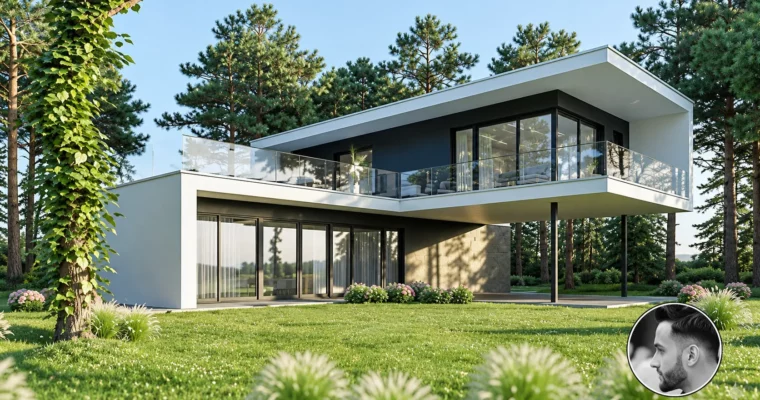
- A portfolio-ready photorealistic daylight render of a modern private villa exterior, modeled from DWG, lit with HDRI, scattered with Forest Pack, and post-processed in Photoshop.
 Channel