


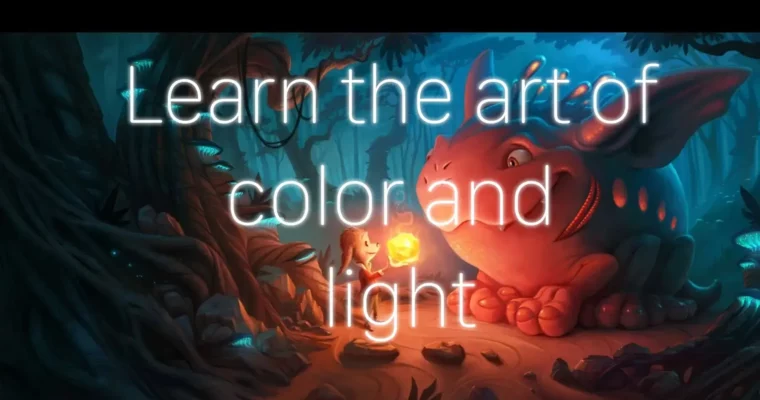
Painting Light 101 by Jeremy Vickery

Duration:7+ hours of lecture (self-paced)
Actual Duration:7h 1m
Release date:2023
Publisher:Lighting Mentor
Skill level:Beginner
Language:English
Exercise files:Yes
Software:Photoshop, Krita, Affinity Photo, Clip Studio Paint, Procreate
Course URL:https://www.lightingmentor.com/
Ready to make your digital paintings pop with realistic light and color? This course is your crash course in understanding how light behaves and how to translate that into stunning artwork. Forget just copying what you see; you’ll learn to truly observe light, from its scientific principles to its artistic impact, and replicate it with confidence.
🎯 What you’ll learn
- Understand the science and art of light and shadow.
- Master color theory, temperature, and relativity for impactful visuals.
- Develop observational skills to see light in the real world.
- Learn essential digital painting tools and techniques.
- Create realistic textures and blend colors seamlessly.
- Apply concepts of dynamic range and bloom for visual depth.
✅ Requirements
- Skills: No prior painting experience needed, but a willingness to observe and practice is key.
- Tools: A drawing tablet is essential for digital painting.
- Hardware: A computer capable of running digital art software like Photoshop, Krita, Affinity Photo, Clip Studio Paint, or Procreate.
📝 Description
This course dives into the fundamental principles of light and color, crucial for any digital artist. You’ll start with the absolute basics, even covering the essential software setup for digital painting. The core focus is on developing your ability to see light – understanding its scientific behavior and artistic application – and then confidently replicating it in your work. Over six weeks, you’ll tackle assignments designed to hone your observational skills and painting techniques, learning to paint anything you encounter by truly understanding how light shapes it. Expect practical demonstrations, including painting simple geometry, more complex objects, and even classic art pieces, all while exploring concepts like color temperature, relativity, reflections, and shadows.
🧑🎓 Who this course is for
- Absolute beginners curious about digital painting and realistic lighting.
- Artists looking to improve their understanding of light and color fundamentals.
- Anyone who wants to learn how to observe and paint light more effectively in their artwork.
- Digital artists seeking to add more depth and realism to their paintings.
🧑🏫 About the Author
Jeremy Vickery is a seasoned professional with over 25 years of experience in the animation, film, and games industries. He’s known for his work at Pixar Animation Studios, where he honed his expertise in lighting and color. Jeremy brings this wealth of industry knowledge to his teaching, breaking down complex concepts into understandable lessons for aspiring artists.
🏁 Final Result
- You’ll complete a series of practical assignments and studies, building a portfolio of work that demonstrates your improved understanding of light and color.
- You’ll gain the confidence to observe and paint any subject by accurately representing how light interacts with it.
 Channel




OMG thank you!
Thank you very much 🥰🥰
Are you planning on uploading part 2 as well?
as soon as it drops anywhere, we’ll upload it here immediately, just watch
hi. can you please upload painting light 102 and 103
https://www.proko.com/s/REJ8