It looks like you're using an adblocker.
Adblockers make us sad. We use ads to keep our content happy and free. If you like what we are doing please consider supporting us by whitelisting our website. You can report badly-behaved ads by clicking/tapping the nearby 'Advertisement' X text.
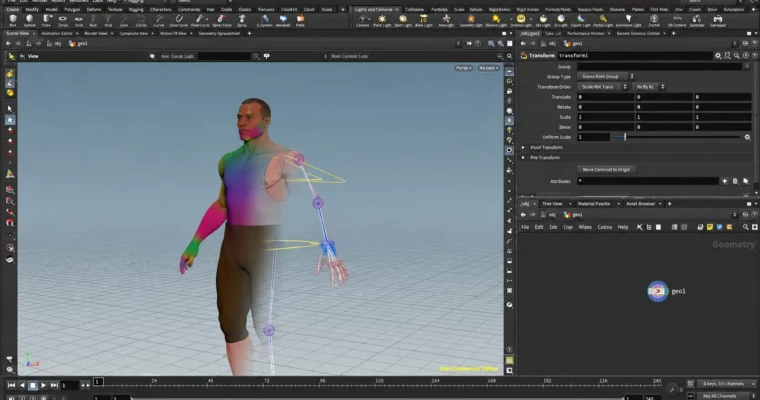
Humanoid Rigging For Games Using Houdini And KineFX by Simon Hayes
Build a complete game-ready humanoid rig in Houdini KineFX with IK/FK and Unity export.
This is a full build-along for a game-ready humanoid rig in Houdini. You build the skeleton, solvers, controls, and export from scratch with KineFX, and end up with something you can actually drop into Unity and drive with mocap.
🎯 What you’ll learn
Build a reconfigurable humanoid skeleton in Houdini KineFX
Create consistent joint orientations with a custom reorient setup
Build hip, spine, leg, arm, hand, and head solvers with IK/FK blending
Set up global vs local controls and blend methods that work in games
Create finger pose presets and blendable hand controls
Handle root motion, twist bones, and proxy geometry for deformation
Build an export pipeline with FBX, character/animation export, and LODs
Make the rig compatible with Unity humanoid and mocap libraries
Curriculum
📋 Course content
Module 1:Foundations and Humanoid Skeleton Build
Introduction7:13
A Summary Of KineFX6:28
KineFX Attributes3:54
Root Motion3:18
Naming1:43
Houdini 19 Updates3:38
Scene Setup2:40
Adding The Root11:09
Adding The Spine7:20
Adding The Head and Neck4:32
Spine Orientations11:15
Adding The Leg6:46
Leg Orientations9:30
Foot Orientations9:59
Finding The Foot Joints7:36
Finishing The Leg5:17
Adding The Arm4:35
Arm Orientations8:09
Cleaning Up The Skeleton4:54
Adding The Fingers6:00
Finger Logic And Orientation4:31
Adding The Eyes And Jaw7:03
Adding Extra Controls7:39
Finishing The Skeleton12:51
Module 2:Rig Setup, Hips and Spine Solvers
Setting Up The Rig HDA10:56
The Initial Control Setup8:04
The Rig Setup5:23
The Hip Solver8:19
Setting Up The Global And Local Controls7:33
The Solver For The Spine Controls8:35
The Spine Solver: The Curve Solver11:25
The Spine Solver: Rotations20:09
The Spine Solver: Spherical Linear Interpolation9:23
The Spine Solver: Adding The Interface8:50
Refining The Spine12:31
Module 3:Legs, Arms, Head, IK/FK and Export – Part I
The Legs6:40
Adding Controls For The Feet10:47
The Solver For The Feet16:45
Preparing The Scene For The Arms8:52
Setting Up The Arm Controls9:20
Setting Up The Controls For The Hands6:06
The Shoulder IK Control4:06
The Shoulder Solver: Calculating Directions16:09
The Shoulder Solver: Rotating The Shoulder9:12
The Shoulder Solver: Refining The Solver4:21
The Solver For The Hand3:41
The Global / Local Blend For The Arm9:51
BUG FIX: The Elbow Control1:16
Cleaning Up The Arms11:29
Creating Poses For The Fingers8:10
The Pose Controls For The Fingers16:29
The Finger Controls4:27
Adding Local Look-At Joints9:17
Adding Controls For The Head8:06
Adding The Solver For The Eyes7:15
The Neck Solver3:36
The Head Solver5:57
The Jaw Solver3:44
IK/FK Blending: Spine6:56
IK/FK Matching: Spine6:05
IK/FK Interface: Legs11:20
IK/FK Solver Update: Legs10:44
IK/FK Arms7:36
IK/FK Head6:19
Deformation8:12
Export: Polygon Reduction And LODs9:36
Export: The Root Bone5:55
Export: Character And Animation14:47
Viewer State And Visibility Interface4:54
Visibility: Root, Global And Local7:05
Visibility: Spine And Legs3:05
Visibility: Arms And Head6:20
Summary: The End Of Part I And What Can Still Be Improved3:08
Module 4:Rebuild Pass – Skeleton, Weights and RigMain
Introduction5:13
Scene Setup7:15
The Edit Mesh And Skeleton HDA Setup6:05
Updating The Skeleton15:21
Weights5:17
Weighting Rigid Geometry14:00
Displaying The Deformations9:53
Proxy Geometry16:42
The Skeleton Export Node26:33
Improving the Interface Using kwargs9:52
Bug Fixes: Skeleton And Weights4:53
The Edit Mesh Node8:29
Setting Up The RigMain Node3:17
Updating The Inputs Of RigMain Node7:56
Separating The Weights And Exports2:53
The Foot Control Joints4:06
Separating The Skeleton And Controls11:19
Updating The Controls13:52
Controls: Cache And Display11:18
Controls: The Local Controls10:04
Controls: The Global Controls13:34
Examining The Spine And The FK Controls7:34
Controls: The FK Controls8:23
Solver: The Root And Hips10:43
Solver: The Upper Chest16:35
Solver: The Spine8:02
Solver: The Spine Twist Attribute9:53
Solver: The Spine Parameters12:39
IK Matching Update21:04
Solver: The Leg And Foot Controls14:34
IK / FK Matching: Legs And Spine11:59
Solver: The Arms14:34
Controls: The Hands7:07
Solver: The Arm Global / Local Blend9:37
Solver: The Arm Solver12:14
Controls: The Fingers4:40
Solver: The Finger Controls22:56
Solvers: The Head6:48
Controls: The Head9:42
Solvers: The Head And Eye Solvers16:41
Solver: The Jaw11:46
Clean-up And Interface Layout7:25
RigMain Display11:40
Visibility8:48
Parameters: Spine And Legs14:53
Parameters: Arms And Head11:26
Pose Channels: Torso And Head26:06
Pose Channels: Arms And Head24:42
Pose Channels: FK9:22
Adding Channel Groups8:39
The RigDisplay Node4:55
Module 5:Export Node, Houdini 19 Conversion and Extensions
The Export Node: Layout8:05
The Export Node: The Interface10:57
The Export Node: Character And Animation Names16:59
The Export Node: The Initial FBX Export17:53
The Export Node: Animation Export7:20
The Export Node: LOD 018:27
The Export Node: LODs And Poly-reduction14:57
The Export Node: Painting Retention16:01
Updating The FK Matching And Viewer States15:17
Houdini 19 Rig Conversion: Viewer State2:35
Houdini 19 Rig Conversion: Pose Nodes15:18
Houdini 19 Rig Conversion: Adding Controls16:14
Houdini 19 Conversion: Universal And Global Controls14:49
Houdini 19 Conversion: FK Controls16:28
Houdini 19 Conversion: Local Controls18:25
Extending the Rig: Twist Bones14:31
Extending the Rig: Twist Weights4:03
Mixamo1:38
Mapping Joints5:59
Deformation, Spine And Feet4:37
Eye Joints4:50
Eye Solver4:36
General Fixes5:17
Controls3:17
Box2:41
Sphere3:20
Planes3:22
Prism1:35
Octohedron3:20
Revolve6:38
Root4:10
Direction4:53
Module 6:Full Rebuild – Project, Skeleton, Controls and Weights
Introduction9:03
KineFX Overview4:04
Attributes, Names And Transforms4:07
Naming Conventions3:10
Separating Rigs Into Components1:33
The Rig Structure2:55
Creating Joints: Skeleton Node Vs Manual Creation6:26
Adding Controls3:58
Manipulating The Rig2:39
Creating The Project1:32
Importing The Character Geometry7:27
The Build HDAs3:23
The EditMesh Node4:38
The EditMesh Node Output And Interface9:37
The Root Joint4:33
The Spine4:08
The Spine Interface5:59
The Leg Joints11:14
The Legs Symmetry5:15
The Legs Interface7:59
Assembling The Rig5:14
The Foot Joints6:55
The Arm Joints7:09
The Arm Orientation And Parameters6:26
The Fingers9:34
The Finger Controls27:33
The Finger Parameters10:36
The Fingers Constraining To A Plane8:28
The Head And Neck4:17
The Jaw3:10
The Eyes7:00
Placing The Eyes Using The Character Geometry (12:53)
*
Watch online or Download for Free
Humanoid Rigging For Games Using Houdini And KineFX by Simon Hayes




 Channel