Forest Cabin Workshop – 3ds max Corona Render by Alex Kondratiev

Duration:5 hours
Release date:2023, June
Publisher:Udemy
Skill level:Intermediate
Language:English
Exercise files:Yes
Software:3ds Max, Corona Renderer, Adobe Photoshop, Quixel Megascans
Course URL:https://www.udemy.com/course/forest-cabin-workshop-3ds-max-corona-render
Want a portfolio piece that actually looks like a finished exterior job? In this workshop you build a lakeside forest cabin in 3ds Max with Corona Renderer, set up cameras and HDRI lighting, scatter vegetation, and finish it in Photoshop to that clean, gallery level.
🎯 What you’ll learn
- Set up cameras and frame a strong exterior composition
- Create realistic daylight / dusk lighting with HDRI in Corona Renderer
- Fill an exterior scene fast with vegetation and ready-made models
- Work with exterior materials and Quixel Megascans scans
- Tune Corona render settings for clean exterior stills
- Finish renders in Photoshop with color correction and matte painting tricks
✅ Requirements
- Skills: Basic familiarity with 3ds Max interface and 3D workflow
- Tools: 3ds Max 2019 or higher, Corona Renderer 4 or higher, Adobe Photoshop any recent version
- Hardware: Multi-core CPU, minimum 16GB RAM, dedicated GPU recommended for viewport work
📝 Description
This is not theory. You watch a full exterior project get built and you build along. Alex recorded this workshop live while making the forest cabin scene — the same image that later picked up Editor’s Choice on Evermotion. No cut corners, you get the scene files and PSD too.
We start with the boring-but-important stuff: how to prep the scene, place the camera, and lock a composition that sells the house and the landscape. Then we get into HDRI lighting and how to get that soft, believable forest light without fighting endless render settings.
Next up is speed. Exteriors die when they look empty, but scattering trees by hand takes forever. You’ll see how to work with vegetation libraries, Quixel Megascans models and scanned materials, and how to fill a large landscape fast while keeping control over scale, variation, and memory.
For materials we stick to what matters outside: wood, glass, stone, ground, water. You’ll tweak Corona Physical Materials for real-world response — roughness, reflection, bump — so the cabin holds up in close-ups, not just wide shots.
And the last 20% is Photoshop. That’s where flat renders turn into images. You’ll do color correction, atmosphere, trees in the background with matte painting, and small fixes that save you from re-rendering. Straightforward steps you can reuse on any exterior job.
🧑🎓 Who this course is for
- 3D artists and architects who want cleaner exterior renders in 3ds Max and Corona
- Beginners in ArchViz who already know the basics and need their first finished portfolio image
🧑🏫 About the Author
Alex Kondratiev is a practicing 3D visualization artist focused on exterior ArchViz. His forest cabin project made during this workshop received Editor’s Choice on Evermotion, one of the main galleries for architectural rendering. He teaches a straight production workflow: scene setup, lighting, scattering, and post — the same steps he uses on client work.
🏁 Final Result
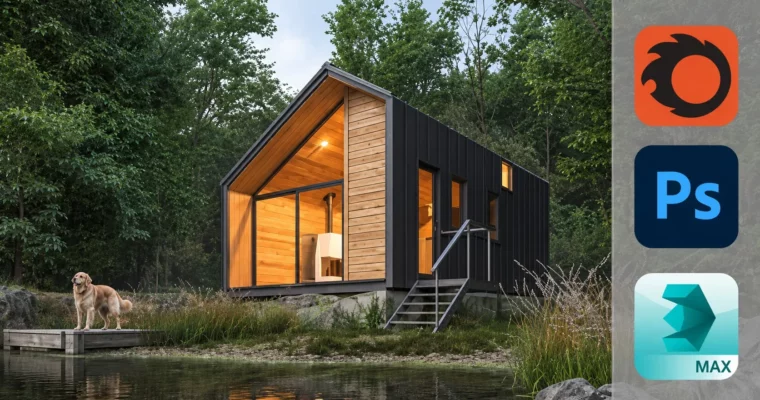
- Finished gallery-quality render of a forest cabin by the lake, plus full project source scene and final PSD for your portfolio breakdown
 Channel