Ad Clicks : Ad Views : Ad Clicks : Ad Views : Ad Clicks : Ad Views : Ad Clicks : Ad Views :
Oh Snap!

It looks like you're using an adblocker. Adblockers make us sad. We use ads to keep our content happy and free. If you like what we are doing please consider supporting us by whitelisting our website. You can report badly-behaved ads by clicking/tapping the nearby 'Advertisement' X text.

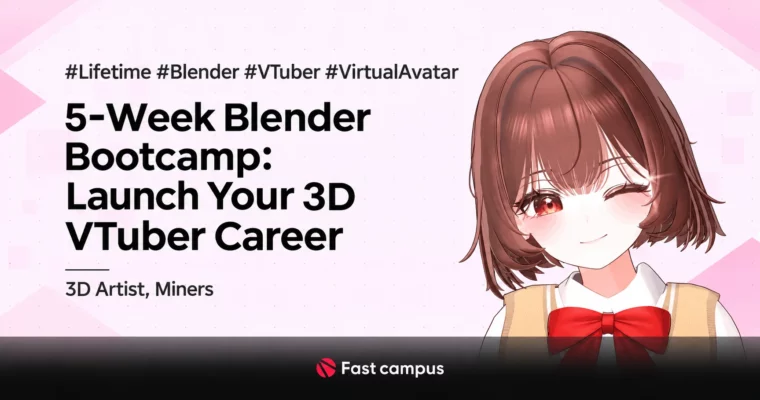
5-Week Blender Bootcamp Launch Your 3D VTuber Career by Gwangbu (광부, credited as Miners on poster)

5-Week Blender Bootcamp Launch Your 3D VTuber Career by Gwangbu (광부, credited as Miners on poster)

Author:Gwangbu (광부, credited as Miners on poster)

Duration:46 clips, about 17 hours

Actual Duration:34h 52m

Release date:2025, June 27

Publisher:FastCampus

Skill level:Beginner

Language:English

Exercise files:Yes

Software:Blender, Substance 3D Painter, Unity, Photoshop, iFacialMocap, Magica Cloth, lilToon Shader, MELIGO

Course URL:https://fastcampus.co.kr/dgn_online_vtuber5w

Build a debut-ready 3D VTuber avatar in 5 weeks, from Blender modeling to Unity setup and photo shoot.

FastCampus course by 3D artist Gwangbu (광부; poster credit “Miners” is the literal translation): a 5-week VTuber debut project taking a base avatar from cleanup and sculpting through clothing modeling, texturing, rigging, and Unity/MELIGO setup to the debut photo shoot. Original title: 블렌더로 5주만에 완성, 3D 버튜버 데뷔 프로젝트. Publisher claims 5 parts, 46 clips, about 17 hours; delivered set is 46 mp4 lessons.

🎯 What you’ll learn

  • Clean up a base avatar and sculpt eyes, makeup, mouth, and face shape to a reference
  • Build 52 facial Shape Keys and test them in Blender with iFacialMocap
  • Model original clothing and props: shirt, ribbon, vest, skirt, shoes, bag, mascot keyring
  • Unwrap UVs part by part and texture wrinkles and shadows in Substance 3D Painter
  • Rig garments with data transfer, customize colors in Photoshop, apply hair and clothes in Unity
  • Set up Magica Cloth bones, facial, and lilToon shaders, use MELIGO backgrounds and API, shoot debut photos

✅ Requirements

  • Skills: No 3D experience required; beginners welcome (step-by-step, function-by-function structure)
  • Tools: Blender, Substance 3D Painter, Unity, Photoshop (publisher provides 40+ learning files via Google Drive; programs not included)
  • Hardware: PC capable of running Blender / Substance Painter / Unity

📝 Description

Gwangbu has worked as a virtual 3D artist since 2022 and earns a living from monthly avatar commissions. The course compresses years of avatar know-how into a 5-week day-by-day routine (33 daily steps on the publisher page): each day finishes one concrete task, from 10-minute avatar tweaks to multi-hour modeling and texturing sessions.

Weeks 1-2 build the body: base cleanup, face sculpting, 52 shape keys, hair fitting, full original outfit plus props, part-by-part UVs, and Substance Painter wrinkle/shadow work. Week 3 finishes surfaces (hair gradient, PNG/PSD export) and rigs every garment. Week 4 upgrades the avatar into multiple variants (effects, recolors, length edits) and moves everything into Unity. Week 5 sets up Magica Cloth, facial, and lilToon shaders, pulls MELIGO backgrounds via API, and shoots the debut photos with the Booth capture tool. Durations to be verified after VOD measurement.

Note: poster filename and on-poster credit say “Miners” (literal translation of 광부); the thread and publisher use Gwangbu, which is the catalog title. Marketing says “46 clips”; the delivered set holds 46 mp4 lessons. The source pack also contains only a Google-Drive link file (강의 자료.txt) — 40+ learning files must be downloaded separately (see Class Materials step).

🧑‍🎓 Who this course is for

  • Beginners who want to debut as a VTuber with their own 3D avatar in 5 weeks
  • Blender users who want avatar-specific modeling, texturing, and rigging practice
  • VTuber artists who want Unity/MELIGO setup and debut-shoot workflow end to end

🧑‍🏫 About the Author

Gwangbu (광부) is a Korean virtual 3D artist active since 2022, specializing in 3D VTuber avatars. After learning through hands-on trial and foreign resources, Gwangbu now works full-time on monthly avatar commissions and teaches the full avatar pipeline from modeling to broadcast setup.

🏁 Final Result

  • A debut-ready 3D VTuber avatar (original outfit, textures, rig, shaders, Unity/MELIGO setup) plus debut photos shot with the Booth capture tool.
Curriculum

📋 Course content

  1. Part 1: Week 1 – Base Avatar Production
    • Chapter 1. Avatar Setup
      • Ch01-01. Removing Unneeded Parts, Bone Cleanup
    • Chapter 2. Avatar Sculpting
      • Ch02-01. Eye Sculpting to Reference
      • Ch02-02. Eye Makeup, Blush, Eye Color Customization
      • Ch02-03. Mouth Shape Sculpting to Reference
      • Ch02-04. Face Shape Sculpting to Reference
    • Chapter 3. 52 Shape Keys Analysis and Production
      • Ch03-01. Facial Expressions for Face Rig
      • Ch03-02. Facial Expressions for Face Rig, Advanced
    • Chapter 4. Facial Test with iFacialMocap
      • Ch04-01. In-Blender Facial Check and Fix, No Conversion
    • Chapter 5. Hair Fitting and Refinement
      • Ch05-01. Booth Hair Purchase and Reference-Based Remodel
    • Chapter 6. Clothing Modeling
      • Ch06-01. Original Shirt
      • Ch06-02. Original Ribbon
      • Ch06-03. Original Vest
      • Ch06-04. Original Skirt
    • Chapter 7. Clothing Modeling, Advanced
      • Ch07-01. Original Shoes
  2. Part 2: Week 2 – Avatar Quality Detail-Up
    • Chapter 1. Clothing Modeling, Advanced
      • Ch01-01. Extra Prop: Original Bag
      • Ch01-02. Extra Prop: Original Bear-Doll Keyring
    • Chapter 2. Part-by-Part UV Split, Cleanup and Layout

      • Ch02-01. UV Unwrap: Shirt
      • Ch02-02. UV Unwrap: Skirt
      • Ch02-03. UV Unwrap: Vest, Ribbon
      • Ch02-04. UV Unwrap: Shoes, Bag
    • Chapter 3. Texturing in Substance 3D Painter
      • Ch03-01. Substance Painter Setup for Texturing
      • Ch03-02. Shirt Wrinkles and Shadows
      • Ch03-03. Vest Wrinkles and Shadows
      • Ch03-04. Ribbon Wrinkles and Shadows
      • Ch03-05. Skirt Wrinkles and Shadows
      • Ch03-06. Bag and Bear-Doll Texturing
  3. Part 3: Week 3 – Avatar Refinement
    • Chapter 1. Texturing, Advanced
      • Ch01-01. Hair Gradient
    • Chapter 2. Texture Export
      • Ch02-01. Exporting Textures to PNG and PSD
    • Chapter 3. Avatar Rigging (Shirt, Vest, Skirt, Shoes)
      • Ch03-01. Shirt Rigging (Data Transfer)
      • Ch03-02. Vest Rigging (Data Transfer)
      • Ch03-03. Skirt Rigging
      • Ch03-04. Shoe Rigging
  4. Part 4: Week 4 – Multi-Type Avatar Upgrade
    • Chapter 1. Avatar Sculpting, Advanced
      • Ch01-01. New Special Effects (Angry, !, ? Marks)
      • Ch01-02. Hair Recolor in Photoshop
      • Ch01-03. Outfit Recolor in Photoshop
      • Ch01-04. Outfit Length Alteration
    • Chapter 2. Applying Clothes and Hair in Unity
      • Ch02-01. Applying Made Clothes and Booth Hair in Unity
  5. Part 5: Week 5 – Avatar Finalization
    • Chapter 1. Magica Cloth Setup
      • Ch01-01. MELIGO-Compatible Bone Setup
    • Chapter 2. Facial Setup
      • Ch02-01. MELIGO-Compatible Facial Setup
    • Chapter 3. Shader Setup
      • Ch03-01. lilToon Shader Setup
      • Ch03-02. Unifying Shader Values, MELIGO File Export
    • Chapter 4. MELIGO 3D Backgrounds and API
      • Ch04-01. Downloading and Applying MELIGO Backgrounds and Features
    • Chapter 5. Debut Photo Shoot
      • Ch05-01. Booth Capture Tool Install and Unity Setup
      • Ch05-02. Pose Setup
      • Ch05-03. Post-Processing (Pre-Shoot Retouch)
      • Ch05-04. Photo Shoot

📢 Guys, this is a Group Buy campaign, check the GBC forum thread to get access

You can find the course preview in the download section below.

Watch online or Download for Free
5-Week Blender Bootcamp Launch Your 3D VTuber Career by Gwangbu (광부, credited as Miners on poster)
NAME
SIZEDURATION
Gwangbu Eng Dub
158.7 MB57m
Part 1. Week 1 – Base Avatar Production
91.5 MB30m
Chapter 1. Avatar Setup
14.4 MB5m
Chapter 3. 52 Shape Keys Analysis and Production
19.6 MB5m
Chapter 4. Facial Test with iFacialMocap
12.6 MB5m
Chapter 5. Hair Fitting and Refinement
0 B
Chapter 6. Clothing Modeling
22.2 MB5m
Chapter 7. Clothing Modeling Advanced
0 B
Part 2. Week 2 – Avatar Quality Detail-Up
23.3 MB7m
Chapter 1. Clothing Modeling Advanced
19 MB5m
Chapter 2. Part-by-Part UV Split Cleanup and Layout
0 B
Chapter 3. Texturing in Substance 3D Painter
4.4 MB2m
Part 3. Week 3 – Avatar Refinement
8.6 MB5m
Chapter 1. Texturing Advanced
8.6 MB5m
Chapter 2. Texture Export
0 B
Chapter 3. Avatar Rigging – Shirt Vest Skirt Shoes
0 B
Part 4. Week 4 – Multi-Type Avatar Upgrade
19 MB5m
Chapter 1. Avatar Sculpting Advanced
19 MB5m
Chapter 2. Applying Clothes and Hair in Unity
0 B
Part 5. Week 5 – Avatar Finalization
16.3 MB10m
Chapter 1. Magica Cloth Setup
0 B
Chapter 2. Facial Setup
0 B
Chapter 3. Shader Setup
0 B
Chapter 4. MELIGO 3D Backgrounds and API
0 B
Gwangbu Eng Sub
22.6 MB10m
Part 1. Week 1 – 기본 아바타 제작하기
14.4 MB5m
Chapter 1. 아바타 세팅
14.4 MB5m
Chapter 2. 아바타 성형
0 B
Chapter 3. 52가지 셰이프 키(Shape Key) 분석 및 제작
0 B
Chapter 4. iFacialMocap을 활용한 페이셜 테스트
0 B
Chapter 5. 헤어 피팅 및 다듬기
0 B
Chapter 6. 의상 모델링
0 B
Chapter 7. 의상 모델링 심화
0 B
Part 2. Week 2 – 나만의 아바타 퀄리티 디테일 업!
0 B
Chapter 1. 의상 모델링 심화
0 B
Chapter 2. UV를 파츠별로 나눈 후 정리 및 배치
0 B
Chapter 3. Substance 3D Painter(서브스턴스 페인터)를 통한 텍스처링
0 B
Part 3. Week 3 – 아바타 성형하기
0 B
Chapter 1. 텍스처링 심화
0 B
Chapter 2. 텍스처 내보
0 B
Chapter 3. 아바타 리깅 (셔츠, 조끼, 치마, 신발 등)
0 B
Part 4. Week 4 – 여러 유형의 아바타로 업그레이드!
0 B
Chapter 1. 아바타 성형 심화
0 B
Chapter 2. Unity에서 의상과 헤어 적용하기
0 B
Part 5. Week 5 – 아바타 완성하기
8.2 MB5m
Chapter 1. Magica Cloth 세팅
0 B
Chapter 2. 페이셜 세팅
0 B
Chapter 3. 쉐이더 세팅
0 B
Chapter 4. MELIGO 3D 배경 & API 활용
0 B
Chapter 5. 버튜버 데뷔를 위한 사진 촬영
8.2 MB5m

Download all

Join us on
  Channel    and      Group

Leave a Comment

Your email address will not be published. Required fields are marked *