

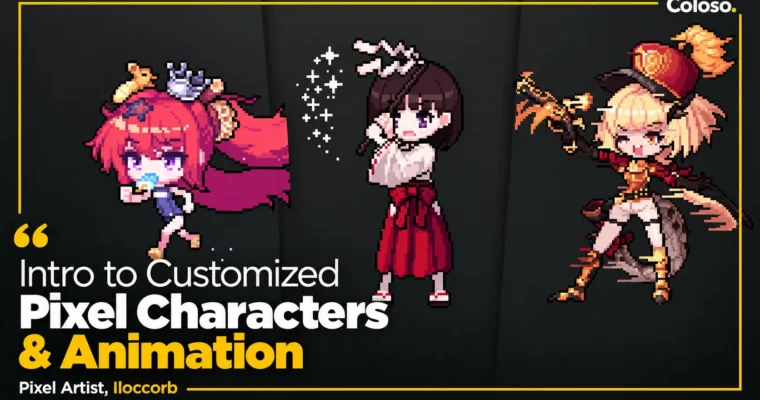
Intro to Customized Pixel Characters & Animation by Iloccorb
Duration:33 videos, 13 hours 23 minutes
Actual Duration:23h 17m
Release date:2024
Publisher:Coloso
Skill level:Beginner
Language:English
Exercise files:Yes
Software:Aseprite v1.2.31, Adobe Photoshop CS 6 or later
Course URL:https://coloso.global/en/products/gamegraphic-iloccorb9-us
Create game-ready dot (pixel) characters that move from every angle with pixel artist Iloccorb — freelance pixel artist after mobile game projects including Ragnarok 2009 ver., Growing Stone, Kingdom of the Winds: Yeon, Raising an Alchemist, Raising a Hunter. Across 33 videos in 2 sections (13h 23m) you go from dot overview and tool setup through color, outlines, viewpoints, light and shade to drawing top/side/quarter-view characters and animal sprites, then to full animation: idle, walk, run, jump, close-range and ranged attacks, subpixels, flags, plus 32px item icons, face icons and rotating animations — with 4 Bonus production demonstrations.
Even if I put a dot or draw a line in an empty space, there is a reason for everything in ‘art’ — we focus on why it is expressed this way and why this color is used here, to produce game resources quickly and efficiently. — Iloccorb
🎯 What you’ll learn
- Understand dots for games vs. dots for illustration — history, uses, and what ‘game play’ readability demands from a sprite
- Set up Aseprite v1.2.31 and Photoshop (CS 6+) for dot work and animate in both
- Build palettes on trend — dot color theory plus a pastel-tone palette reflecting latest color trends
- Draw clean lines — outline methods, viewpoint theory, light/dark and line-drawing theory, anti-aliasing
- Draw characters by size and angle — 16px / 32px / ~64px top-view, side-view and quarter-view characters, three outline uses, rough line stage to detail
- Draw animal (non-human, four-legged) characters side-view and animate them
- Animate the game essentials — idle, side/top/quarter walk, run, jump (physics-based), close-range attack with weapon trails, ranged attack (gun, bow)
- Add advanced life — subpixel animation, waving-flag + character idle combos, icon rotation animation
- Ship icons — 32px item icons with texture expression, character face icons (emoji)
- Work small but deep — neat detailed dots inside <100px spaces with visibility and color harmony readable in complex game scenes
✅ Requirements
- Skills: Basic — open from beginners dreaming of becoming pixel artists to current practitioners; no prior dot experience required
- Tools: Aseprite v1.2.31 [essential] + Adobe Photoshop CS 6 or later [select] — purchased and installed separately, not provided; take the course with the indicated versions; class materials included (EN)
- Languages: Audio KO, subtitles KO [Auto], EN, ZH-TW [Auto], ES [Auto]; 33 videos, 13h 23m total
- Notes: Photoshop coverage focuses on dot-related functions among its many features
📝 Description
Dots for illustrations and dots for game resources are different crafts — game dots must survive game play: readability in busy scenes, natural top/quarter/side views, and motion that reads at tiny sizes. This is a mobile-game customized curriculum, hard to find in systematic form, built from Iloccorb’s field years and popular dot-game lecture history.
Part 1 sets the base: dot outline and history, Aseprite + Photoshop setup, then light/shade by light direction, clean lines, and a trend-aware pastel palette. Part 2 draws casual characters around 64px from rough to detail — top, side, quarter, three outline styles, animal sprites, anti-aliasing. Part 3 animates: Aseprite and Photoshop animation functions, then idle, walk, run, jump, melee with trails, gun/bow ranged, animal walks, flag waves — ending with texture-driven 32px item icons, face emoji and rotating-body icon animation across 20+ rich examples.
Class features: game-resource dot concept (top/quarter/side done naturally), neat deep dots in <100px, and basic animation anyone can learn — character plus icon/object motion, all resource types for production.
Card built from browser-rendered manufacturer page (template A/fc-layout-214, HTML ~1.52M bytes, 2 sections / 33 lessons: 29 numbered + 4 Bonus demonstrations; page Class composition text groups the same lessons into 7 parts).
🧑🎓 Who this course is for
- Beginners dreaming of becoming pixel artists who want a systematic path instead of scattered tips
- Hobbyists who love cute dot sensibility and want to go beyond hobby into employment-ready skills
- Current dot practitioners stuck on direction who want deeper technique and animation range
- Mobile/indie game artists needing readable small sprites, walk/attack cycles and game icons
🧑🏫 About the Author
Iloccorb (pixel artist) is a freelance pixel artist after years in mobile games and small-business leadership. Former: Underworld Company Vice President & Art Director, Act Seven Entertainment Dot Manager, Bunkerville Art Team Leader, Gravity Dot Manager, Supercat Dot Manager. Projects: Kingdom of the Winds: Yeon, Growing Stone(s), Ragnarok 2009 ver., Raising an Alchemist, Raising a Hunter. Known for popular game-focused dot curricula on other platforms; this Coloso class distills that practical know-how — pain points beginners through practitioners share — into one lifetime lecture.
🏁 Final Result
- Trend-aware palette + pastel tone set and reusable color logic for small sprites
- Top/side/quarter human characters and side-view animal characters drawn clean at 16–64px with outline, light/shade and anti-aliasing control
- Full basic animation set: idle, side/top/quarter walk, run, physics-based jump, melee with trails, gun/bow ranged, animal walks, flag + character combos, subpixel motion
- Game icon set: texture-expressed 32px item icons, face icons and rotating-body icon animation — portfolio-ready dot resources optimized for mobile games
📢 Guys, this is a Group Buy campaign, check the GBC forum thread to get access
You can find the course preview in the download section below.
 Channel