

Postproducción y Matte Painting para ArchViz by Martin Loureiro

Release date:2025, November
Publisher:School-ing
Skill level:Intermediate
Language:Spanish
Exercise files:Yes
Software:Photoshop, 3ds Max
Course URL:https://school-ing.es/curso-matte-painting-archviz-2/
This course is about finishing images like a pro studio does. You take a decent 3D render, run it through a solid post-production workflow, and add matte painting where modeling would take forever.
🎯 What you’ll learn
- Build a full post-production workflow for ArchViz from render passes to final delivery
- Use render elements like AO, ZDepth, and masks to control light and depth
- Integrate photo plates, skies, vegetation and people into still renders
- Apply matte painting strategies for backgrounds, extensions and atmosphere
- Fix common render issues with color correction and photobashing
- Prepare clean, high-resolution finals for clients and portfolio
✅ Requirements
- Skills: Basic understanding of 3D rendering, familiarity with Photoshop layers and masks
- Tools: Photoshop, any 3D renderer for ArchViz like 3ds Max with Corona or V-Ray
- Hardware: Computer capable of handling high-res PSD files, minimum 16GB RAM recommended
📝 Description
Most renders look flat straight out of the 3D software. Studios fix that in post. Here you learn that exact process: how to organize render passes, rebuild light, add haze, push contrast where it matters, and keep everything editable when the client asks for changes.
Then comes the fun part. Instead of modeling a whole city, you paint it. You will work with photo plates, skies, trees, cutouts and brushwork to extend backgrounds, fill empty lots, and add life to the scene. It is faster, cheaper, and for stills it often looks better than full 3D.
Martin teaches it the way it happens on real jobs. Short decisions, practical tricks, no endless theory. You see what to fix first, what to leave alone, and how to get that clean photorealistic finish without overcooking the image.
🧑🎓 Who this course is for
- ArchViz artists who want cleaner, faster finals without re-rendering everything
- 3D generalists and students who know how to render but struggle with the final look
- Freelancers who need to add matte painting and post-production to their services
🧑🏫 About the Author
Martin Loureiro works in architectural visualization with a strong focus on post-production and image finishing. He collaborates with studios on residential and commercial projects, handling the final look from raw render to delivery.
His teaching is straight to the point and based on real studio workflows. He shows what actually saves time on deadlines and what clients notice in the final image.
🏁 Final Result
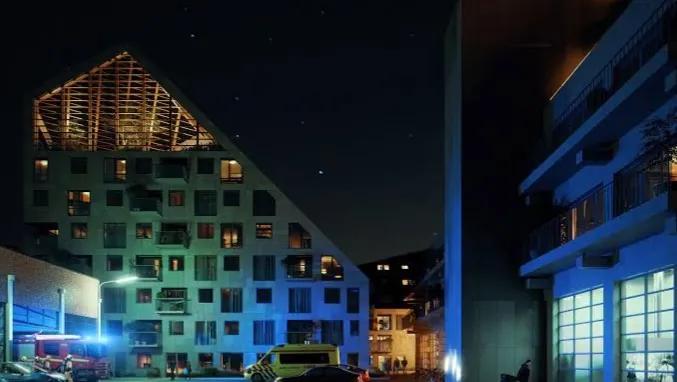
- A portfolio-ready ArchViz final built from a raw render with full post-production and matte painted environment
 Channel