Unreal Engine 5 Blueprints & Blender Learn Game Development by Victor Deno

Duration:9h 1m
Actual Duration:9h 1m
Release date:2023
Publisher:Udemy
Skill level:Intermediate
Language:English
Exercise files:Yes
Software:Unreal Engine 5, Blender
Course URL:https://www.udemy.com/course/how-to-make-your-first-game-with-blender-and-unreal-engine-5
Want to stop asset-flipping and actually ship a game? This one takes you from a blank Unreal Engine 5 template to a playable survival game, with all characters and environment made by you in Blender.
🎯 What you’ll learn
- Using Blueprints to make game mechanics
- Creating game art with Blender and exporting to Unreal Engine
- Making your own game environment
- Creating your own game character and enemies
- Common Blueprint practices
- Making complex HUDs with widgets
- Creating dynamic adjustable materials
- Develop strong problem solving skills
- Create a fully playable game from start to finish
✅ Requirements
- Skills: Basic navigation in Blender and Unreal Engine
- Tools: 3-button mouse, keyboard
- Hardware: PC capable of running Unreal Engine 5, dedicated GPU recommended
📝 Description
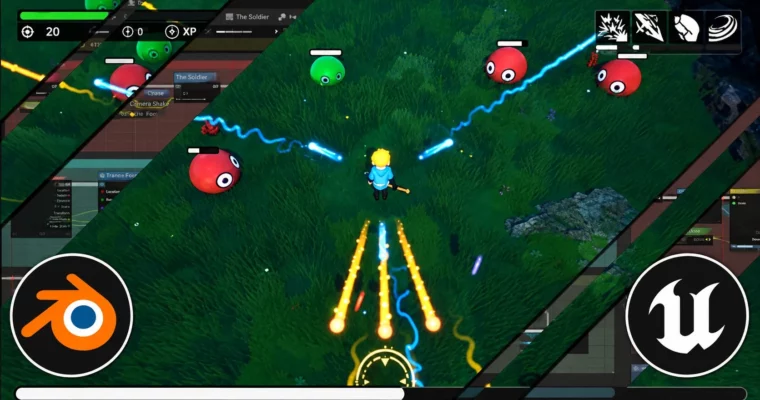
This isn’t a “watch me click” tutorial. You start empty and build a 10-minute survival game with Zelda-like looks. No store packs. You model, texture, and export everything yourself, then wire it up to work in-engine.
On the Unreal Engine 5 side, you work almost entirely in Blueprints. That means character controllers, enemy AI that chases you, projectiles, timers, damage logic, and how different Blueprints talk to each other. You also build real UI: health bars, damage numbers, kill count, timer, skill indicators, level-up screens, plus a main menu and pause menu.
On the Blender side, it’s a full game-art loop. You model props like coins, slimes, a staff and a playable character, then do UV mapping, bake bevels, texture for games, and export game-ready meshes to Unreal. You also make tiling textures, landscape, grass foliage, and do basic rigging and cloth for posing.
Later on it gets fun. You add fire, ice, orb and wind spells with their own leveling systems, slime spawners, different enemy types, loot, health pickups, Niagara-style VFX like fireballs, light functions, post-process volumes, and sound with a volume slider. You finish by balancing the game so it actually feels good to play for 10 minutes.
🧑🎓 Who this course is for
- Beginner or intermediate game developers who want the full pipeline from Blender art to Unreal gameplay
- Indie devs tired of asset flips who want to make their own characters, environments, and RPG systems
🧑🏫 About the Author
Victor Deno is an indie game development instructor focused on the Blender to Unreal Engine workflow. He teaches by building complete, playable projects — covering modeling, texturing, Blueprints, UI, and game feel — so students learn how to solve real production problems, not just follow steps.
🏁 Final Result
- A fully playable 10-minute stylized survival game with custom Blender character, slime enemies, landscape arena, 4 upgradeable spells, complete HUD, menus, VFX and sound — ready for your portfolio.
 Channel