It looks like you're using an adblocker.
Adblockers make us sad. We use ads to keep our content happy and free. If you like what we are doing please consider supporting us by whitelisting our website. You can report badly-behaved ads by clicking/tapping the nearby 'Advertisement' X text.
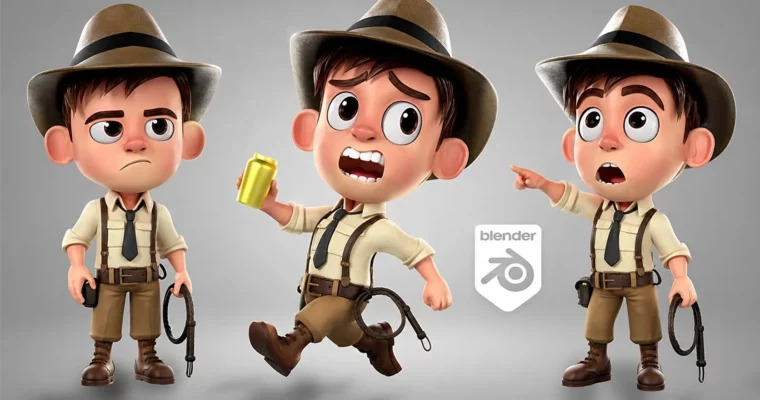
Cartoon Character Modeling for 3D Animation in Blender by Cisco Raya
Build a complete, production-ready cartoon character from scratch in Blender, covering modeling, UVs, texturing, rigging, and final presentation.
This course walks you through the entire process of creating a 3D cartoon character for animation, all inside Blender. You’ll start with the basics of the interface and end with a fully rigged, textured, and posed character ready for your portfolio. It’s a practical, hands-on journey focused on building a solid, production-ready workflow.
🎯 What you’ll learn
Model a cartoon character with clean, animation-friendly topology.
Create UV maps and apply materials for fabrics, skin, and accessories.
Rig a complete skeleton with facial controls using Rigify.
Set up cameras, lighting, and render striking final images.
Build a professional portfolio piece for the animation industry.
✅ Requirements
Skills: Basic computer skills; no prior 3D or Blender knowledge needed.
Tools: A computer capable of running Blender (Windows or macOS).
Hardware: A 3-button mouse is highly recommended.
📝 Description
This isn’t just a modeling tutorial; it’s a full production pipeline. You’ll start by learning the Blender interface and core modeling tools, then immediately apply them to build a base character. The course emphasizes clean topology from the start, ensuring your model deforms correctly during animation.
You’ll model every piece of clothing and accessory, from boots and pants to a hat and whip, all while thinking about edge flow and subdivision. The UV unwrapping section is thorough, teaching you how to organize your maps for efficient texturing. Then, you’ll dive into PBR materials, creating realistic fabrics, skin, and metals using Blender’s node system.
The rigging section is a major highlight. You’ll use Rigify to create a complete human skeleton, including a detailed facial rig with shape keys for expressions. Weight painting is covered in depth, so your character moves naturally. Finally, you’ll set up lighting, compose shots, and render portfolio-ready images, even adding a fire simulation for an extra dramatic touch.
🧑🎓 Who this course is for
Aspiring 3D artists who want to learn character creation from the ground up.
Junior artists looking to solidify their modeling and rigging skills.
Experienced artists transitioning to Blender from other 3D software.
🧑🏫 About the Author
Cisco Raya is a seasoned 3D artist and instructor with a passion for character creation. He specializes in cartoon-style modeling and rigging, with a focus on creating clean, animation-ready assets. His teaching style is methodical and clear, breaking down complex workflows into manageable steps. He is dedicated to helping students build a strong foundation in Blender and the art of 3D character design.
🏁 Final Result
A fully modeled, textured, and rigged cartoon character.
A set of professional-quality rendered images and poses.
A complete portfolio piece ready for online platforms like ArtStation.
Curriculum
📋 Course content
Module 1: Blender Fundamentals
Interface, Navigation, and Viewports
Edit Mode, Extrusion, and Modifiers
Sculpting Basics and Proportional Editing
Module 2: Base Character Modeling
Blueprint Setup and Torso Modeling
Legs, Feet, and Neck Construction
Shoulder, Clavicle, and Arm Topology
Module 3: Hand and Head Modeling
Finger and Palm Modeling
Facial Loop Study and Eye/Nose/Mouth Loops
Ear, Skull, and Neck Integration
Module 4: Clothing and Accessories
Boots, Pants, and Shirt Modeling
Belt, Suspenders, and Tie Creation
Hat, Whip, and Bag Modeling
Module 5: UV Unwrapping
Seams, Unwrap, and Checker Textures
UV Organization for Clothes, Head, and Accessories
Module 6: Materials and Texturing
PBR Materials and Node Setup
Skin, Fabric, and Metal Textures
Vertex Painting and Hair Materials
Module 7: Rigging with Rigify
Bone Placement and Rig Generation
Weight Painting and Vertex Groups
Facial Rig and Shape Keys
Module 8: Posing and Lighting
Line of Action and Dynamic Poses
Camera Setup and Lighting Techniques
Final Render and Compositing
Module 9: Portfolio and Presentation
Environment Setup and Fire Simulation
Render Settings and Image Export
Uploading to Online Portfolios
Watch online or Download for Free
Cartoon Character Modeling for 3D Animation in Blender by Cisco Raya




 Channel