Using CG Passes (2020) by Ian Vicknair

Duration:35m 32s
Actual Duration:36m
Release date:2020, August
Publisher:MattePaint Academy
Skill level:Intermediate
Language:English
Exercise files:Yes
Software:Photoshop
Course URL:https://mattepaint.com/academy/tutorial/using-cg-passes/
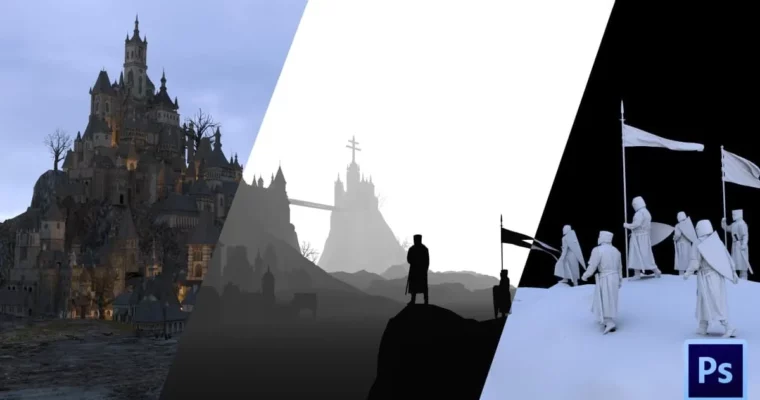
Learn how to use CG passes like a pro with this focused tutorial from Scanline VFX matte painter, Ian Vicknair. This series breaks down the major CG passes you’ll encounter, shows you which ones are most important, and teaches you how to prepare and use them in your work.
🎯 What you’ll learn
- Identify the most useful CG passes for matte painting
- Prepare and organize CG passes for compositing
- Use blend modes and layer styles to integrate passes
- Build a final composite from raw render elements
✅ Requirements
- Skills: Intermediate knowledge of Photoshop and basic understanding of 3D rendering concepts.
- Tools: Photoshop
- Hardware: Computer capable of running Photoshop and handling large PSD files.
📝 Description
This isn’t a theory lecture. Ian Vicknair gets straight into the practical side of CG multipass compositing. You’ll learn exactly which passes—like diffuse, specular, and ambient occlusion—are worth your time and which ones you can ignore.
The course walks you through a real-world workflow: from opening raw render passes to building a polished composite. Ian shows you his personal Photoshop file, breaking down how he stacks layers, sets blend modes, and uses masks to pull everything together. You’ll see how a pro handles the messy reality of integrating CG elements into a plate.
By the end, you’ll have a clear, repeatable method for handling any set of CG passes that comes your way. No fluff, just the techniques that work on the job.
🧑🎓 Who this course is for
- Matte painters looking to improve their CG integration skills
- Junior artists wanting to understand the VFX compositing pipeline
- Photoshop users who work with 3D renders and need a better workflow
🧑🏫 About the Author
Ian Vicknair is a professional matte painter at Scanline VFX, a studio known for high-end visual effects in major film productions. He brings years of hands-on industry experience to this tutorial, focusing on the practical, production-tested methods that get results.
🏁 Final Result
- A completed matte painting composite built from multiple CG passes, using a professional workflow.
- A reusable Photoshop file (PSD) template for future CG integration projects.
 Channel