


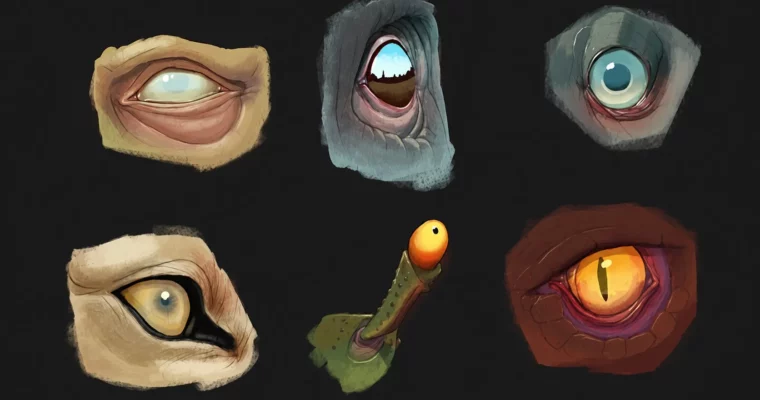
Digital Art- Painting Realistic Eyes by Austin Batchelor

Duration:1.5 hours
Actual Duration:2h 8m
Release date:2017, May
Publisher:Udemy
Skill level:Beginner
Language:English
Exercise files:Yes
Software:Photoshop, Manga Studio, ProCreate
Course URL:https://www.udemy.com/course/digitally-painting-and-drawing-eyes/
This course cuts the fluff and gets straight to painting realistic eyes. You’ll break down the eye’s anatomy, learn to draw it from different angles, and then apply lighting and color to make it pop. It’s a focused, practical guide for anyone who wants to level up their character art.
🎯 What you’ll learn
- Paint eyes of different types from various angles.
- Understand the basic structure of the eyeball and surrounding anatomy.
- Apply lighting, shadows, and specular highlights for realism.
✅ Requirements
- Skills: Basic understanding of how to use digital painting software with a layer system.
- Tools: A drawing tablet is recommended.
📝 Description
This isn’t a theory-heavy lecture. It’s a hands-on walkthrough where you’ll learn the exact steps to paint a convincing eye. You’ll start by understanding the eye as a sphere and then build up the iris, eyelids, and lashes. The course focuses on practical techniques like using reference correctly, blocking in flat colors, and nailing the specular highlights that give eyes their wet, glassy look.
The instructor, a working concept artist, breaks down his entire process. You’ll see how he moves from a simple drawing to a fully rendered eye with realistic light and shadow. The techniques are software-agnostic, so whether you use Photoshop, ProCreate, or Manga Studio, you can follow along. You also get access to all the project files to study and trace over.
🧑🎓 Who this course is for
- Beginning artists who want to learn how to paint eyes.
- Digital painters looking to improve their portrait and character art.
🧑🏫 About the Author
Austin Batchelor is a professional concept artist and freelance illustrator working in the game industry. He has worked in-house at an animation studio and now creates art from his home studio. With over 290,000 students and a 4.5 instructor rating, he is known for clear, practical instruction that helps artists build real-world skills.
🏁 Final Result
- A portfolio-ready digital painting of a realistic eye, demonstrating your understanding of anatomy, lighting, and color.
 Channel



please ad this course
https://www.udemy.com/course/the-complete-drawing-painting-illustration-course/
https://www.udemy.com/course/ultimate-guide-to-drawing-from-your-imagination-step-by-step/
please can you add this courses
https://www.udemy.com/course/retratoalapiz/
https://www.udemy.com/course/dibujo-basico-de-la-figura-humana-aprende-a-dibujar-bien/
https://www.udemy.com/course/drawing-amazing-backgrounds-with-perspective-step-by-step/
https://www.udemy.com/course/how-to-make-comics/