Ad Clicks : Ad Views : Ad Clicks : Ad Views : Ad Clicks : Ad Views : Ad Clicks : Ad Views :
Oh Snap!

It looks like you're using an adblocker. Adblockers make us sad. We use ads to keep our content happy and free. If you like what we are doing please consider supporting us by whitelisting our website. You can report badly-behaved ads by clicking/tapping the nearby 'Advertisement' X text.

Unreal Engine 5 Tactical FPS Game Development PC & Mobile by Kalponic Studio

Unreal Engine 5 Tactical FPS Game Development PC & Mobile by Kalponic Studio

/

Author:Kalponic Studio

Duration:34.5 hours

Actual Duration:33h 53m

Release date:2025, June

Publisher:Udemy

Skill level:Beginner

Language:English

Exercise files:Yes

Software:Unreal Engine 5

Course URL:https://www.udemy.com/course/unreal-engine-5-tactical-fps-game-development-pc-mobile

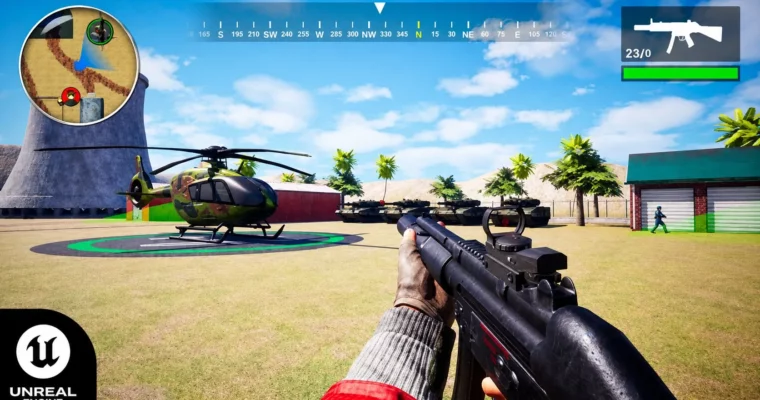
Build a complete tactical shooter from scratch for PC and Android using Unreal Engine 5 Blueprints, no coding required.

Build a complete tactical shooter for PC and Android using Unreal Engine 5 Blueprints—no C++ required. This course walks you through every step, from setting up your character to publishing your game on the Google Play Store.

🎯 What you’ll learn

  • Build a complete tactical FPS game using Unreal Engine 5 Blueprints
  • Create a full weapon system with recoil, damage, and ammo management
  • Design a quest system with objectives, puzzles, and a mini-map
  • Implement enemy AI with patrol, chase, and combat behaviors
  • Package and publish your game for both PC (Itch.io) and Android (Play Store)

✅ Requirements

  • Skills: No prior programming experience needed. You will learn everything you need to know.
  • Tools: A computer capable of running Unreal Engine 5.
  • Hardware: Minimum 16GB RAM, dedicated GPU recommended.

📝 Description

This isn’t just a tutorial series—it’s a full production pipeline. You’ll start by setting up Unreal Engine 5.5.4 for Android development, then build a complete tactical shooter from the ground up. The course focuses on Blueprints, so you don’t need to write a single line of C++.

The curriculum is massive. You’ll create a robust weapon system with multiple weapon types (pistol, rifle, sniper, RPG), each with its own recoil, damage, and animation logic. You’ll build an inventory system, a quest system with puzzles, and a dynamic mini-map with points of interest. The enemy AI is no joke either—army characters will patrol, chase, and engage you based on difficulty settings.

What sets this course apart is the mobile focus. You’ll learn how to set up virtual joysticks, optimize materials for mobile, and package your game for Android. The final sections walk you through publishing on both Itch.io for PC and the Google Play Store for Android. By the end, you’ll have a real, playable game you can share with the world.

🧑‍🎓 Who this course is for

  • Aspiring game developers who want to build a complete FPS game from scratch
  • Beginners looking to learn Unreal Engine 5 Blueprints without coding
  • Indie devs who want to publish games for both PC and Android
  • Students or hobbyists interested in mobile game development

🧑‍🏫 About the Author

Kalponic Studio is run by Mahadi, a game development enthusiast with a passion for creating immersive experiences. With skills in Blender, Unreal Engine, and graphic design, Mahadi has built a reputation for practical, hands-on tutorials. He has taught over 3,000 students across 5 courses, focusing on making complex game development concepts accessible to beginners.

🏁 Final Result

  • A fully playable tactical FPS game for PC and Android
  • A published game on Itch.io and the Google Play Store
  • A portfolio-ready project demonstrating Blueprint scripting, AI, and mobile optimization
Curriculum

📋 Course content

  1. Module 1: Project Setup & Character Basics
    • Install Unreal Engine 5.5.4 For Android Development4:00
    • Create Default Third Person Project4:02
    • Setup SDK NDK JDK For Unreal Engine 5.5.48:51
    • Package Apk And Install On Real Device5:20
    • Information About Unreal Engine 5 Blueprints3:03
    • Create New Project2:41
    • Create Player Character Blueprints4:53
    • Create Controller And Game Mode Blueprint6:31
    • Setup Movement Input In To Character11:29
    • Add Mouse Movement Input For Character3:59
    • Add Jump And Sprinting Input2:46
    • Add Virtual Joystick Controller Support3:19
    • Create Idle Walk Run Animation Inside Animation Blueprint8:56
    • Implement Falling Animation3:17
    • Import All Content Inside Your Project5:17
    • Setup Fps Character Mesh In Character BP9:06
    • Setup Animation Blueprint For FPS Character5:31
    • Create Blueprint Interfaces To Communicate Between Blueprints8:30
    • Create Data Table For Weapons6:48
    • Create Pistol AnimState3:37
    • Create Weapon Actor With Data Table10:25
    • Change First Person Character Animation Based On Weapon Type5:47
    • Complete Our Pistol Animation10:43
    • Setup Knife Animation State3:05
    • Setup Grenade Animation State3:17
    • Setup SMG Animation State8:44
    • Setup Shotgun Animation State6:39
    • Setup Rifle Animation State4:55
    • Setup Sniper Animation State7:06
    • Setup RPG Animation State9:28
    • Important Video Fixing Issues & Project File7:10
    • Setup Weapon Animation Logic Using Interfaces11:35
    • Add Weapon Animation In Data Table9:59
    • Add Weapon Muzzle Flash Particle12:15
    • Spawn Camera Shake While Shooting8:26
    • Add Weapon Sound FX15:38
    • Create Dummy NPC With Damage Counter14:48
    • Weapon Damage System10:24
    • Spawn Bullet Decal Where bullet Hit7:03
    • Spawn Bullet Hole Decal Based On Surface Type12:44
    • Play Bullet Impact Sound At location4:59
    • Spawn Hit Particle Where Bullet Hit5:58
    • Remove Decal Spawn On Player And Optimize Blueprint8:36
    • Line Trace Distance Based On Weapon Type3:23
    • Damage Based On Weapon Type2:55
    • Shot RPG Shell With Fall Of Damage System14:09
    • Throw Grenade With Music System10:46
    • Add Punching And Knife Damage System5:04
    • Add Random Weapon Recoil13:13
    • Force Player To Run Only Forward Direction5:20
    • Fix First Person Character Overlap On Other Object3:23
    • Make Dynamic Footstep Based On Surface20:01
    • Setup Random Weapon Damage Rate2:15
    • Player Crouch System3:15
    • Make A Inventory UI To Show Current Weapon13:04
    • Subtract Weapon Ammo11:21
    • Reload Ammo Counter With UI12:27
    • Optimize Our Blueprint Nodes11:31
    • Create Inventory System Using Actor Component18:21
    • Show Item On Inventory Part 111:22
    • Show Item On Inventory Part 217:14
    • Change Selected Weapon based On Inventory Item Click14:02
    • Optimization Gun System And Auto Reload11:22
    • Fixing Grenade Reloading Issue6:44
    • Fixing RPG Reloading Issue7:22
    • Fixing Some Weapon Mechanics Bugs5:30
    • Setup Sniper Scoping System With UI15:28
    • Sniper Scope Wiggle Animation And Change Scope8:28
    • Remove Sniper Scope While Changing Weapon3:15
    • Change Weapon Sensitivity Based On Weapon State8:04
    • Block Aiming State For Some Weapon Types6:57
    • Create Weapon Pickup Actor11:22
    • Move Inventory System To Game Mode Blueprints17:01
    • Spawn Weapon Modularly10:06
    • Save Pickup Weapon And Ammo In Inventory11:24
    • Alignment Weapon in Inventory Based On Data Table Row6:19
    • Create Save Game Data Blueprint14:32
    • Hide Empty Items From Inventory UI4:20
    • Create Painkiller Consume System13:16
    • Create Health Bar UI using Progress Bar10:50
    • Update HP Progress Bar Based On Player Health10:15
    • Add HP To Player After Taking Health Kit6:48
    • Hide UI While Inventory Opened6:35
    • Create Landscape Level In Unreal Engine10:47
    • Military Base Level Design Part 111:44
    • Military Base Level Design Part 213:20
    • Military Base Level Design Part 316:56
    • Paint Road Material6:25
    • Add Light Inside Houses9:41
    • Place Props Inside Houses15:48
    • Capture Map Image For Map System8:00
    • Create Big Map Widget5:54
    • Update Player Location On Big Map9:37
    • Add Player Icon With Character Rotation4:24
    • Add Point Of Interest On Big Map18:32
    • Add Quest Marker And Show Distance in meter14:47
    • Create Compass For Navigation10:19
    • Add Point Of Interest Icon On Compass13:00
    • Dynamic Point Of Interest Icon On Compass8:20
    • Create Mini Map Material With Widget12:21
    • Minimap Modular Change Texture8:09
    • Create Point Of Interest For Mini Map12:37
    • Modular Point Of Interest For Mini Map19:09
    • Mini Map Point Of Interest Static7:15
    • Adjust Mini Map Size Modularly3:33
    • Task That We Implement In This Mission Objective2:46
    • Create Cinematic Cutscene Part 18:41
    • Create Cinematic Cutscene Part 217:36
    • Create Cinematic Cutscene Part 36:40
    • Hide UI During Cinematic Cutscene12:45
    • Show Quest Title Starting Of the Objective15:35
    • Spawn Quest Actor Dynamically13:11
    • Create Math Game UI10:30
    • Complete Puzzle Math UI12:52
    • Create DialPad Input UI11:31
    • Add Button Input For DialPad13:01
    • Add Digit Input Password Checker9:17
    • Add Blueprint Interface For Digit Input8:13
    • Start Task 1 Mission13:11
    • Start Task 2 Mission9:30
    • Fix Math Widget Issue6:57
    • Setup Interface For math Widget6:13
    • Create Math Widget based on Game Difficulty7:13
    • Setup Task 4 Objective13:31
    • Setup Task 5 Objective4:30
    • Setup Task 6 Objective3:20
    • Setup Task 7 & 8 Objective6:46
    • Setup Task 9 Objective3:50
    • Create Level Sequence And Make Helicopter Escape Animation14:52
    • Spawn Explosion Particle14:09
    • Add Sound Effects On Level Sequence4:15
    • Setup Event Dispatcher For Level Blueprint8:39
    • Add Commando Voice over Before Spawning Object12:20
    • Stop Playing introduction Video For Every Time6:16
    • Create CC Camera Actor11:08
    • Setup CCTV Camera detection Ability3:25
    • Create WatchTower Sound System7:24
    • Add Weapons On Player Spawn4:48
    • Setup Player Can Destroy Camera And WatchTower10:41
    • Import Army Character Model With Animations4:19
    • Setup Army Character With Animations12:42
    • Setup Character Roam Around On level9:27
    • Setup Army Character Rifle Locomotion8:37
    • Setup AI Army Can See Pawn And Chase player7:54
    • Setup AI Army Aim State Animations12:14
    • Setup AI Army Reload Weapon2:33
    • Setup Army Character Turn In Place Animation12:28
    • Setup Army Character Aim Offset10:17
    • Setup Army Character Damage System & Get New Attack Position12:47
    • Add Army Character Gun & Reload Sound6:13
    • Play Army Character FootStep Sound FX10:13
    • Setup Army Character Damage System10:41
    • Setup HeadShot Damage System6:11
    • 15 Army Character Fire Damage System Based On Game Difficulty7:56
    • Set Up Ability AI Can Hear Noise12:23
    • Set Up AI Move To Noise Location7:25
    • Make Some Optimizations For AI And Weapons3:33
    • Create Control Center To Control All Game Obstacles15:43
    • Setup CCTV Camera Ability To See AI Character Is Death Or Alive13:25
    • Place CC Camera On level Buildings9:01
    • Add Point Of Interest On AI Army And CC Camera5:07
    • Place Army And CC Camera On Level8:45
    • Spawn Weapons On Army Character Death5:33
    • Fixing Army Character Communications With Control Center2:28
    • Reposition Camera And Army Character0:40
    • Turn On Realtime FPS UI3:42
    • Setup Level OF Details For Models11:51
    • Add Lod For Army Character2:27
    • Setup Draw Distance For Props4:58
    • Create Settings UI11:59
    • Create Settings UI Button Mechanic14:21
    • Create Graphic UI9:10
    • Connect Graphic UI With Game User Settings13:55
    • Set Screen Percentage6:06
    • Get All Graphic Date On UI10:30
    • Game Sensitivity Settings With Save System24:46
    • Create Main Menu Options19:47
    • Import Images For Levels UI1:32
    • Create level Select UI Part 114:27
    • Create level Select UI Part 212:57
    • Implement Level Unlock System11:41
    • Open level Based On Selector Lever Button9:10
    • Unlock Level Dynamically And implement Save System11:02
    • Add Level Unlock Widget On Main Menu5:27
    • Create New Level 2 For Experiment7:43
    • Implement Player Death System20:57
    • Adjust Difficulty Button Hover Issue14:45
    • Play Mission 1 In Easy Difficulty9:59
    • Fixing UI Click Issue After Level Sequence4:33
    • Add loading Screen8:40
    • Add back button On UI8:22
    • Play Game To Verify Everything OK7:12
    • Manage Some Army Character Weapon That They Spawn After Death8:59
    • Add Physics Material Link To Normal Materials12:33
    • Add Sound On UI Buttons5:51
    • Texture Optimizations5:27
    • Setup Visual Studio For Unreal Engine 5.5.43:04
    • Package Game For Windows3:43
    • Fixing The Level Opening Issue3:49
    • Testing Game For Second Time6:19
    • Fix Missing Materials And Exit Button5:24
    • Fixing Player Firing While Cinematic On6:34
    • Create New Project And Move All Content7:55
    • Create Post Processing Volume2:25
    • Package Project For Windows8:11
    • Fixing Weapon Clipping And Widget Issue2:52
    • Mission 1 Full Game Play6:27
    • Setup Project Meghna Page On Itch.io8:10
    • Add Media Files And Publish On Itch.io5:26
    • Add Mobile Input Button11:14
    • Add Virtual Joystick on Display2:51
    • Use Interface To Communicate Between Player Character And UI19:17
    • Setup Screen Touch Input Instead Of Virtual Joystick9:36
    • Test Your Game On Real Devices7:26
    • ReArrange Button For Mobile UI4:30
    • Fix Sprinting Mechanics On FPS Character10:37
    • Make A Fire Input Button Like Pubg Mobile8:14
    • Export Game For Experiment5:31
    • Fixing Player Can’t Run And UI Buttons5:09
    • Replace Sky And Lightning6:38
    • Set All Materials To Unlight Part 113:19
    • Set All Materials To Unlight Part 213:09
    • Add Draw Distance And Reduce Recoil For Weapons14:48
    • Make Some Optimizations9:16
    • Setup Render Settings For Mobile Devices6:56
    • Create Google Play Console App With Privacy Policy10:54
    • Add Details About App on Play Console12:10
    • Unreal Engine Export Settings For Play Console3:56
    • Signing Projects for Release10:21
    • Upload AAB File On Close Testing6:28
    • Install Testing App On Mobile Phone1:59
    • Fix Android Storage Permission Issue10:44
    • Apply For Production google play6:20
Watch online or Download for Free
Unreal Engine 5 Tactical FPS Game Development PC & Mobile by Kalponic Studio
NAME
SIZEDURATION
26 – Publish Game On Itch.io
14.2 MB13m

Download all Videos (230)
3.6 GB33h 53m


Download all

Join us on
  Channel    and      Group

Leave a Comment

Your email address will not be published. Required fields are marked *