


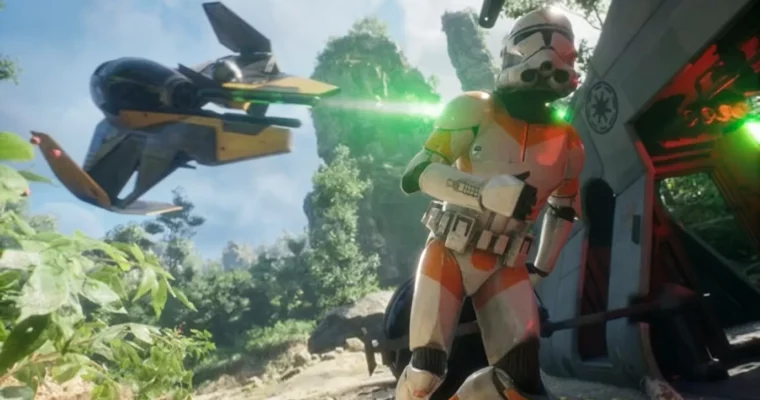
Unreal Engine 5: Master Cinematics, Sequencer & Animation by Dillon Sun

Duration:5h 37m
Actual Duration:5h 37m
Release date:2026, May 3
Publisher:Udemy
Skill level:Intermediate
Language:English
Exercise files:Yes
Software:Unreal Engine 5, Niagara, Blueprints
Course URL:https://www.udemy.com/course/unreal-engine-5-master-cinematics-sequencer-animation/
This course is for people who want to stop treating Unreal Engine 5 like a general-purpose sandbox and start using it like a proper cinematic pipeline, with Sequencer, lighting, animation, VFX, and final output all working together. It stays practical and production-minded, so you are building scenes, shots, and renders that look closer to trailer work than to a basic software demo.
🎯 What you’ll learn
- Navigate the Unreal Engine interface and manage scenes, assets, and core panels efficiently.
- Build and animate cinematic sequences with Sequencer, including camera movement, keyframes, timing, and depth of field.
- Light and compose shots with directional lights, HDRIs, atmospheric effects, and cinematic framing.
- Animate characters, vehicles, and props with skeletal meshes and animation assets inside Unreal.
- Add Niagara-based effects like explosions, lasers, and particles to support storytelling beats.
- Render high-quality final shots with Movie Render Queue and basic Blueprint-driven reactions.
✅ Requirements
- Skills: Basic comfort with 3D navigation, scene organization, and the Unreal Engine interface.
- Tools: Unreal Engine 5 installed, a 3-button mouse, and access to asset packs or test models for scene building.
- Hardware: A PC that can run Unreal Engine 5 smoothly, ideally with a dedicated GPU, solid-state storage, and enough RAM for real-time rendering work.
📝 Description
The course angle is pretty clear: it is not trying to be a giant all-purpose Unreal Engine class, and it does not spend its time on broad beginner theory. It stays locked on cinematics, Sequencer, camera language, lighting, animation, and the practical steps needed to build a polished real-time sequence from scratch.
That makes it useful for artists who already know why they want Unreal in the pipeline but need a cleaner way to turn environment work, motion, and shot design into something watchable. You go from scene setup and asset handling into cinematic cameras, keyframes, Niagara effects, storytelling beats, and final renders through Movie Render Queue.
Another nice part is the production mindset. The course frames the work around real trailer and cutscene workflows, with an emphasis on composition, blocking, mood, and getting shots to read well instead of just making the editor look busy. By the end, the stated goal is simple: build enough confidence to create your own cutscenes, trailers, or portfolio-ready cinematic sequences inside Unreal Engine 5.
🧑🎓 Who this course is for
- Unreal Engine users who want to specialize in cinematics instead of general engine workflow.
- Game developers who need to build trailers, cutscenes, or marketing-style real-time sequences.
- 3D artists, animators, cinematographers, and content creators moving into real-time storytelling.
🧑🏫 About the Author
Dillon Sun works in AAA and AA game cinematics and has described contributing to projects connected to Forza Horizon 5, Forza Motorsport, Riot’s 2XKO, and Bethesda’s Hi-Fi Rush. His LinkedIn profile identifies him as Director, Cinematics and Special Projects and Co-Head of Capture at Hammer Creative, where he leads Unreal Engine cinematic and virtual production work for major game campaigns. He also comes from a creator background, building Star Wars machinima and 3D animation on YouTube before moving deeper into professional studio pipelines, and he is described online as a 2026 Unreal Engine Authorized Instructor.
🏁 Final Result
- A finished Unreal Engine 5 cinematic scene or trailer-style sequence that combines environment setup, animation, camera work, lighting, VFX, and high-quality final rendering into one cohesive piece.
 Channel





Please include this course
Animating a Fight Scene from A to Z From 2D Animator Jin
Idk who uploads the courses but if you see this, can you upload “ Break Through Your Drawing Plateau with Proven Techniques” by Jinseok Lim on Coloso plzz 🙂