Ad Clicks : Ad Views : Ad Clicks : Ad Views : Ad Clicks : Ad Views : Ad Clicks : Ad Views :
Oh Snap!

It looks like you're using an adblocker. Adblockers make us sad. We use ads to keep our content happy and free. If you like what we are doing please consider supporting us by whitelisting our website. You can report badly-behaved ads by clicking/tapping the nearby 'Advertisement' X text.

Unreal Engine JRPG Masterclass by Cobra Code

Unreal Engine JRPG Masterclass by Cobra Code

/

Author:Cobra Code

Release date:2025, December

Publisher:Cobra Code

Skill level:Beginner

Language:English

Exercise files:Yes

Software:Unreal Engine 5, Paper 2D, PaperZD, Git, Github Desktop

Course URL:https://cobracode.teachable.com/p/jrpg-masterclass

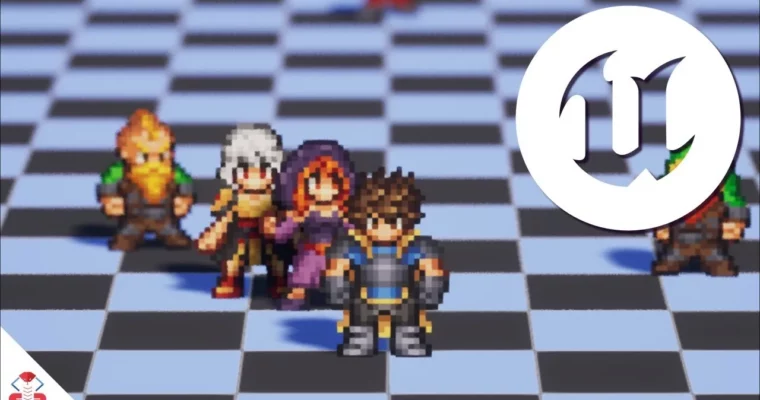
Build your dream JRPG from scratch in Unreal Engine 5, mastering turn-based combat and field exploration with Blueprint Visual Scripting.

Ready to build that JRPG you’ve always dreamed of? This masterclass dives deep into Unreal Engine 5, showing you exactly how to craft a complete JRPG experience. You’ll go from setting up your project to implementing complex systems like turn-based combat, field exploration, and even a robust save/load system, all without writing a single line of traditional code, thanks to Blueprint Visual Scripting.

🎯 What you’ll learn

  • Implement turn-based combat systems using Blueprint Visual Scripting.
  • Create a dynamic field phase with character exploration and NPC interaction.
  • Design and build modular, reusable UI elements for menus and battle interfaces.
  • Develop essential RPG mechanics like inventory systems, save/load functionality, and character progression.
  • Utilize Paper 2D and the PaperZD plugin for stunning 2D sprite animations in a 2D/3D hybrid environment.
  • Learn fundamental RPG game design principles for combat flow and damage formulas.
  • Set up Git and Github Desktop for effective project version control.

✅ Requirements

  • Skills: Basic familiarity with Unreal Engine interface is helpful but not strictly required, as a crash course is included.
  • Tools: Unreal Engine 5, Git, Github Desktop.
  • Hardware: A computer capable of running Unreal Engine 5 smoothly. A dedicated GPU is recommended.

📝 Description

This masterclass is your all-in-one ticket to creating a full-fledged JRPG in Unreal Engine 5. Forget complex coding; we’re diving headfirst into Blueprint Visual Scripting to build everything from the ground up. You’ll learn to craft engaging turn-based combat, design explorable field maps, and implement essential systems like inventories and saving. The course emphasizes a 2D/3D hybrid approach, leveraging Paper 2D and the PaperZD plugin for dynamic character animations. We’ll also cover crucial development practices like version control with Git, ensuring your project is well-managed and secure.

🧑‍🎓 Who this course is for

  • Aspiring game developers who want to create their own JRPGs.
  • Artists and designers looking to implement their game ideas without deep coding knowledge.
  • Unreal Engine users interested in mastering Blueprint Visual Scripting for complex game systems.
  • Developers aiming to build a portfolio piece with a complete JRPG project.

🧑‍🏫 About the Author

Cobra Code is a Gold Level Authorized Unreal Engine Instructor, recognized by Epic Games for high standards in teaching and technical expertise. Featured at Unreal Fest and creator of official courses for Artstation Learning, Cobra Code specializes in 2D and 2D/3D hybrid games in Unreal Engine, particularly using Paper 2D and PaperZD. With a background in professional game programming and software engineering, and studies in Game Development in Japan, Cobra Code brings a wealth of practical experience to the platform.

🏁 Final Result

By the end of this masterclass, you’ll have a fully functional JRPG project in Unreal Engine 5, complete with turn-based combat, field exploration, inventory management, and a save/load system. This project will serve as a strong portfolio piece, demonstrating your ability to design and implement complex game mechanics using Blueprint Visual Scripting. You’ll also receive hundreds of dollars worth of included Pixel Art Assets to use in your projects.

Curriculum

📋 Course content

  1. Course Overview
    • Curriculum Overview5:55
    • What Version of Unreal Engine to Use1:28
    • How We’ll Organize this Project2:37
    • Why We Don’t Use GAS (and other decisions)1:55
    • How to Get Help2:05
    • Included Assets and Licenses2:11
  2. Unreal Engine 5 Crash Course
    • About the Unreal Engine 5 Crash Course1:11
    • How to Install Unreal Engine 52:16
    • How to Create a New Project2:22
    • How to Navigate the Editor13:37
    • Content Drawer and Blueprints8:30
    • How to Make a Simple Blueprint4:50
    • Adding Functionality to our Blueprint24:11
    • Useful Keyboard Shortcuts and Tips3:22
    • How to Debug Your Game4:19
  3. Top Down Character & Field Base
    • What You’ll Learn in this Chapter1:17
    • Setting Up the Project15:29
    • Setting Up Version Control8:45
    • An Introduction to OOP and Inheritance8:56
    • Making the Character Blueprint14:43
    • Camera and Character Possession14:24
    • Inputs and Character Movement19:05
    • Animation Source and Animation Sequence5:28
    • Animation Blueprint and Directionality17:56
    • FOV and Depth of Field7:30
  4. Turn Based Battle System Base
    • What You’ll Learn in this Chapter0:58
    • Preparing the Battle Animations11:56
    • Battle Character Blueprints9:14
    • Battle Manager Blueprint14:08
    • An Introduction to Arrays5:44
    • Spawning Battle Characters28:07
    • Turn Order and Active Character20:19
    • Moving Active Character to Active Location19:30
    • Moving Back on Turn End7:03
    • Battle Camera Sway11:09
    • Moving Battle to Different Level13:01
    • Going From Battle Back to Field23:10
    • Using a Struct for the FieldPosition10:35
    • Using an Interface on the GameInstance21:08
  5. Battle System UI
    • What You’ll Learn in this Chapter1:09
    • UI Widget Introduction17:13
    • Making our Fullscreen UI11:26
    • Displaying the Turn Order14:12
    • Using Data Assets and Showing Character Portrait19:56
    • Dynamically Updating the Turn Order Display6:41
    • Displaying Health and Mana9:21
    • Pushing Values to Health and Mana Panels25:00
    • Animating HP Panel for Active Character7:23
    • Making a Modular and Reusable Button13:28
    • Making the Action Menu14:05
    • UI Navigation and its Issues10:23
    • Showing the Target Pointer23:17
    • Setting Up the BattleNav Input9:57
    • Cycling Through Targets11:19
    • Ending Target Mode3:31
  6. Battle Actions
    • What You’ll Learn in this Chapter1:13
    • Player Attack Action13:55
    • Sprite Shake on Damage16:05
    • Apply Attack Effect9:47
    • Enemies Attacking the Player11:51
    • Adjusting the Game Speed3:50
    • Adding the Defend State8:45
    • Handling Character Attributes and State16:17
    • Damaging Battle Characters13:14
    • Knocking Out Enemies24:30
    • Knocking Out Party Members8:29
    • Deciding Battle Outcome7:24
    • Victory Screen Stub9:23
    • Notifications and Losing the Battle10:02
    • Fleeing the Battle11:24
    • Making Global Variables19:03
  7. Battle System Effects
    • What You’ll Learn in this Chapter1:16
    • An Introduction to Materials and Highlight Pick19:47
    • An Introduction to Niagara and Particle Effects2:29
    • Making the Glowworm Particle Effect17:44
    • Making the Enemy Attack Particle Effect14:29
    • Spawning the Attack Particle in Game4:54
    • Making the Player Attack Particle Effect7:32
    • Creating Skill Data7:37
    • Using Skill Data for Particle Effect and Damage14:57
    • Show Skill Name3:34
    • Set Chromatic Aberration8:39
    • Floating Damage Numbers16:13
    • Styling the Combat Text6:41
    • Calculating Defense Stats19:36
    • Calculating Crit Chance and Crit Multiplier20:43
  8. Adding Battle Enemies and Party Members
    • What You’ll Learn in this Chapter1:23
    • Adding the Boar Enemy11:03
    • Adding the Wolf Enemy5:29
    • Adding the Battle Paladin19:23
    • Adding the Battle Mage12:02
  9. Battle Skills
    • What You’ll Learn in this Chapter1:46
    • Allow Multi Targeting Enemies19:35
    • Allow Enemies to Multi Target Party5:29
    • Enabling and Disabling the Skill Button6:38
    • Showing the Skill Menu14:34
    • Populating the Skills Menu8:41
    • Executing Skills14:03
    • Playing the Correct Skill Animations10:03
    • Making the Cleave Skill7:59
    • Making the Mage’s Fire Skill8:23
    • Targeting Friendly Units7:28
    • Enabling Skills to Restore Health9:04
    • Using God Rays5:14
    • Creating the Heal Skills7:19
    • Mana Usage14:46
    • Battle Camera Target22:48
    • Preparing the Battle Transition Widget11:11
    • Triggering the Battle Transition Animation13:18
  10. Field Followers & Encounters
    • What You’ll Learn in this Chapter1:35
    • Field Versions of New Characters11:28
    • Creating the Follower Blueprint3:23
    • Spawning Party Members20:02
    • Party Member Index and Z-Fighting8:07
    • Saving the FieldPlayer’s Movement History12:54
    • Making Party Members Follow21:15
    • Follower Animations14:54
    • Field Area Detection21:21
    • UI for Area Transitions16:48
    • Using the Forest Battle Map12:09
    • Encounter Combat Level Data16:03
    • Encounter Enemy Data18:45
    • Using the Actual Party Members in Battle5:20
    • Triggering Random Encounters15:08
    • Saving HP and MP Throughout Battles21:38
    • Handling Defeated Members in Battle8:01
    • Handling Defeated Members in Field9:06
    • Designing the Forest Field Map21:17
    • You Finished the Core Module!1:45
  11. Inventory and Consumable Items
    • What You’ll Learn in this Chapter2:35
    • Item Button Widget8:45
    • Item List Widget8:27
    • Item Data6:57
    • Making the Inventory14:39
    • Picking the Item Target14:18
    • Removing Used Items19:24
    • Inventory Empty Message6:22
    • Playing the Item Animation7:23
    • Creating Health Potion Variants4:06
    • Adding Items to the Inventory7:21
    • Treasure Chest Blueprint15:19
    • Interaction Trace10:49
    • Interaction Interface8:09
    • Saving Unique Chest Identifier14:04
    • Checking Triggered IDs10:02
    • Enforcing ID Uniqueness21:45
    • Item Drops from Enemy Encounters11:05
    • Showing Item Drops12:24
  12. XP and Leveling
    • What You’ll Learn in this Chapter2:03
    • Gaining XP from Enemies12:12
    • Applying the Level Up13:10
    • Gaining Multiple Levels in One Fight15:38
    • Making the XPDisplay Widget10:47
    • Preparing Data for XP Widget9:40
    • Showing Initial Data on the XPDisplay Widget9:19
    • Counting Up Gained XP15:59
    • Counting Up Level Changes12:13
    • Considering Max Level in Count Up9:29
    • Applying Attribute Increases by Level14:17
    • Unlocking Skills at Certain Levels11:54
  13. Save/Load System & Menus
    • What You’ll Learn in this Chapter2:02
    • Creating a Save Point15:25
    • Making the Save Slot Widget18:38
    • Saving Data16:31
    • Saving to Different Slots from Menu10:12
    • Populating Save Slot Display with Real Data33:47
    • Dynamically Update Save Data Display5:18
    • Showing Empty Save Slots through Widget Switcher9:56
    • Prompt Widget Layout10:32
    • Override Save Logic13:20
    • Loading the Game State14:07
    • Show Load Screen when Defeated7:11
    • Setting up the Main Menu Scene12:19
    • Creating the Main Menu UI11:20
    • Creating the Pause Menu11:44
  14. NPCs and Dialogue
    • What You’ll Learn in this Chapter1:39
    • Updating PaperZD and Importing Assets14:53
    • Making a Field NPC15:07
    • Creating the Speech Bubble Widget11:21
    • Positioning the Dialogue Widget9:46
    • Locking Characters While Speaking14:22
    • Implementing UI Transitions for Dialogue9:01
    • Showing Speaker Name7:48
    • Pulling Dialogue from Data Tables12:06
    • Accessing the Next Row17:07
    • Importing Table from CSV6:11
    • Making the NPC Join Blueprint12:44
    • Spawning Follower After Dialogue15:13
    • Unique IDs for NPC Events11:00
  15. Cutscenes and Audio
    • What You’ll Learn in this Chapter0:56
    • Sequencer Basics17:44
    • Triggering Dialogue From Sequencer6:44
    • Playing the Sequence7:28
    • Sequencer Settings and Transition6:07
    • Making a Cutscene Trigger Actor18:28
    • Making a Second Cutscene10:28
    • Playing Cutscenes Only Once6:24
    • Preparing Music and SFX8:12
    • Playing Sound Effects18:02
    • Playing Music5:37
  16. UI Navigation and Finishing Touches
    • What You’ll Learn in this Chapter2:02
    • Improving Some Blueprints9:50
    • Updating the Ironwood Level8:34
    • Balancing the Game22:33
    • Getting Started with UI Navigation8:28
    • Setting up UI Nav Component15:11
    • Navigating the ActionMenu17:17
    • Backing Out and Changing Inputs8:07
    • Navigating the Pause Menu1:57
    • Navigating the Save Menu11:23
    • Navigating the Main Menu8:24
    • Closing Out UI Navigation2:05
    • Adding the Dwarven Ranger4:36
    • [Optional] Using Marketplace Environments16:46
    • [Optional] Making a Packaged Build17:03
    • [Optional] Updating UE Version of the Project5:01
    • What’s Next (2:31)
      Bonus: Party Management (WIP)
    • Using the Skin System on Field Characters
    • Using the Skin System on Battle Characters
    • Adding 4 New Party Members
Watch online or Download for Free
Unreal Engine JRPG Masterclass by Cobra Code
NAME
SIZEDURATION


Join us on
  Channel    and      Group

Leave a Comment

Your email address will not be published. Required fields are marked *