Ad Clicks : Ad Views : Ad Clicks : Ad Views : Ad Clicks : Ad Views : Ad Clicks : Ad Views :
Oh Snap!

It looks like you're using an adblocker. Adblockers make us sad. We use ads to keep our content happy and free. If you like what we are doing please consider supporting us by whitelisting our website. You can report badly-behaved ads by clicking/tapping the nearby 'Advertisement' X text.

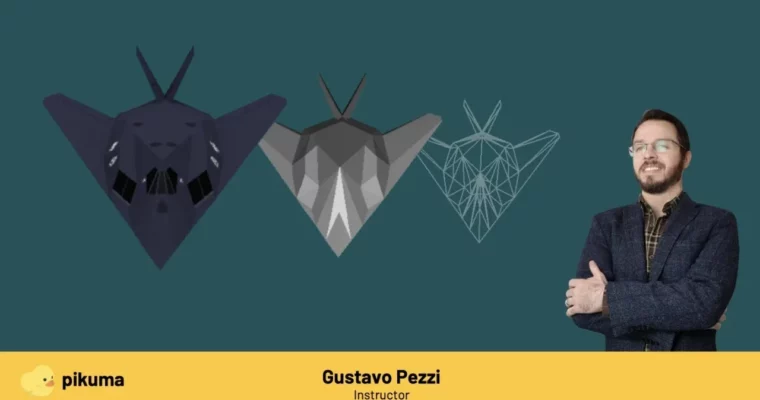
3D Computer Graphics Programming by Gustavo Pezzi

3D Computer Graphics Programming by Gustavo Pezzi

/

Author:Gustavo Pezzi

Duration:45 hours on-demand video content

Actual Duration:37h 52m

Release date:2022

Publisher:Pikuma

Skill level:Beginner

Language:English

Exercise files:Yes

Software:C, SDL, Make

Course URL:https://pikuma.com/courses/learn-3d-computer-graphics-programming

Learn the math and theory behind 3D graphics by building a software renderer from scratch in C.

Ready to peek under the hood of 3D graphics? This course dives deep into the fundamentals of computer graphics, showing you exactly how a software 3D engine works. You’ll code a complete software rasterizer from scratch using C, handling everything from textures and cameras to clipping and loading complex OBJ files. It’s a hands-on journey, building a powerful renderer without any graphics APIs, just pure C and linear algebra.

🎯 What you’ll learn

  • Understand the core math and theory behind 3D computer graphics.
  • Build a complete software rasterizer from scratch using the C programming language.
  • Implement features like textures, camera controls, clipping, and loading OBJ files.
  • Learn how 3D objects are displayed on screen without relying on GPU acceleration.
  • Gain insights into techniques used in retro 3D game development.

✅ Requirements

  • Skills: Basic understanding of programming concepts (loops, functions, variables). Familiarity with C is helpful but not required.
  • Tools: A code editor, a C compiler, and the SDL library.
  • Hardware: A computer running Windows, macOS, or Linux.

📝 Description

This course is a deep dive into the foundations of computer graphics, focusing on the underlying math and theory. You won’t just be using a graphics library; you’ll be building a software renderer from the ground up using C. This means understanding how every pixel gets its color, how triangles are drawn, and how complex models are projected onto your screen, all without touching a GPU. It’s a fantastic way to grasp the core principles that drive all 3D applications, from games to architectural visualization. Expect a thorough review of linear algebra and geometric concepts, applied directly in code.

🧑‍🎓 Who this course is for

  • Anyone curious about how 3D graphics actually work under the hood.
  • Programmers who want to understand the math behind rendering pipelines.
  • Developers interested in retro game development or low-level graphics techniques.
  • Students looking for a project-based course to solidify their C programming skills.

🧑‍🏫 About the Author

Gustavo Pezzi is an experienced university lecturer based in London, UK, with a passion for teaching computer science and mathematics fundamentals. He’s a multiple award-winning educator and the founder of pikuma.com. His academic background spans prestigious institutions like Pittsburg State University, City University of London, and the University of Oxford, giving him a solid foundation to explain complex topics clearly.

🏁 Final Result

  • A fully functional software renderer written in C, capable of loading and displaying complex 3D models with textures, lighting, and perspective.
  • A portfolio piece demonstrating a deep understanding of 3D graphics programming principles and mathematical concepts.
Curriculum

📋 Course content

  1. Introduction
    • Motivations & Learning Outcomes
    • How to Take This Course
  2. Compiling our C Project
    • Configuring Dependencies
    • Project Folder Structure
    • Configuring a Makfile
    • Compiling on Linux
    • Compiling on macOS
    • Configuring Visual Studio on Windows
  3. SDL Window & Color Buffer
    • Creating an SDL Window
    • Declaring a Color Buffer
    • Allocating and Freeing Memory
    • SDL Texture
    • Fullscreen Window
    • Exercise: Drawing a Background
    • Drawing Rectangles
  4. Header Files
    • Defining Header Files
  5. Vectors and Points
    • A Function to Draw Pixels
    • Vectors
    • Declaring a Vector Type
    • Declaring Structs
    • Array of Vector Points
  6. Projecting Points
    • Orthographic Projection
    • Isometric Projection
    • Perspective Projection
    • Implementing the Perspective Divide
    • Coordinate System Handedness
  7. Vector Transformations
    • Transforming Vectors
    • Review of Sine, Cosine, and Tangent
    • Rotating Vectors
    • Proof of Angle Sine Addition
    • Proof of Angle Cosine Addition
  8. Fixed Framerate
    • Fixing our Game Loop Timestep
    • Using a Delay Function
    • Constant Framerate and Variable Delta Time
  9. Triangles and Vertices
    • 3D Triangles and Meshes
    • Vertices and Triangle Faces
    • Triangle Edges
  10. Drawing Lines
    • Line Equation
    • DDA Line Drawing Algorithm
    • Do We Need Bresenham Lines?
    • Coding a Function to Draw Lines
  11. Dynamic Arrays
    • Dynamic Arrays in C
    • Dynamic Mesh Vertices and Faces
    • Defining the Project Playfield Graphics
  12. OBJ Files
    • OBJ File Vertices and Faces
    • Exercise: Loading OBJ File Content
    • OBJ File Triangles vs Quads
  13. Vector Operations
    • Introduction to Back-face Culling
    • Vector Magnitude
    • Vector Addition
    • Vector Subtraction
    • Vector Scaling
    • Vector Cross Product
    • Finding the Triangle Normal Vector
    • Dot Product
    • Implementing the Back-face Algorithm
    • Vector Normalization
  14. Triangle Rasterization
    • Triangle Fill
    • Flat-Top & Flat-Bottom Technique
    • Flat-Top Triangle Code
    • Flat-Bottom Triangle Code
    • Avoiding Division by Zero
    • Exercise: Different Rendering Methods
    • Solid Color Triangle Faces
  15. Sorting Faces by Depth
    • Painter’s Algorithm
    • Exercise: Sorting Faces by Depth
    • A Simple Sorting Function
  16. Matrices
    • Matrices Review
    • Matrix Operations
    • Matrix Multiplication
    • Exercise: Matrix Multiplication
    • 2D Rotation Matrix
  17. 3D Matrix Transformations
    • 3D Scale Matrix
    • 3D Translation Matrix
    • 3D Rotation Matrices
    • The World Matrix
    • Order of Matrix Transformations
    • Translation is Not a Linear Transformation
  18. Projection Matrix
    • Defining a Projetion Matrix
    • Populating the Perspective Projection Matrix
    • Exercise: Projecting Negative Z Values
    • Projection in OpenGL & DirectX
    • Row-Major and Column-Major Order
  19. Light and Shading
    • Flat Shaded Triangles
    • Coding Flat Shading and Light
    • Smooth Shading
    • Gouraud Shading & Phong Shading
  20. Texture Mapping
    • Representing Textures in Memory
    • Textured Triangles
    • Textured Flat-Top Triangle
    • Textured Flat-Bottom Triangle
    • Barycentric Coordinates
    • Barycentric Weights (α, β, γ)
    • Coding Textured Triangles
  21. Perspective Correct Interpolation
    • Perspective Correct Interpolation
    • What Does “Affine” Mean?
    • 3D UV Coordinates
  22. Decoding PNG Files
    • Decoding PNG Files
    • Loading PNG File Content
    • Freeing PNG Textures from Memory
  23. Textured OBJ Files
    • Loading OBJ Textures Attributes
    • Preventing Texture Buffer Overflow
    • Rasterization Rules
    • Visualizing Textured OBJ Files
  24. Z-Buffer
    • Implementing a Z-Buffer
    • Exercise: Z-Buffer for Flat-Shaded Triangles
    • Z-Buffer for Flat-Shaded Triangles
    • Reviewing Dynamic Memory Allocation
  25. Camera
    • Camera Space
    • LookAt Camera Model
    • LookAt Camera Transformations
    • Implementing a Variable Delta Time
    • Coding a Simple FPS Camera Movement
  26. 3D Clipping
    • Frustum Clipping
    • Frustum Planes
    • Exercise: Frustum Planes and Normals
    • Computing Points Inside and Outside Planes
    • Intersection Between Lines and Planes
    • Clipping Polygon Against a Plane
    • Coding the Function to Clip Polygons Against Planes
    • Visualizing Clipped Triangles
    • Horizontal and Vertical FOV
    • Clipping Texture UV Coordinates
    • Clipping Space
    • Deciding What Not to Render
  27. Code Refactoring
    • Working with Static Variables
    • Refactoring SDL Global Variables
    • Refactoring Light Code
    • Simulating Low-Resolution Display with SDL
    • Exercise: Camera Pitch Rotation
    • Implementing Camera Pitch Rotation
  28. Rendering Multiple Meshes
    • Declaring Multiple Meshes
    • Coding Multiple Meshes
    • Coding Multiple Textures
    • Exercise: Reading OBJ Quads
    • Reading OBJ Quads
  29. CPU vs GPU Rendering
    • Dedicated Graphics Cards
    • Modern Graphics APIs & Shaders
  30. Camera Control via Mouse
    • Non-FullScreen SDL Window
    • Mouse Motion (Camera Pitch & Yaw)
    • Mouse Wheel (Camera Front & Back)
  31. Coding a Subpixel Rasterizer
    • Exercise: Subpixel Rasterizer
    • Subpixel Line Drawing
    • Subpixel Flat-Shaded Triangles
    • Subpixel Textured Triangles
  32. Fill Rules & Subpixel Precision
    • Pineda’s Rasterization Algorithm
    • Determining Point Inside Triangle
    • Top-Left Rasterization Rule
    • Edge Function & Barycentric Weights
    • Edge Function & Constant Increments
    • Subpixel Rasterization
    • Fixed-Point Rasterization
    • Signed Area & Backface Culling
  33. Conclusion & Next Steps
    • Finishing our Code
    • Bonus: Handedness & Orientation
    • Bonus: Modern 3D Hardware Techniques
    • Bonus: Older 3D Hardware Techniques
    • Moving Forward
Watch online or Download for Free
3D Computer Graphics Programming by Gustavo Pezzi
NAME
SIZEDURATION
04 Multiple Header Files
49.7 MB24m
08 Fixed Time Step
41.8 MB22m
09 Triangles and Vertices
38.8 MB40m
11 Dynamic Arrays
29.1 MB43m
15 Sorting Faces by Depth
45.2 MB25m
22 Decoding PNG Files
53.8 MB33m
30 Conclusion and Next Steps
25.7 MB10m


Join us on
  Channel    and      Group

Leave a Comment

Your email address will not be published. Required fields are marked *