Ad Clicks : Ad Views : Ad Clicks : Ad Views : Ad Clicks : Ad Views : Ad Clicks : Ad Views :
Oh Snap!

It looks like you're using an adblocker. Adblockers make us sad. We use ads to keep our content happy and free. If you like what we are doing please consider supporting us by whitelisting our website. You can report badly-behaved ads by clicking/tapping the nearby 'Advertisement' X text.

Unreal Engine Automotive Masterclass by Allan Portilho

Unreal Engine Automotive Masterclass by Allan Portilho

Author:Allan Portilho

Duration:11h 26m

Actual Duration:9h 7m

Release date:2026, May 11

Publisher:Academy Allan Portilho

Skill level:Advanced

Language:English

Exercise files:Yes

Software:Unreal Engine, Quixel Megascans, Substance 3D Designer

Course URL:https://academy.allanportilho.com/courses/unreal-engine-automotive-masterclass/

Build a complete automotive visualization pipeline in Unreal Engine, from importing CAD data to rendering cinematic sequences.

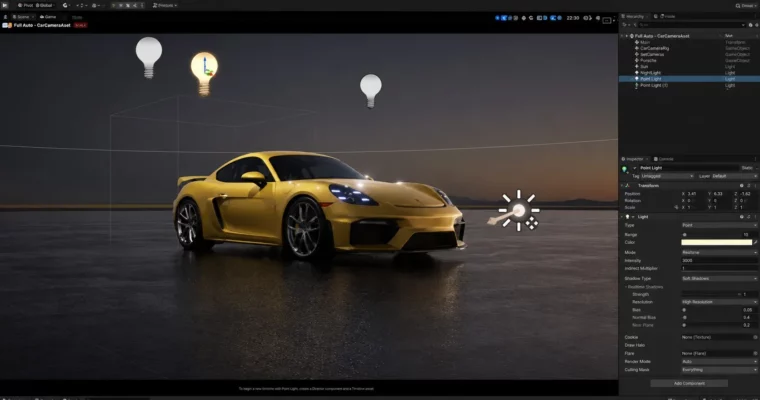
This course is a straight shot into automotive visualization with Unreal Engine. It covers everything from the absolute basics of the interface to advanced rendering with Lumen and Path Tracing. You’ll learn how to set up materials, light a scene, and build a complete car showcase, all without the fluff.

🎯 What you’ll learn

  • Build a complete automotive visualization scene from scratch.
  • Master Unreal Engine’s material system for car paint, glass, and trim.
  • Configure and render with Lumen, Ray Tracing, and Path Tracing.
  • Create professional turntable and cinematic animations using the Sequencer.
  • Import and prepare CAD data for real-time rendering.

✅ Requirements

  • Skills: Basic understanding of 3D space and computer navigation.
  • Tools: A 3-button mouse with a scroll wheel.
  • Hardware: A dedicated GPU (NVIDIA RTX series recommended for Ray Tracing/Path Tracing), minimum 16GB RAM.

📝 Description

This isn’t a theory-heavy lecture series. It’s a practical, project-based walkthrough where you build a complete automotive visualization from the ground up. You’ll start by setting up your project and importing assets, then move straight into building realistic materials for car paint, glass, and interior trim.

The course covers the three main rendering paths in Unreal Engine: Lumen, Ray Tracing, and Path Tracing. You’ll learn the specific setup for each one and see the trade-offs in quality and performance. The instructor also dedicates a full section to the Movie Render Queue, showing you exactly how to configure it for high-quality final output.

Beyond static renders, you’ll get into animation. The course covers rigging a car for movement, setting up camera sequences, and even adding camera shake for a more dynamic feel. There’s also a dedicated module on creating advanced glass materials that work correctly with both Lumen and Path Tracing, solving common transparency issues.

🧑‍🎓 Who this course is for

  • 3D artists and designers looking to move into real-time automotive visualization.
  • Unreal Engine beginners who want a structured, project-based introduction to the engine.
  • Experienced Unreal users who want to learn specific workflows for car rendering and animation.

🧑‍🏫 About the Author

Allan Portilho is a 3D artist and educator specializing in real-time visualization. He runs Academy Allan Portilho, where he creates focused, practical courses on Unreal Engine for the automotive and product design industries. His teaching style is direct and workflow-oriented, aimed at getting students to a professional result quickly.

🏁 Final Result

  • A fully rendered automotive scene with realistic materials and lighting.
  • A turntable or cinematic animation sequence of a car.
  • A solid understanding of the Unreal Engine pipeline for automotive visualization.
Curriculum

📋 Course content

  1. Module 1: Intro & System Setup
    • Disclaimer1:31
    • Timeout Detection and Recovery2:42
    • GPU Selection2:00
    • Project Files Downloads
  2. Module 2: Unreal Engine Basics
    • Epic Games Launcher1:59
    • Project Folder1:09
    • Project Files Re-Association1:44
    • Interface1:35
    • Toolbar5:27
    • Viewport6:10
    • Navigation And Shortcuts1:27
    • Content Browser1:12
    • Outliner Vs Layers4:30
  3. Module 3: Importing Assets
    • Importing FBX6:15
    • Importing as Datasmith8:08
    • Importing Cineware2:18
    • Power of 2 Images2:11
    • Importing Textures3:00
    • Importing HDRI2:01
    • Importing from Library0:47
    • Import from Quixel2:00
    • Importing from other projects2:00
  4. Module 4: Lights
    • Lights Overview3:06
    • Directional Light4:57
    • Point Light2:26
    • Spot Light1:20
    • Rect Light2:50
    • HDRI Backdrop5:09
    • Sun and Sky1:17
    • IES Lights4:25
  5. Module 5: Cameras
    • Camera Actor2:26
    • Cine Camera Actor2:44
  6. Module 6: Materials
    • Material Creation Overview1:24
    • Basic Material7:15
    • Constant Vectors6:39
    • Switch Parameter5:15
    • Multi-Texture6:03
    • Normal Map Intensity3:48
    • Emissive3:21
    • Transparent Material5:16
    • Automotive Material Overview1:24
  7. Module 7: Project Settings Essentials
    • Project Settings5:32
    • Post Process Volume5:52
    • Plugins1:32
    • Levels1:45
    • Duplicating Levels0:54
  8. Module 8: Lumen vs Ray Tracing vs Path Tracing
    • Comparison4:37
    • Setting up Ray Tracing5:45
    • Setting up Lumen3:35
    • Setting up Path Tracing3:47
  9. Module 9: Model Prep
    • Car Paint12:19
    • Exterior Trim10:22
    • Glass3:42
    • Plastic and Rubber4:13
    • Headlight and Taillights8:10
    • Blocker4:03
    • Basic Interior4:10
    • Brakes9:45
    • Tire19:11
  10. Module 10: Project | Ray Tracing (Deprecated)
    • Part 110:12
    • Part 29:58
    • Part 36:18
  11. Module 11: Project | Lumen
    • Part 113:10
    • Part 211:31
    • Part 36:15
  12. Module 12: Project | Path Tracing
    • Part 19:58
    • Part 29:41
    • Part 39:22
  13. Module 13: Sequencer
    • Sequencer Overview5:47
    • Timeline3:27
    • Key Frames and Cameras9:25
    • Custom Attributes12:05
    • Animation with Curves2:18
    • Master Sequencer3:29
  14. Module 14: Movie Render Queue
    • Overview4:36
    • Settings Overview5:35
    • Required Settings9:33
    • Enable Features0:46
    • Lumen Settings5:59
    • Ray Tracing Settings (Deprecated)3:01
    • Path Tracing Settings4:53
    • Custom CVAR2:39
  15. Module 15: Rendering
    • Rendering Ray Tracing Project7:06
    • Rendering Lumen Project8:37
    • Rendering Path Tracing Project7:56
  16. Module 16: HDRI + Backplate
    • Overview1:20
    • Scene Exposure2:14
    • Scene Setup3:26
    • Backplate Material3:51
    • Light Properties2:02
    • Lighting Adjustments10:57
    • Render Setup1:22
  17. Module 17: Animation
    • Important Consideration11:04
    • CAD Preparation10:43
    • Updating CAD4:51
    • Car Scene4:09
    • Dummy Car8:20
    • Rig Concept1:03
    • Rigging12:59
    • Animation21:05
    • Camera Animation Sequencer19:07
    • Camera Shake3:35
    • Bonus Lesson15:14
  18. Module 18: Advanced Glass Material
    • Glass Material Overview1:13
    • Lumen Glass Basics9:34
    • Lumen Textured Tinted Glass6:31
    • Lumen Glass Opacity Mask5:18
    • Lumen Glass Normal Map17:53
    • Lumen Glass Transparency Fix3:48
    • Path Tracing Glass Basics7:07
    • Path Tracing Normal Map17:57
  19. Module 19: Substance Materials
    • Installation and Requirements3:15
    • Substance Templates Usage7:56
    • Material Parameters 19:04
    • Material Parameters 29:27
    • Fixing Texture Seam4:21
  20. Module 20: Pro Tips
    • Custom Splash Screen1:45
    • Vertical Lines Issues2:41
    • Detach HKV Studio 3D Models12:03
    • Fixing Flipped Normals2:52
    • Fixing Lumen Reflections2:29
Watch online or Download for Free
Unreal Engine Automotive Masterclass by Allan Portilho
NAME
SIZEDURATION
Section 1 WELCOME
951.8 KB1m
Section 3 SYSTEM CONFIGURATION
4 MB4m
Section 5 BASICS
47.1 MB26m
Section 6 IMPORTING ASSETS
58.7 MB30m
Section 7 LIGHTS
82.7 MB26m
Section 8 CAMERAS
13.7 MB5m
Section 9 MATERIALS
96.1 MB48m
Section 10 PROJECT SETTINGS ESSENTIALS
56.9 MB16m
Section 11 LUMEN VS RAY TRACING VS PATH TRACING
37.5 MB18m
Section 12 MODEL PREP
256 MB58m
Section 13 PROJECT I – RAY TRACING
84.8 MB26m
Section 14 PROJECT II – LUMEN
67 MB33m
Section 15 PROJECT III – PATH TRACING
20.6 MB10m
Section 16 SEQUENCER
135.7 MB40m
Section 17 MOVIE RENDER QUEUE
53.1 MB42m
Section 18 RENDERING
43.2 MB26m
Section 19 HDRI + BACKPLATE
48.5 MB28m
Section 20 ADVANCED GLASS MATERIAL
376 MB1h 17m
Section 23 PRO TIPS
83.5 MB24m

Download all Videos (20)
1.5 GB9h 7m

Project Files (Assets, Resources)
4.2 GB

Download all

Join us on
  Channel    and      Group

Leave a Comment

Your email address will not be published. Required fields are marked *